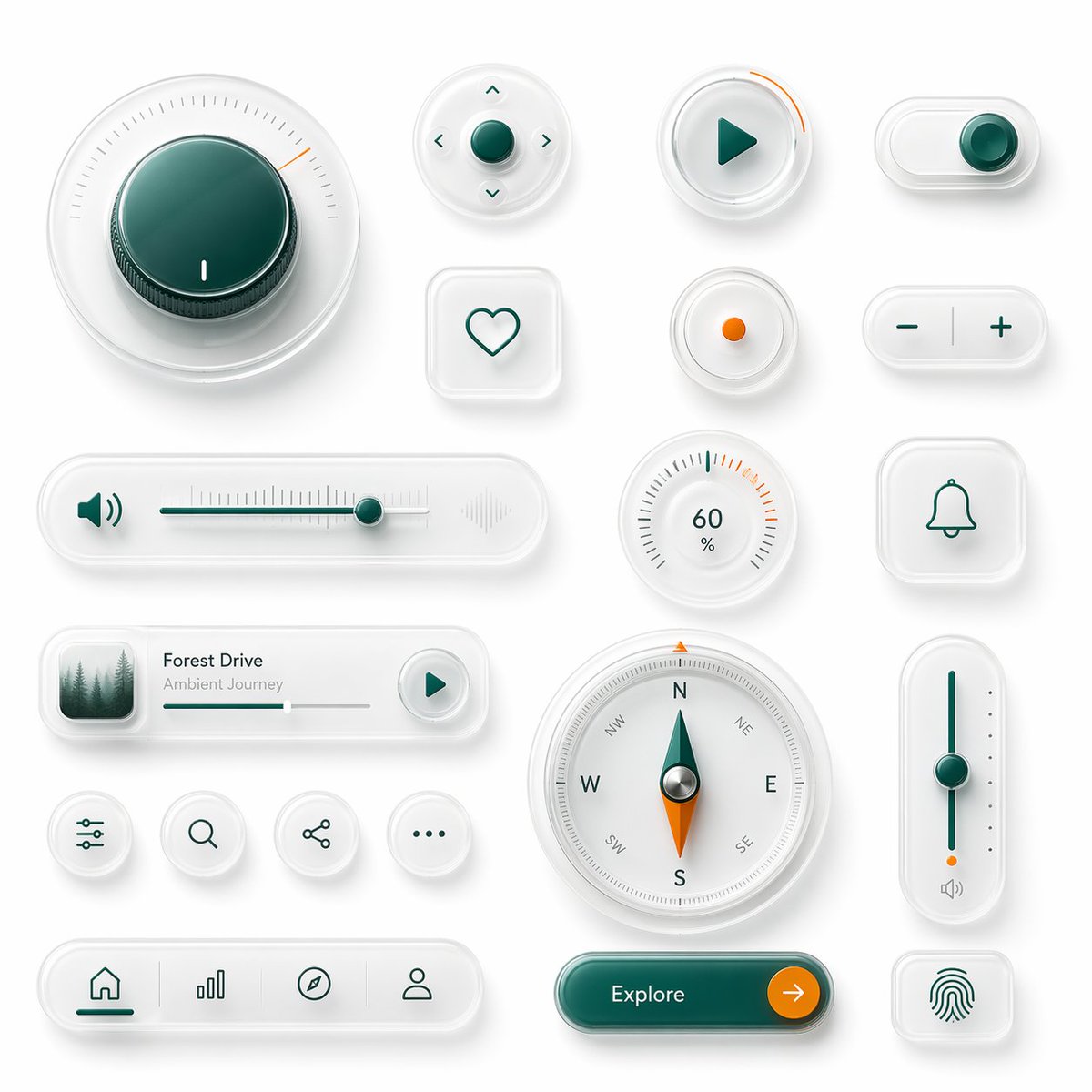
Papan Kit UI Kaca Neumorphic
Perintah ini menghasilkan papan kontrol antarmuka neumorfik premium yang rapi berisi 18 kontrol, ideal untuk memamerkan komponen UI aplikasi futuristik atau konsep dasbor perangkat pintar.
Ini adalah contoh kasus GPT Image 2 untuk Produk & Komersial . Gunakan contoh siap salin di bawah ini untuk menghasilkan visual serupa, dan tinjau atribusi Awesome GPT Image 2 Prompts serta hak penggunaan komersial sebelum digunakan kembali.
Butuh seluruh rangkaian prompt? Gunakan Produk & Komersial Untuk contoh terkait lainnya, kunjungi pusat topik, atau buka GPT Image 2 katalog cepat untuk indeks contoh lengkap, struktur yang dapat digunakan kembali, dan atribusi sumber.
Free 1K preview
Generate one preview image instantly, no sign-up required.
2804/4000
Mengingatkan
Prompt siap salin
A clean neumorphic UI component showcase on a soft light gray background, arranged as a balanced design board of 18 separate interface elements with subtle shadows, frosted translucent white plastic surfaces, rounded corners, and glossy glass-like depth. Use a premium minimal product-design aesthetic with white-on-white layering, soft ambient occlusion, delicate inner shadows, and a restrained accent palette of deep teal green and vivid orange. Include 18 distinct components: 1 large circular rotary knob in the upper left with a dark teal glossy center, fine radial tick marks, and a small orange position indicator; 1 small circular directional control pad with a teal center button and four tiny arrow icons around it; 1 circular play button with a teal triangle icon and a short orange progress arc on the rim; 1 horizontal pill toggle switch at the top right with a teal knob positioned to the right; 1 rounded square heart button with a simple teal outline heart; 1 small circular indicator button with a single orange dot in the center; 1 pill-shaped plus-minus control with a teal minus on the left and teal plus on the right separated by a vertical divider; 1 long horizontal volume slider with a teal speaker icon on the left, fine slider ticks, a teal track, a teal knob near the right side, and a faint waveform icon on the far right; 1 circular percentage dial showing 60% with radial ticks and a few orange highlight marks near the upper right; 1 rounded square bell notification button with a teal outline bell icon; 1 compact music player card with a small square album image of misty evergreen trees on the left, the title {argument name="track title" default="Forest Drive"}, the subtitle {argument name="track subtitle" default="Ambient Journey"}, a thin progress bar, and a circular play button on the right; 4 small circular utility icon buttons in one row showing sliders/settings, search, share, and ellipsis; 1 large circular compass with cardinal letters N, E, S, W plus diagonal labels, a teal-and-orange needle, and metallic center; 1 tall vertical slider on the right with a teal track, teal knob around the middle, small side dots, an orange accent near the bottom, and a tiny speaker icon below; 1 bottom navigation bar in a long rounded pill containing 4 icons separated by subtle dividers: home, bar chart, compass, and user profile, with the home tab active in teal; 1 large rounded pill call-to-action button in glossy dark teal labeled {argument name="button text" default="Explore"} with a circular orange arrow button attached on the right; and 1 rounded square fingerprint button with a teal fingerprint icon. Keep spacing generous, alignment grid-based, and the overall render highly polished, tactile, and futuristic, like a luxury smart-device UI kit mockup.Variabel perintah
Placeholder argumen yang dapat diedit ditemukan dalam prompt, beserta nilai defaultnya.
Variabel
track title
Bawaan
Forest Drive
Variabel
track subtitle
Bawaan
Ambient Journey
Variabel
button text
Bawaan
Explore
Best for
- - Produk & Komersial visual exploration
- - Image generation and reference-image edits
- - Reusable briefs that keep source attribution visible
Change these parts
- - Subject, product, character, or scene
- - Aspect ratio, camera, lighting, and background
- - Brand, text, color, and output constraints
Recommended model and settings
- - Model: gpt-image-2
- - Input mode: Teks ke Gambar
- - Aspect ratio: source
- - Commercial status: review original source
How to use this prompt
- 1. Copy the prompt and preserve its structure for the first test.
- 2. Replace the subject, context, and publishing channel.
- 3. Change one camera, lighting, or style variable per iteration.
- 4. Inspect the output, source, text, and rights before reuse.
Limitations, source, and reuse cautions
- - Generated output is an editable draft, not factual, legal, or rights evidence.
- - Review the linked source, people, brands, logos, text, and third-party media before commercial use.
Diimpor dari Awesome GPT Image 2 Prompts . Atribusi diperlukan. Status penggunaan komersial adalah allowed ; tinjau hak sumber sebelum penggunaan berbayar.
Lebih banyak kasus dalam kategori ini
Diprioritaskan berdasarkan kategori, kompatibilitas mode input, kualitas, dan risiko yang lebih rendah.






Catatan penggunaan kembali dan sumber
Gunakan perintah ini dengan aman setelah melihat pratinjau kasus.
- 1.Salin perintah tersebut atau buka langsung di Dovoo dengan tombol pembuatan.
- 2.Sesuaikan variabel, rasio aspek, dan gambar referensi untuk kebutuhan Anda sendiri.
- 3.Sebelum mempublikasikan atau menggunakan untuk tujuan berbayar, verifikasi hak sumber, persyaratan atribusi, dan risiko merek atau citra.