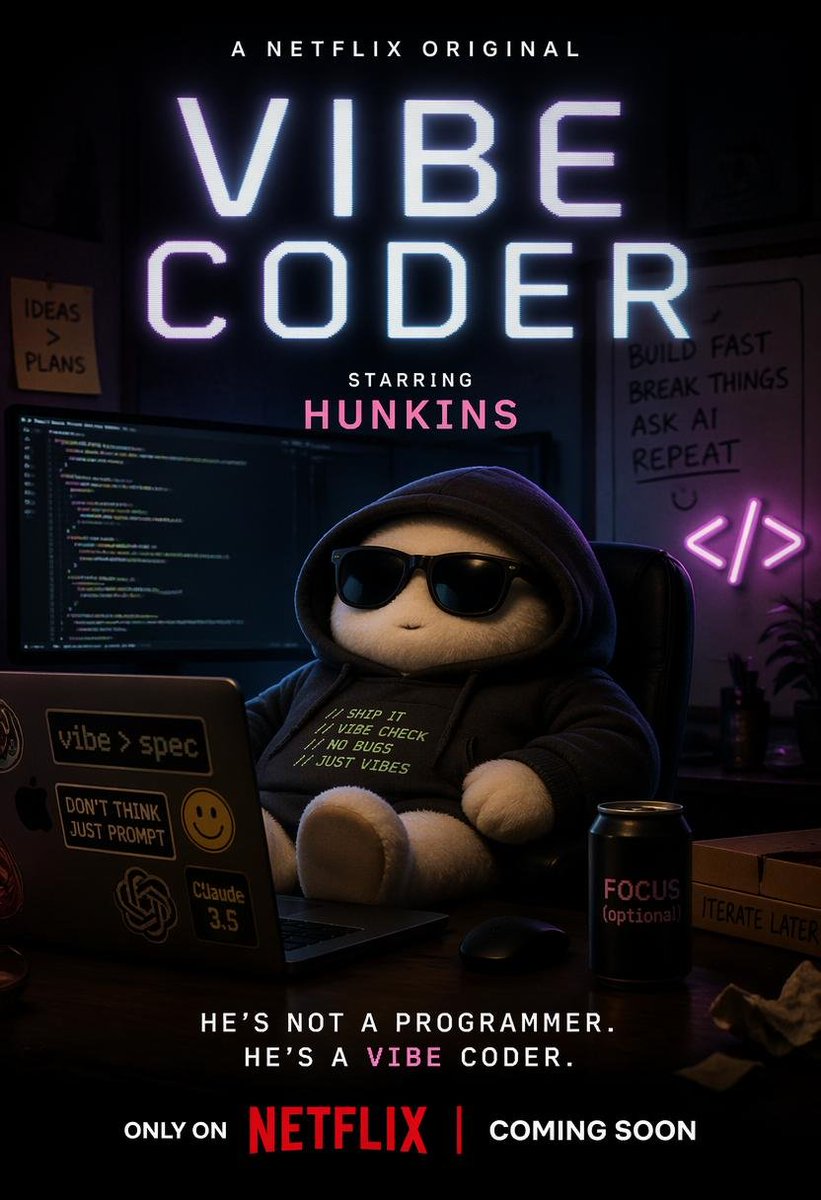
Poster Vibe Coder ala Netflix
Sebuah panduan pembuatan poster streaming komedi gelap untuk menghasilkan teaser palsu bergaya Netflix yang apik tentang 'pemrogram suasana' bertenaga AI di ruang kerja programmer yang diterangi lampu neon.
Ini adalah contoh kasus GPT Image 2 untuk Grafis & Poster . Gunakan contoh siap salin di bawah ini untuk menghasilkan visual serupa, dan tinjau atribusi Awesome GPT Image 2 Prompts serta hak penggunaan komersial sebelum digunakan kembali.
Free 1K preview
Generate one preview image instantly, no sign-up required.
Mengingatkan
Prompt siap salin
A cinematic parody streaming-poster in vertical 2:3 format, styled like a dark Netflix original teaser poster for a humorous AI programming drama. At the very top, small white text reads {argument name="top banner text" default="A NETFLIX ORIGINAL"}. Centered and dominating the composition, huge glowing sci-fi sans serif title text in icy white with a faint lavender-blue neon bloom reads {argument name="title text" default="VIBE CODER"}, stacked on two lines. Below it, smaller white text says "STARRING" and beneath that a pink cast name in bold all caps reads {argument name="cast name" default="HUNKINS"}. The scene shows a dim moody programmer bedroom or office at night lit by monitors and purple-blue neon. In the center foreground, a plush teddy-bear-like mascot with white fuzzy paws sits slouched in a black desk chair wearing a black hoodie, face mostly hidden in shadow for a mysterious comedic look. On the hoodie chest, 4 lines of small off-white text read exactly: "// SHIP IT", "// VIBE CHECK", "// NO BUGS", "// JUST VIBES". In front of the character is an open laptop covered with 4 visible stickers: "vibe > spec", "DON'T THINK JUST PROMPT", a smiley face sticker, and "Claude 3.5", plus an abstract AI-style logo sticker. Behind the laptop are 2 widescreen monitors displaying dense code on dark themes. The background includes 2 wall notes/signs on the left: a sticky note reading "IDEAS > PLANS" and, on the right, a whiteboard with 3 stacked handwritten lines reading "BUILD FAST", "BREAK THINGS", "ASK AI", and a fourth line "REPEAT" beneath, plus a hand-drawn smiley. Next to the whiteboard is a pink-purple neon </> code icon sign. On the desk at lower right sits a matte black drink can with pink text reading "FOCUS (optional)" and a cardboard pizza box edge labeled "ITERATE LATER". Use rich shadows, soft practical light, purple and cyan rim light, subtle monitor glow, shallow depth of field, high contrast, glossy premium poster finish, and a slightly absurd, self-aware startup-comedy tone. At the bottom, centered white tagline text reads {argument name="tagline text" default="HE’S NOT A PROGRAMMER. HE’S A VIBE CODER."}, with the word "VIBE" highlighted in pink. Below that, a release line in white and red reads {argument name="release line" default="ONLY ON NETFLIX | COMING SOON"}, with "NETFLIX" in bold red. Make it look like a polished official teaser one-sheet for a fictional streaming series.Variabel perintah
Placeholder argumen yang dapat diedit ditemukan dalam prompt, beserta nilai defaultnya.
Best for
- - Grafis & Poster visual exploration
- - Image generation and reference-image edits
- - Reusable briefs that keep source attribution visible
Change these parts
- - Subject, product, character, or scene
- - Aspect ratio, camera, lighting, and background
- - Brand, text, color, and output constraints
Recommended model and settings
- - Model: gpt-image-2
- - Input mode: Teks ke Gambar
- - Aspect ratio: source
- - Commercial status: review original source
How to use this prompt
- 1. Copy the prompt and preserve its structure for the first test.
- 2. Replace the subject, context, and publishing channel.
- 3. Change one camera, lighting, or style variable per iteration.
- 4. Inspect the output, source, text, and rights before reuse.
Limitations, source, and reuse cautions
- - Generated output is an editable draft, not factual, legal, or rights evidence.
- - Review the linked source, people, brands, logos, text, and third-party media before commercial use.
Lebih banyak kasus dalam kategori ini
Diprioritaskan berdasarkan kategori, kompatibilitas mode input, kualitas, dan risiko yang lebih rendah.






Catatan penggunaan kembali dan sumber
Gunakan perintah ini dengan aman setelah melihat pratinjau kasus.
- 1.Salin perintah tersebut atau buka langsung di Dovoo dengan tombol pembuatan.
- 2.Sesuaikan variabel, rasio aspek, dan gambar referensi untuk kebutuhan Anda sendiri.
- 3.Sebelum mempublikasikan atau menggunakan untuk tujuan berbayar, verifikasi hak sumber, persyaratan atribusi, dan risiko merek atau citra.