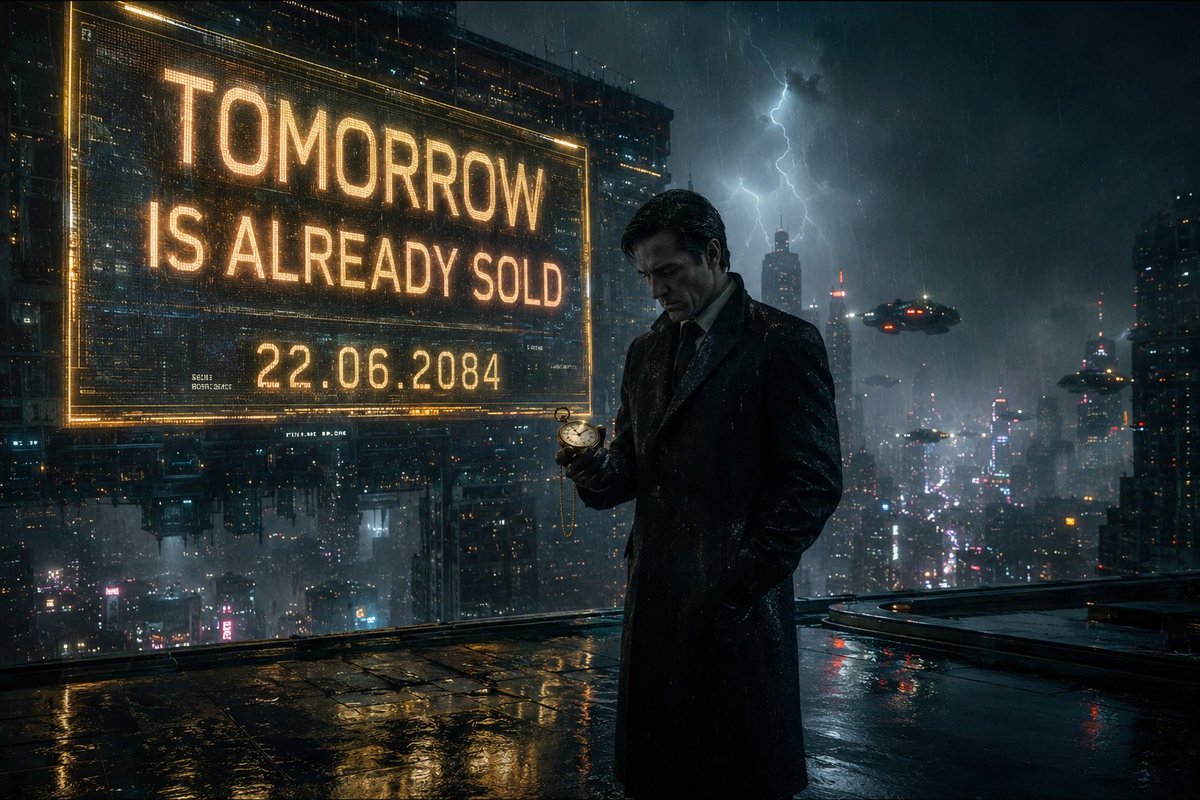
Neo-Noir Cyberpunk Businessman Portrait
A complex cinematic prompt for a mysterious businessman in a rainy futuristic city, featuring detailed environmental and cinematographic specifications.
Ini adalah contoh kasus GPT Image 2 untuk Potret & Karakter . Gunakan contoh siap salin di bawah ini untuk menghasilkan visual serupa, dan tinjau atribusi Awesome GPT Image 2 Prompts serta hak penggunaan komersial sebelum digunakan kembali.
Butuh seluruh rangkaian prompt? Gunakan Potret & Karakter Untuk contoh terkait lainnya, kunjungi pusat topik, atau buka GPT Image 2 katalog cepat untuk indeks contoh lengkap, struktur yang dapat digunakan kembali, dan atribusi sumber.
Free 1K preview
Generate one preview image instantly, no sign-up required.
2111/4000
Mengingatkan
Prompt siap salin
{
  "title": "The Man Who Sold Tomorrow",

  "image_description": "A cinematic neo-noir scene set in a {argument name="city style" default="futuristic city"} during heavy rain. A mysterious businessman stands alone beneath a glowing holographic billboard 500 stories above the city. Countless neon lights reflect across the wet rooftop surface. Flying vehicles drift silently through dense fog between skyscrapers. The man wears a perfectly tailored {argument name="clothing" default="black overcoat"} and leather gloves. In his hand is a small {argument name="prop" default="golden pocket watch"}. The watch displays tomorrow's date. His expression is calm but deeply troubled, as if he knows something nobody else does. Lightning briefly illuminates the city skyline behind him.",

  "subject": {
    "character": "Mysterious businessman",
    "appearance": "Elegant black overcoat, leather gloves, sharp facial features",
    "expression": "Melancholic, thoughtful, secretive",
    "pose": "Standing at the edge of a skyscraper rooftop"
  },

  "environment": {
    "location": "Cyberpunk megacity rooftop",
    "weather": "Heavy rain",
    "atmosphere": "Fog, neon reflections, distant flying vehicles"
  },

  "story_element": {
    "twist": "The pocket watch shows tomorrow's date because he already knows exactly how the world ends."
  },

  "cinematography": {
    "camera_angle": "Low angle",
    "shot_type": "Medium wide shot",
    "lens": "85mm anamorphic lens",
    "depth_of_field": "Shallow depth of field"
  },

  "lighting": {
    "primary": "Neon city lights",
    "secondary": "Lightning flashes",
    "effects": [
      "Volumetric fog",
      "Rain reflections",
      "Cinematic glow"
    ]
  },

  "color_palette": [
    "Blue",
    "Cyan",
    "Amber",
    "Black"
  ],

  "mood": [
    "Mysterious",
    "Thrilling",
    "Emotional",
    "Cinematic"
  ],

  "quality": {
    "style": "Denis Villeneuve inspired sci-fi cinema",
    "realism": "Ultra photorealistic",
    "resolution": "8K",
    "film_grain": true,
    "IMAX_quality": true,
    "award_winning_cinematography": true
  }
}
Variabel perintah
Placeholder argumen yang dapat diedit ditemukan dalam prompt, beserta nilai defaultnya.
Variabel
city style
Bawaan
futuristic city
Variabel
clothing
Bawaan
black overcoat
Variabel
prop
Bawaan
golden pocket watch
Best for
- - Potret & Karakter visual exploration
- - Image generation and reference-image edits
- - Reusable briefs that keep source attribution visible
Change these parts
- - Subject, product, character, or scene
- - Aspect ratio, camera, lighting, and background
- - Brand, text, color, and output constraints
Recommended model and settings
- - Model: gpt-image-2
- - Input mode: Teks ke Gambar
- - Aspect ratio: source
- - Commercial status: review original source
How to use this prompt
- 1. Copy the prompt and preserve its structure for the first test.
- 2. Replace the subject, context, and publishing channel.
- 3. Change one camera, lighting, or style variable per iteration.
- 4. Inspect the output, source, text, and rights before reuse.
Limitations, source, and reuse cautions
- - Generated output is an editable draft, not factual, legal, or rights evidence.
- - Review the linked source, people, brands, logos, text, and third-party media before commercial use.
Diimpor dari Awesome GPT Image 2 Prompts . Atribusi diperlukan. Status penggunaan komersial adalah allowed ; tinjau hak sumber sebelum penggunaan berbayar.
Lebih banyak kasus dalam kategori ini
Diprioritaskan berdasarkan kategori, kompatibilitas mode input, kualitas, dan risiko yang lebih rendah.






Catatan penggunaan kembali dan sumber
Gunakan perintah ini dengan aman setelah melihat pratinjau kasus.
- 1.Salin perintah tersebut atau buka langsung di Dovoo dengan tombol pembuatan.
- 2.Sesuaikan variabel, rasio aspek, dan gambar referensi untuk kebutuhan Anda sendiri.
- 3.Sebelum mempublikasikan atau menggunakan untuk tujuan berbayar, verifikasi hak sumber, persyaratan atribusi, dan risiko merek atau citra.