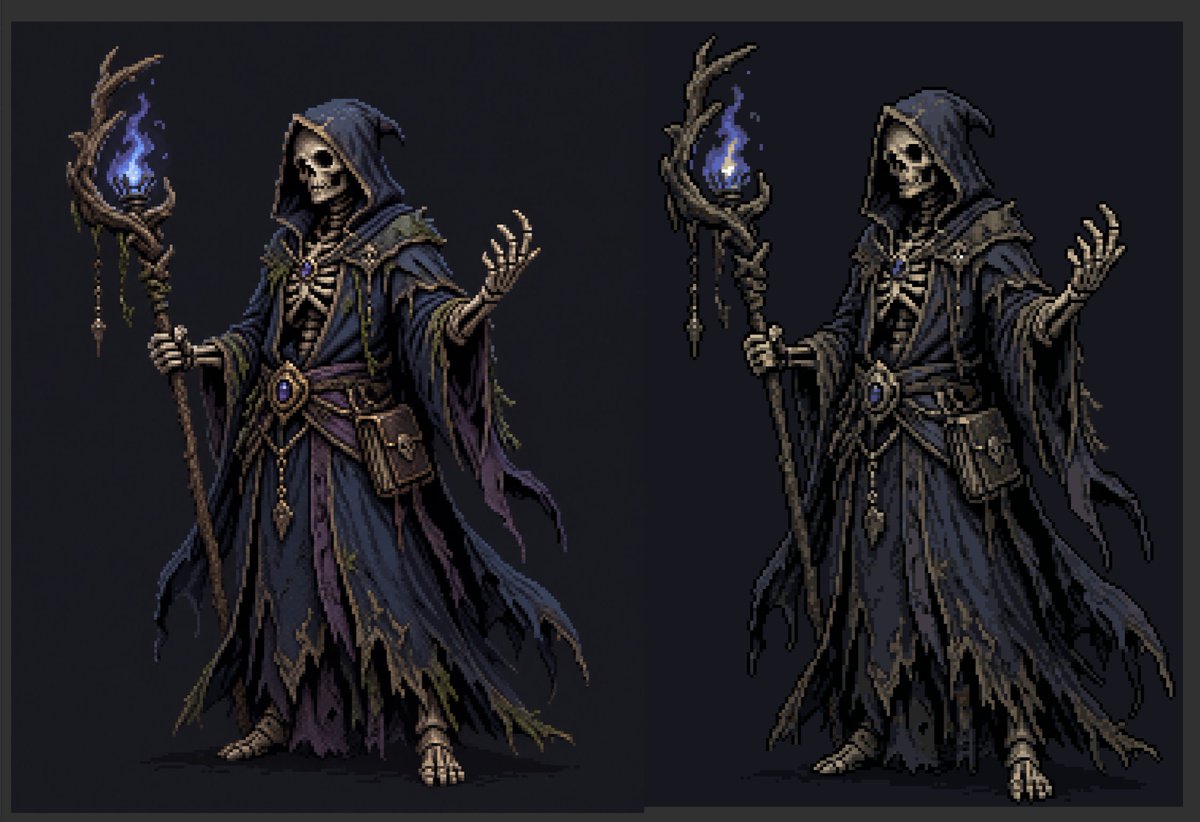
Perbandingan Seni Piksel Necromancer
Menghasilkan perbandingan sprite ahli sihir necromancer fantasi gelap berdampingan yang menunjukkan versi mixel lembut dan versi piksel yang lebih tajam untuk demonstrasi alur kerja pixel-art.
Ini adalah contoh kasus GPT Image 2 untuk Anime & Game . Gunakan contoh siap salin di bawah ini untuk menghasilkan visual serupa, dan tinjau atribusi Awesome GPT Image 2 Prompts serta hak penggunaan komersial sebelum digunakan kembali.
Butuh seluruh rangkaian prompt? Gunakan Anime & Game Untuk contoh terkait lainnya, kunjungi pusat topik, atau buka GPT Image 2 katalog cepat untuk indeks contoh lengkap, struktur yang dapat digunakan kembali, dan atribusi sumber.
Free 1K preview
Generate one preview image instantly, no sign-up required.
1745/4000
Mengingatkan
Prompt siap salin
Create a dark fantasy pixel-art character comparison on a wide horizontal canvas with a charcoal-black background and a subtle dark gray border. Show exactly 2 full-body necromancer figures side by side: the left figure is a softer near-pixel-art/mixel version, and the right figure is a crisper pixelated version with stronger black contours and clearer blocky edges. Both figures depict the same undead wizard: a hooded skeletal necromancer in layered, tattered robes, holding a twisted wooden staff topped with a blue ghost flame. The left figure has an obscured shadowy blank face under the hood, while the right figure has a visible skull face with hollow eye sockets and bared teeth. The character wears a deep {argument name="robe color" default="midnight blue and muted purple"} hooded robe with ragged hems, layered sleeves, torn trailing cloth strips, bone-like chest armor, a rope-and-leather belt, dangling gold ornaments, a central oval blue gemstone, small pouches, and exposed skeletal hands and feet. Each figure holds exactly 1 gnarled staff in the left hand; each staff has exactly 1 blue flame surrounded by twisted branches, with small hanging charms and bead-like ornaments. The right hand of each figure is raised in a spellcasting gesture with splayed skeletal fingers. Use a limited pixel-art palette, high contrast rim shadows, muted brown wood, bone ivory skeleton details, dark navy folds, and glowing electric-blue flame highlights. Keep the pose nearly identical between the 2 figures, centered vertically, with the left character slightly softer and painterly and the right character more sharply pixelated. No text, no labels, no watermark, no extra characters, no background scenery beyond the flat dark backdrop.Variabel perintah
Placeholder argumen yang dapat diedit ditemukan dalam prompt, beserta nilai defaultnya.
Variabel
robe color
Bawaan
midnight blue and muted purple
Best for
- - Anime & Game visual exploration
- - Image generation and reference-image edits
- - Reusable briefs that keep source attribution visible
Change these parts
- - Subject, product, character, or scene
- - Aspect ratio, camera, lighting, and background
- - Brand, text, color, and output constraints
Recommended model and settings
- - Model: gpt-image-2
- - Input mode: Teks ke Gambar
- - Aspect ratio: source
- - Commercial status: review original source
How to use this prompt
- 1. Copy the prompt and preserve its structure for the first test.
- 2. Replace the subject, context, and publishing channel.
- 3. Change one camera, lighting, or style variable per iteration.
- 4. Inspect the output, source, text, and rights before reuse.
Limitations, source, and reuse cautions
- - Generated output is an editable draft, not factual, legal, or rights evidence.
- - Review the linked source, people, brands, logos, text, and third-party media before commercial use.
Diimpor dari Awesome GPT Image 2 Prompts . Atribusi diperlukan. Status penggunaan komersial adalah allowed ; tinjau hak sumber sebelum penggunaan berbayar.
Lebih banyak kasus dalam kategori ini
Diprioritaskan berdasarkan kategori, kompatibilitas mode input, kualitas, dan risiko yang lebih rendah.






Catatan penggunaan kembali dan sumber
Gunakan perintah ini dengan aman setelah melihat pratinjau kasus.
- 1.Salin perintah tersebut atau buka langsung di Dovoo dengan tombol pembuatan.
- 2.Sesuaikan variabel, rasio aspek, dan gambar referensi untuk kebutuhan Anda sendiri.
- 3.Sebelum mempublikasikan atau menggunakan untuk tujuan berbayar, verifikasi hak sumber, persyaratan atribusi, dan risiko merek atau citra.