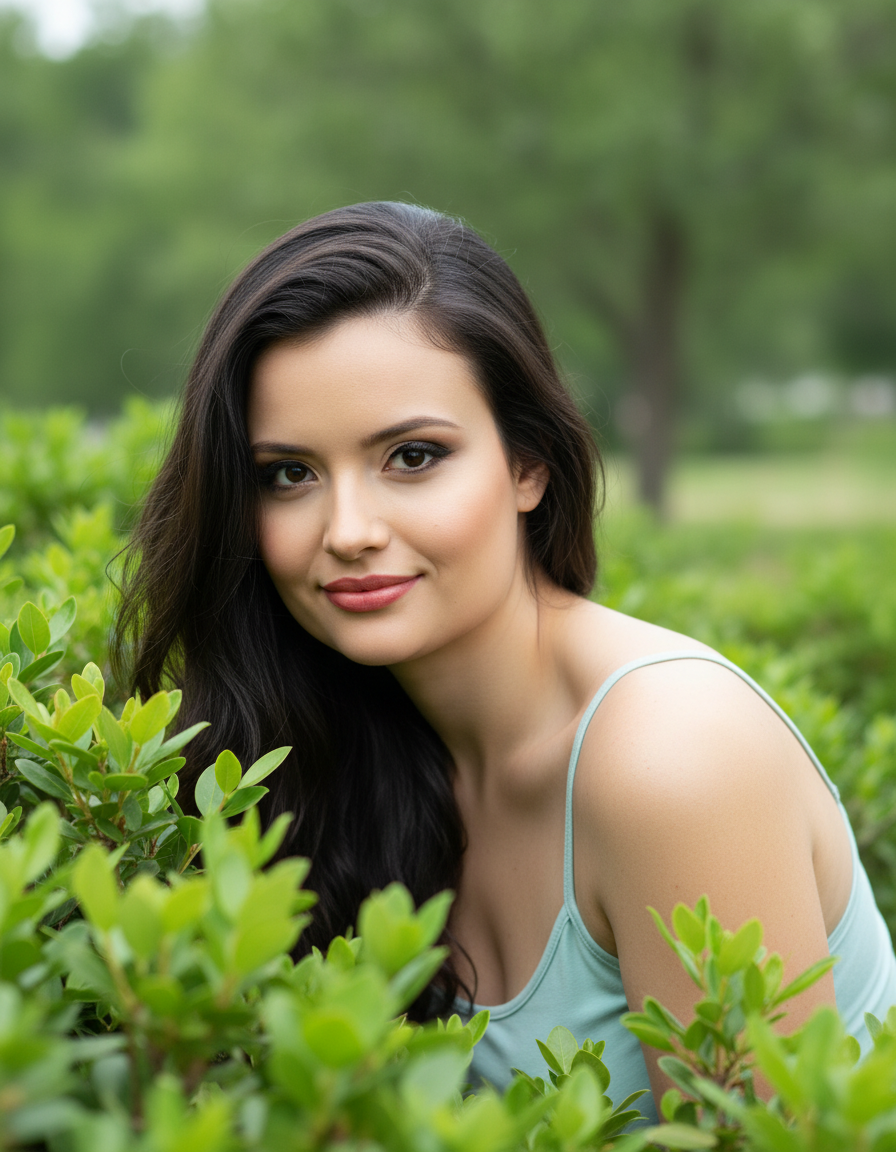
Nature's Gaze
Gambar prompt Nano Banana Pro yang bersumber dari repositori Awesome Nano Banana Pro Prompts, dengan pratinjau gambar dan catatan tinjauan penggunaan kembali.
Ini adalah contoh kasus Nano Banana Pro untuk Potret & Karakter . Gunakan contoh siap salin di bawah ini untuk menghasilkan visual serupa, dan tinjau atribusi Awesome Nano Banana Pro Prompts serta hak penggunaan komersial sebelum digunakan kembali.
Butuh seluruh rangkaian prompt? Gunakan Potret & Karakter Untuk contoh terkait lainnya, kunjungi pusat topik, atau buka Nano Banana Pro katalog cepat untuk indeks contoh lengkap, struktur yang dapat digunakan kembali, dan atribusi sumber.
Mengingatkan
Prompt siap salin
A natural, captivating close-up portrait captured outdoors amidst the foliage. The female figure is partially hidden by a bush or plant with dense, green leaves in the foreground, creating a sense of intimacy and discovery. She leans out of the foliage, looking directly at the camera with a sweet, curious, and captivating expression.

She wears a blouse or tank top in a soft shade of light blue or aqua green, which complements the color of the foliage.

Her hair is long, brown, and wavy, with a healthy shine, falling over one shoulder and framing her face. Her makeup is natural, but accentuates her eyes with earthy tones and thick lashes.

The background is a green environment, composed of more foliage or trees, gently blurred, keeping the focus on the subject. The lighting is natural and soft, typical of an overcast day or light filtered through trees, creating a gentle glow on her face and highlighting the textures of her skin and hair.

Camera Settings: Captured with a prime portrait lens (e.g., 85mm f/1.8 or 100mm f/2.8 macro for detail) on a full-frame camera for flattering compression and pronounced bokeh. Aperture set between f/1.8 and f/2.8 to create a very shallow depth of field, isolating the subject's face from the leafy foreground and green background. ISO 100-200 for maximum image quality in natural light. Shutter speed of 1/250s to 1/500s to ensure sharpness. The lighting is exclusively natural, taking advantage of the soft, diffuse light of a dim or cloudy outdoor environment.

Instructions for the "nano banana":

"Please use the user's reference image to capture and apply all of their facial features, facial structure, eye color, skin tone, style, and hair color with maximum fidelity. The goal is to create a version of the user in this natural portrait. The attire (light blue top), the pose peeking through the foliage, the captivating expression, the soft natural lighting, and the blurred green background should be generated as described, creating a perfect fusion between the user's identity and the image's aesthetic."
Best for
- - Potret & Karakter visual exploration
- - Image generation and reference-image edits
- - Reusable briefs that keep source attribution visible
Change these parts
- - Subject, product, character, or scene
- - Aspect ratio, camera, lighting, and background
- - Brand, text, color, and output constraints
Recommended model and settings
- - Model: nano-banana-pro
- - Input mode: Gambar ke Gambar
- - Aspect ratio: square
- - Commercial status: restricted
How to use this prompt
- 1. Copy the prompt and preserve its structure for the first test.
- 2. Replace the subject, context, and publishing channel.
- 3. Change one camera, lighting, or style variable per iteration.
- 4. Inspect the output, source, text, and rights before reuse.
Limitations, source, and reuse cautions
- - Generated output is an editable draft, not factual, legal, or rights evidence.
- - Review the linked source, people, brands, logos, text, and third-party media before commercial use.
Diimpor dari Awesome Nano Banana Pro Prompts . Atribusi diperlukan. Status penggunaan komersial adalah restricted ; tinjau hak sumber sebelum penggunaan berbayar.
Lebih banyak kasus dalam kategori ini
Diprioritaskan berdasarkan kategori, kompatibilitas mode input, kualitas, dan risiko yang lebih rendah.
Catatan penggunaan kembali dan sumber
Gunakan perintah ini dengan aman setelah melihat pratinjau kasus.
- 1.Salin perintah tersebut atau buka langsung di Dovoo dengan tombol pembuatan.
- 2.Sesuaikan variabel, rasio aspek, dan gambar referensi untuk kebutuhan Anda sendiri.
- 3.Sebelum mempublikasikan atau menggunakan untuk tujuan berbayar, verifikasi hak sumber, persyaratan atribusi, dan risiko merek atau citra.