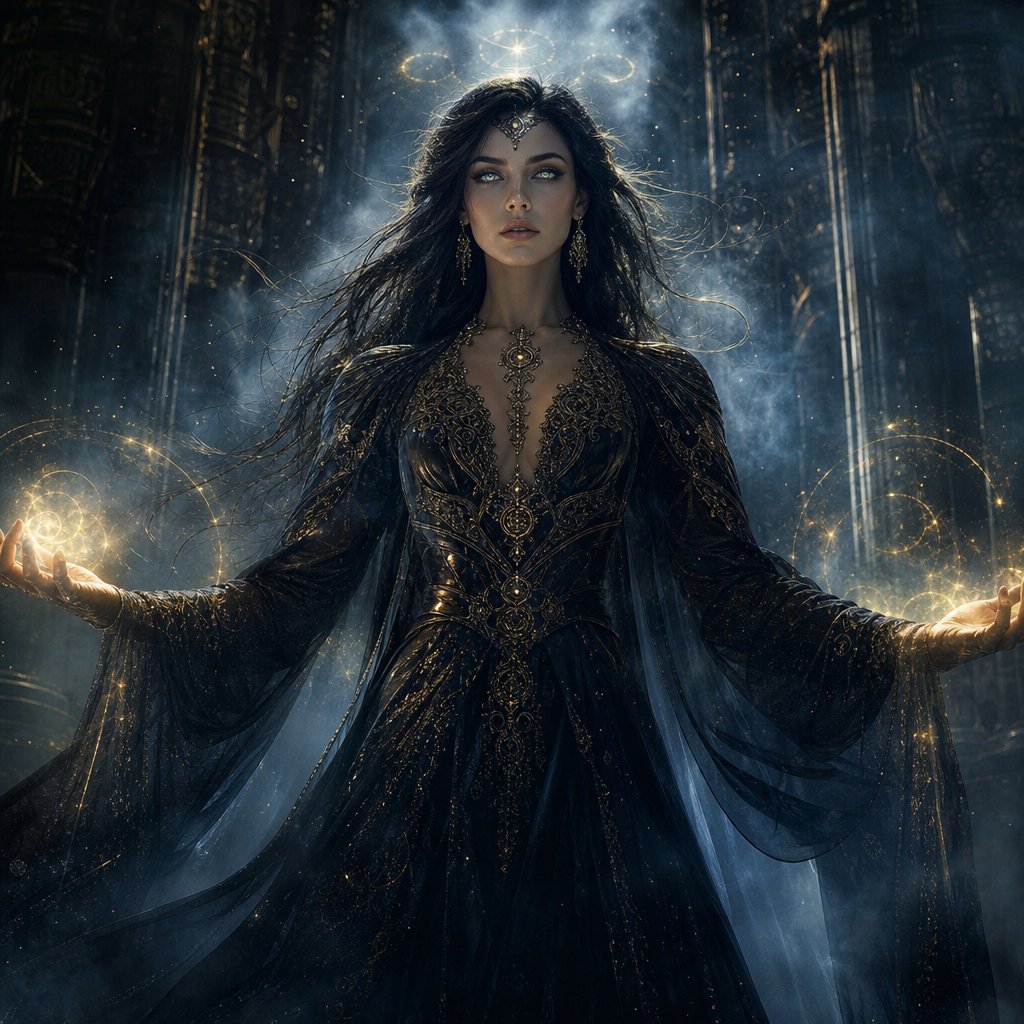
Mystic Woman Extraordinary Cinematic Portrait
A premium cinematic fantasy prompt for creating an ultra-realistic portrait of a mysterious woman in an enchanted, mist-filled landscape.
Ini adalah contoh kasus GPT Image 2 untuk Potret & Karakter . Gunakan contoh siap salin di bawah ini untuk menghasilkan visual serupa, dan tinjau atribusi Awesome GPT Image 2 Prompts serta hak penggunaan komersial sebelum digunakan kembali.
Butuh seluruh rangkaian prompt? Gunakan Potret & Karakter Untuk contoh terkait lainnya, kunjungi pusat topik, atau buka GPT Image 2 katalog cepat untuk indeks contoh lengkap, struktur yang dapat digunakan kembali, dan atribusi sumber.
Free 1K preview
Generate one preview image instantly, no sign-up required.
1641/4000
Mengingatkan
Prompt siap salin
Create an extraordinary ultra-realistic cinematic portrait of a {argument name="subject" default="mysterious woman"} with an otherworldly mystical presence. She stands in an {argument name="setting" default="ancient enchanted landscape"} surrounded by drifting silver mist, floating glowing particles, subtle celestial symbols, and enormous shadowy stone structures disappearing into the darkness. Her expression is calm, powerful, and enigmatic, with piercing luminous eyes and long flowing hair gently moving in an unseen wind.

She wears an {argument name="outfit" default="elegant dark mystical gown"} with intricate ancient-inspired patterns, delicate metallic details, and translucent flowing fabric that catches the surrounding light. A faint supernatural aura surrounds her body, with subtle golden-blue energy swirling around her hands.

Use dramatic volumetric lighting, deep shadows, cinematic contrast, realistic skin texture, highly detailed eyes, individual hair strands, atmospheric fog, realistic fabric, shallow depth of field, and sophisticated fantasy cinematography. Make her look powerful rather than frightening, like an ancient guardian who has just awakened after centuries.

Composition: woman dominating the frame, slightly low camera angle, close-to-medium shot, symmetrical cinematic framing, powerful silhouette, dramatic background depth.

Color palette: midnight black, deep blue, silver, subtle antique gold.

Style: ultra-realistic, premium cinematic fantasy, photorealistic, 8K detail, movie-poster quality, sophisticated visual effects, natural anatomy, realistic lighting, no text, no watermark, no logos.
Variabel perintah
Placeholder argumen yang dapat diedit ditemukan dalam prompt, beserta nilai defaultnya.
Variabel
subject
Bawaan
mysterious woman
Variabel
setting
Bawaan
ancient enchanted landscape
Variabel
outfit
Bawaan
elegant dark mystical gown
Best for
- - Potret & Karakter visual exploration
- - Image generation and reference-image edits
- - Reusable briefs that keep source attribution visible
Change these parts
- - Subject, product, character, or scene
- - Aspect ratio, camera, lighting, and background
- - Brand, text, color, and output constraints
Recommended model and settings
- - Model: gpt-image-2
- - Input mode: Teks ke Gambar
- - Aspect ratio: source
- - Commercial status: review original source
How to use this prompt
- 1. Copy the prompt and preserve its structure for the first test.
- 2. Replace the subject, context, and publishing channel.
- 3. Change one camera, lighting, or style variable per iteration.
- 4. Inspect the output, source, text, and rights before reuse.
Limitations, source, and reuse cautions
- - Generated output is an editable draft, not factual, legal, or rights evidence.
- - Review the linked source, people, brands, logos, text, and third-party media before commercial use.
Diimpor dari Awesome GPT Image 2 Prompts . Atribusi diperlukan. Status penggunaan komersial adalah allowed ; tinjau hak sumber sebelum penggunaan berbayar.
Lebih banyak kasus dalam kategori ini
Diprioritaskan berdasarkan kategori, kompatibilitas mode input, kualitas, dan risiko yang lebih rendah.



Catatan penggunaan kembali dan sumber
Gunakan perintah ini dengan aman setelah melihat pratinjau kasus.
- 1.Salin perintah tersebut atau buka langsung di Dovoo dengan tombol pembuatan.
- 2.Sesuaikan variabel, rasio aspek, dan gambar referensi untuk kebutuhan Anda sendiri.
- 3.Sebelum mempublikasikan atau menggunakan untuk tujuan berbayar, verifikasi hak sumber, persyaratan atribusi, dan risiko merek atau citra.