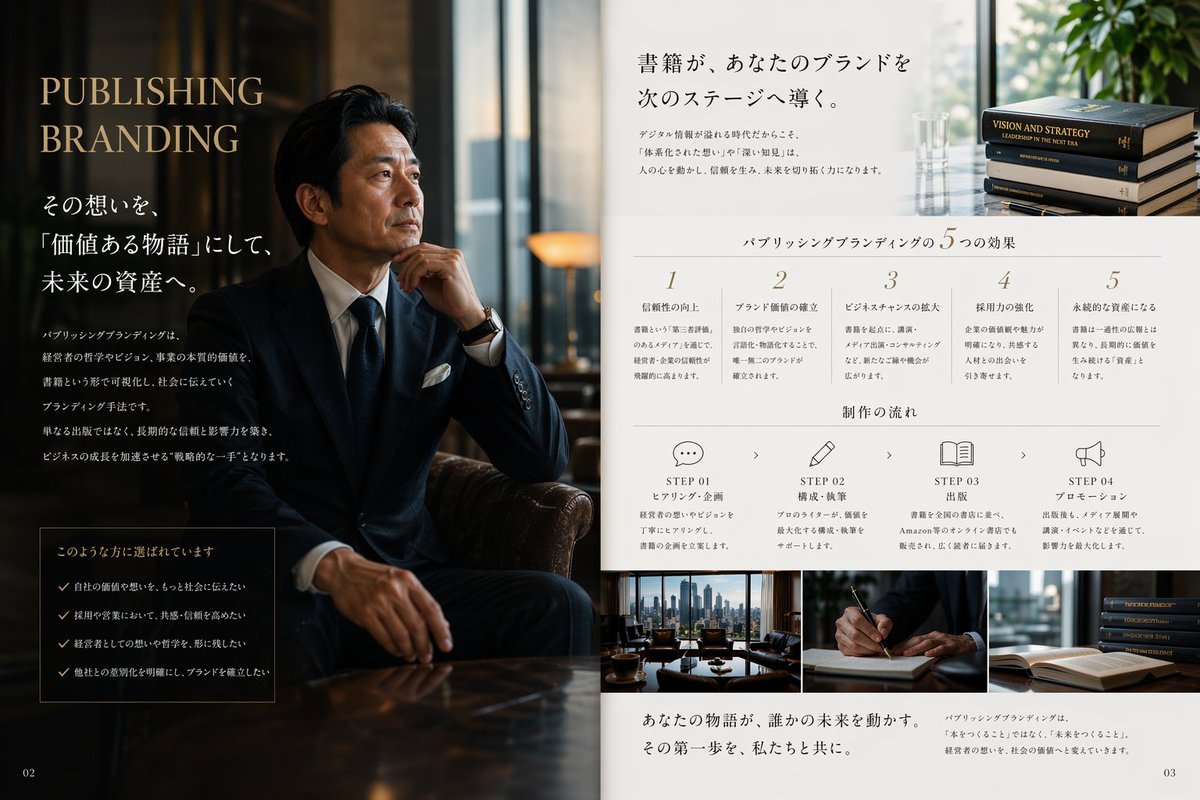
Tata Letak Editorial Branding Penerbitan Mewah
Prompt ini menghasilkan tata letak promosi dua halaman bergaya majalah Jepang kelas atas untuk layanan penerbitan dan branding, ideal untuk brosur, visual PR, dan pemasaran perusahaan.
Ini adalah contoh kasus GPT Image 2 untuk Grafis & Poster . Gunakan contoh siap salin di bawah ini untuk menghasilkan visual serupa, dan tinjau atribusi Awesome GPT Image 2 Prompts serta hak penggunaan komersial sebelum digunakan kembali.
Butuh seluruh rangkaian prompt? Gunakan Grafis & Poster Untuk contoh terkait lainnya, kunjungi pusat topik, atau buka GPT Image 2 katalog cepat untuk indeks contoh lengkap, struktur yang dapat digunakan kembali, dan atribusi sumber.
Free 1K preview
Generate one preview image instantly, no sign-up required.
2911/4000
Mengingatkan
Prompt siap salin
Create a luxurious Japanese magazine-style PR editorial spread for a publishing and branding service, designed as a two-page brochure layout. The left half is a dark, cinematic portrait scene in a sophisticated office lounge: a seated Japanese businessman in a navy bespoke suit, white shirt, dark tie, white pocket square, and wristwatch sits in a leather chair with one hand near his chin, posed thoughtfully beside a glossy wooden table. Show every face clearly with natural, detailed facial features. The lighting is moody and warm, with reflections from tall windows and a premium executive atmosphere. On this dark left page, place large elegant serif headline text in English reading {argument name="headline text" default="PUBLISHING BRANDING"}, stacked in two lines near the upper left in muted gold. Below it, add multiple lines of Japanese copy in white, including a larger subheadline and several short body paragraphs arranged vertically. Near the lower left, include a bordered dark box containing exactly 4 checklist items, each preceded by a check mark, with Japanese text. Put a small page number "02" in the bottom-left corner. The right half is a clean white editorial information page with refined minimalist typography and generous spacing. At the top, place a large Japanese headline in black, aligned upper center-right, with two short Japanese body text blocks beneath it; on the upper far right include a small photo of exactly 4 stacked hardcover books and a glass vase near a bright window with greenery. Across the middle, add a centered section title in Japanese for five benefits, followed by exactly 5 numbered columns labeled 1 through 5, each with a short Japanese heading and several lines of smaller explanatory Japanese text. Beneath that, add another centered Japanese section title for workflow, followed by exactly 4 step blocks laid out horizontally: STEP 01 with a speech bubble icon, STEP 02 with a pencil icon, STEP 03 with an open book icon, STEP 04 with a megaphone icon. Each step includes the English word STEP plus a two-digit number, a short Japanese subtitle, and a few lines of smaller Japanese description, with small chevrons between steps. Along the bottom of the right page, place exactly 3 rectangular photos side by side: a city-view office meeting table scene, a close-up of a hand writing with a pen, and a stack of books near an open book. Under these images, add a prominent Japanese closing statement in a serif style on the lower left, and a smaller Japanese paragraph on the lower right. Put page number "03" in the bottom-right corner. Use a premium palette of deep navy, black, warm brown, ivory, and muted gold, with a balance of editorial luxury, corporate trust, and high-end publishing aesthetics. The overall composition should feel like a real magazine advertisement or consulting brochure, polished, photorealistic, elegant, and credible.Variabel perintah
Placeholder argumen yang dapat diedit ditemukan dalam prompt, beserta nilai defaultnya.
Variabel
headline text
Bawaan
PUBLISHING BRANDING
Best for
- - Grafis & Poster visual exploration
- - Image generation and reference-image edits
- - Reusable briefs that keep source attribution visible
Change these parts
- - Subject, product, character, or scene
- - Aspect ratio, camera, lighting, and background
- - Brand, text, color, and output constraints
Recommended model and settings
- - Model: gpt-image-2
- - Input mode: Teks ke Gambar
- - Aspect ratio: source
- - Commercial status: review original source
How to use this prompt
- 1. Copy the prompt and preserve its structure for the first test.
- 2. Replace the subject, context, and publishing channel.
- 3. Change one camera, lighting, or style variable per iteration.
- 4. Inspect the output, source, text, and rights before reuse.
Limitations, source, and reuse cautions
- - Generated output is an editable draft, not factual, legal, or rights evidence.
- - Review the linked source, people, brands, logos, text, and third-party media before commercial use.
Diimpor dari Awesome GPT Image 2 Prompts . Atribusi diperlukan. Status penggunaan komersial adalah allowed ; tinjau hak sumber sebelum penggunaan berbayar.
Lebih banyak kasus dalam kategori ini
Diprioritaskan berdasarkan kategori, kompatibilitas mode input, kualitas, dan risiko yang lebih rendah.






Catatan penggunaan kembali dan sumber
Gunakan perintah ini dengan aman setelah melihat pratinjau kasus.
- 1.Salin perintah tersebut atau buka langsung di Dovoo dengan tombol pembuatan.
- 2.Sesuaikan variabel, rasio aspek, dan gambar referensi untuk kebutuhan Anda sendiri.
- 3.Sebelum mempublikasikan atau menggunakan untuk tujuan berbayar, verifikasi hak sumber, persyaratan atribusi, dan risiko merek atau citra.