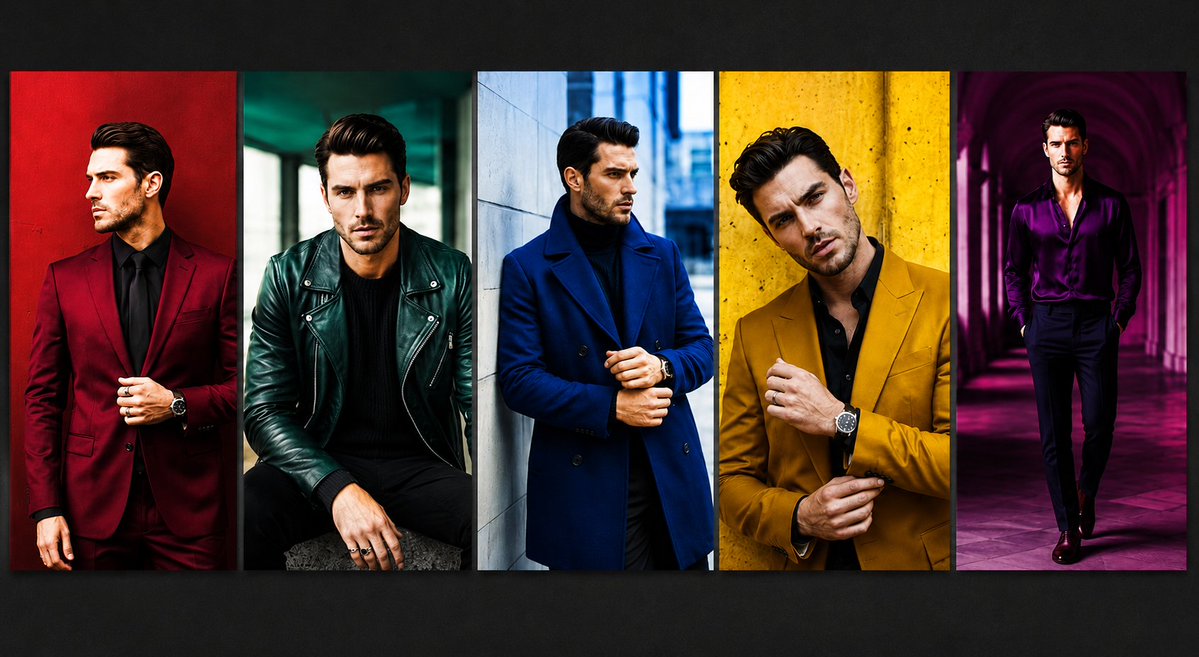
Five-Panel Luxury Menswear Collage
A photorealistic fashion editorial collage featuring five color-blocked menswear portraits with anonymized blurred faces.
Ini adalah contoh kasus GPT Image 2 untuk Mode & Kecantikan . Gunakan contoh siap salin di bawah ini untuk menghasilkan visual serupa, dan tinjau atribusi Awesome GPT Image 2 Prompts serta hak penggunaan komersial sebelum digunakan kembali.
Butuh seluruh rangkaian prompt? Gunakan Mode & Kecantikan Untuk contoh terkait lainnya, kunjungi pusat topik, atau buka GPT Image 2 katalog cepat untuk indeks contoh lengkap, struktur yang dapat digunakan kembali, dan atribusi sumber.
Free 1K preview
Generate one preview image instantly, no sign-up required.
2476/4000
Mengingatkan
Prompt siap salin
Goal: Create a high-fashion editorial collage showing exactly 5 vertical portrait panels of the same stylish adult male model, Show every face clearly with natural, detailed facial features.

Canvas: Wide horizontal 16:9 image, approximately 1200x675, dark charcoal background with a subtle vignette. Place five tall rectangular photo strips side by side across the center, separated by thin dark dividers, each with cinematic contrast, saturated colors, and a glossy magazine look.

Layout: Use exactly 5 panels, left to right:
1. A man in a deep burgundy suit with a black shirt and black tie, standing against a rich red wall, one hand adjusting the jacket, visible wristwatch.
2. A seated man in a dark emerald green leather biker jacket over a black sweater, black pants, rings on hand, moody teal urban background.
3. A man in a royal blue double-breasted overcoat over a black turtleneck, standing near a pale stone wall in a cool city street, hands clasped near the coat front.
4. A close cropped man in a mustard yellow blazer over a black shirt, standing against a textured yellow wall, adjusting his cuff, visible wristwatch.
5. A full-body man in a shiny purple satin shirt with black trousers, walking through a magenta-lit arched corridor, dramatic purple shadows.

Subject details: The model should appear as a fashionable adult man with dark styled hair, slim-to-athletic build, confident posture, luxury menswear styling, watches and rings as accessories. In every panel, cover the facial features with a centered soft-edged rectangular blur in beige/brown tones, matching the original anonymized look.

Visual style: Photorealistic fashion photography, editorial lighting, bold color blocking, sharp clothing texture, high saturation, dramatic shadows, cinematic urban locations, luxury magazine campaign aesthetic.

Customizable details: Use {argument name="model description" default="a stylish adult man with dark styled hair and a slim athletic build"}, {argument name="panel count" default="5"}, {argument name="fashion theme" default="bold luxury menswear color-block editorial"}, {argument name="face treatment" default="soft rectangular blur covering the face in every panel"}, and {argument name="background mood" default="dark charcoal gallery backdrop with cinematic vignette"}.

Constraints: Keep exactly 5 vertical panels, keep the panels aligned in a single row, do not add text, logos, watermarks, captions, extra people, or additional panels.
Variabel perintah
Placeholder argumen yang dapat diedit ditemukan dalam prompt, beserta nilai defaultnya.
Variabel
model description
Bawaan
a stylish adult man with dark styled hair and a slim athletic build
Variabel
panel count
Bawaan
5
Variabel
fashion theme
Bawaan
bold luxury menswear color-block editorial
Variabel
face treatment
Bawaan
soft rectangular blur covering the face in every panel
Variabel
background mood
Bawaan
dark charcoal gallery backdrop with cinematic vignette
Best for
- - Mode & Kecantikan visual exploration
- - Image generation and reference-image edits
- - Reusable briefs that keep source attribution visible
Change these parts
- - Subject, product, character, or scene
- - Aspect ratio, camera, lighting, and background
- - Brand, text, color, and output constraints
Recommended model and settings
- - Model: gpt-image-2
- - Input mode: Teks ke Gambar
- - Aspect ratio: source
- - Commercial status: review original source
How to use this prompt
- 1. Copy the prompt and preserve its structure for the first test.
- 2. Replace the subject, context, and publishing channel.
- 3. Change one camera, lighting, or style variable per iteration.
- 4. Inspect the output, source, text, and rights before reuse.
Limitations, source, and reuse cautions
- - Generated output is an editable draft, not factual, legal, or rights evidence.
- - Review the linked source, people, brands, logos, text, and third-party media before commercial use.
Diimpor dari Awesome GPT Image 2 Prompts . Atribusi diperlukan. Status penggunaan komersial adalah allowed ; tinjau hak sumber sebelum penggunaan berbayar.
Lebih banyak kasus dalam kategori ini
Diprioritaskan berdasarkan kategori, kompatibilitas mode input, kualitas, dan risiko yang lebih rendah.

Fashion Studio Portrait with Blue Rim Lighting
Teks ke Gambar

Spring Editorial Fashion Collage
Teks ke Gambar

New Chinese-Style Editorial Portrait
Teks ke Gambar

Transparent Earbuds on Stone Pedestal
Teks ke Gambar

Pink Hijab Mirror Selfie Portrait
Teks ke Gambar

Surreal Macro Fashion Illusion
Gambar ke Gambar
Catatan penggunaan kembali dan sumber
Gunakan perintah ini dengan aman setelah melihat pratinjau kasus.
- 1.Salin perintah tersebut atau buka langsung di Dovoo dengan tombol pembuatan.
- 2.Sesuaikan variabel, rasio aspek, dan gambar referensi untuk kebutuhan Anda sendiri.
- 3.Sebelum mempublikasikan atau menggunakan untuk tujuan berbayar, verifikasi hak sumber, persyaratan atribusi, dan risiko merek atau citra.