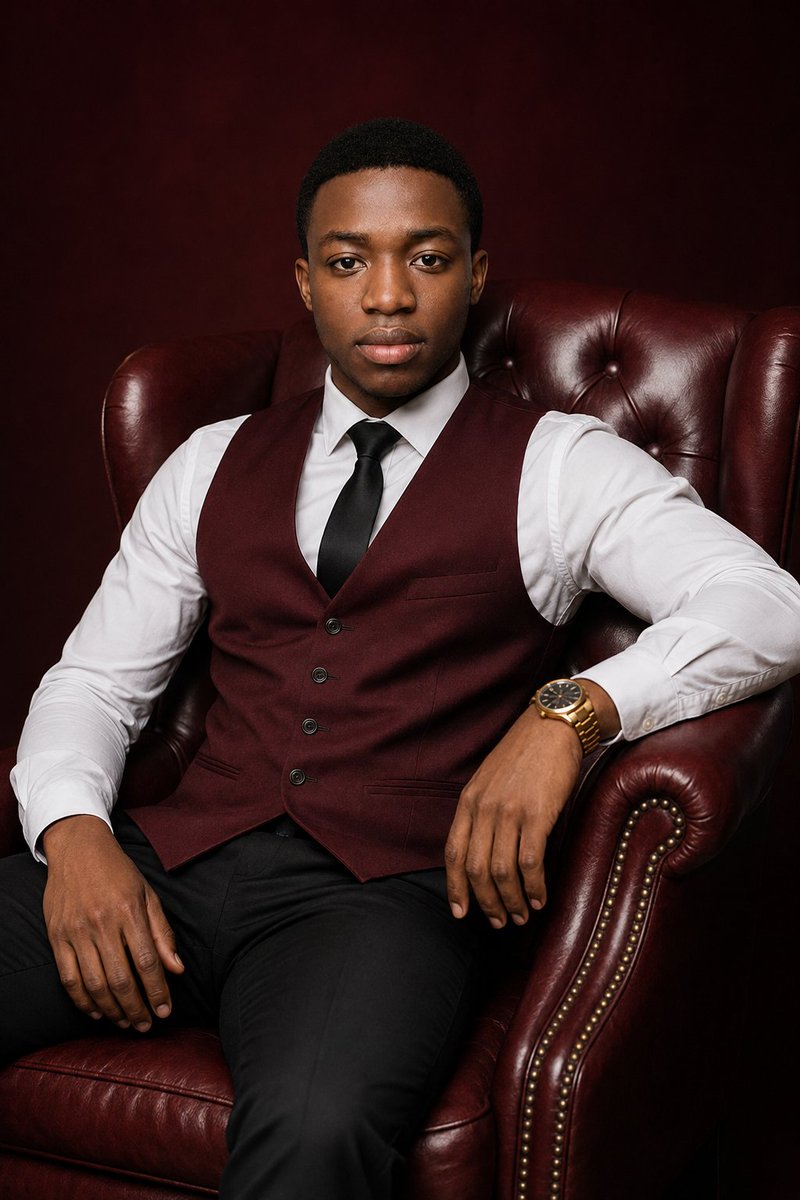
Luxury Burgundy Studio Portrait
Generates a realistic editorial studio portrait of a well-dressed man seated in a burgundy leather armchair for professional branding or profile imagery.
Ini adalah contoh kasus GPT Image 2 untuk Potret & Karakter . Gunakan contoh siap salin di bawah ini untuk menghasilkan visual serupa, dan tinjau atribusi Awesome GPT Image 2 Prompts serta hak penggunaan komersial sebelum digunakan kembali.
Butuh seluruh rangkaian prompt? Gunakan Potret & Karakter Untuk contoh terkait lainnya, kunjungi pusat topik, atau buka GPT Image 2 katalog cepat untuk indeks contoh lengkap, struktur yang dapat digunakan kembali, dan atribusi sumber.
Free 1K preview
Generate one preview image instantly, no sign-up required.
1239/4000
Mengingatkan
Prompt siap salin
Create an ultra-realistic luxury studio portrait of {argument name="subject" default="a young adult Black man"} seated confidently in a deep burgundy tufted leather wingback armchair with rolled arms and brass nailhead trim. He faces the camera directly with a calm, composed expression, relaxed posture, one hand resting on the chair arm and the other on his thigh. He has short neatly trimmed black hair, smooth natural skin tone, and sharp realistic facial detail. Dress him in {argument name="outfit" default="a crisp white dress shirt, burgundy buttoned waistcoat, black satin tie, black trousers, and a gold wristwatch"}. Use a dark {argument name="background color" default="burgundy"} studio backdrop that blends with the leather chair for a refined monochrome luxury feel. Lighting should be professional editorial portrait lighting: soft key light from front-left, subtle fill, gentle highlights on the leather texture, natural catchlights in the eyes, realistic shadows, high dynamic range, polished but not overly retouched. Frame as a vertical three-quarter seated portrait from head to upper legs, centered composition, 2:3 aspect ratio, shallow depth of field, premium magazine cover quality, no text, no logo, no watermark.Variabel perintah
Placeholder argumen yang dapat diedit ditemukan dalam prompt, beserta nilai defaultnya.
Variabel
subject
Bawaan
a young adult Black man
Variabel
outfit
Bawaan
a crisp white dress shirt, burgundy buttoned waistcoat, black satin tie, black trousers, and a gold wristwatch
Variabel
background color
Bawaan
burgundy
Best for
- - Potret & Karakter visual exploration
- - Image generation and reference-image edits
- - Reusable briefs that keep source attribution visible
Change these parts
- - Subject, product, character, or scene
- - Aspect ratio, camera, lighting, and background
- - Brand, text, color, and output constraints
Recommended model and settings
- - Model: gpt-image-2
- - Input mode: Teks ke Gambar
- - Aspect ratio: source
- - Commercial status: review original source
How to use this prompt
- 1. Copy the prompt and preserve its structure for the first test.
- 2. Replace the subject, context, and publishing channel.
- 3. Change one camera, lighting, or style variable per iteration.
- 4. Inspect the output, source, text, and rights before reuse.
Limitations, source, and reuse cautions
- - Generated output is an editable draft, not factual, legal, or rights evidence.
- - Review the linked source, people, brands, logos, text, and third-party media before commercial use.
Diimpor dari Awesome GPT Image 2 Prompts . Atribusi diperlukan. Status penggunaan komersial adalah allowed ; tinjau hak sumber sebelum penggunaan berbayar.
Lebih banyak kasus dalam kategori ini
Diprioritaskan berdasarkan kategori, kompatibilitas mode input, kualitas, dan risiko yang lebih rendah.






Catatan penggunaan kembali dan sumber
Gunakan perintah ini dengan aman setelah melihat pratinjau kasus.
- 1.Salin perintah tersebut atau buka langsung di Dovoo dengan tombol pembuatan.
- 2.Sesuaikan variabel, rasio aspek, dan gambar referensi untuk kebutuhan Anda sendiri.
- 3.Sebelum mempublikasikan atau menggunakan untuk tujuan berbayar, verifikasi hak sumber, persyaratan atribusi, dan risiko merek atau citra.