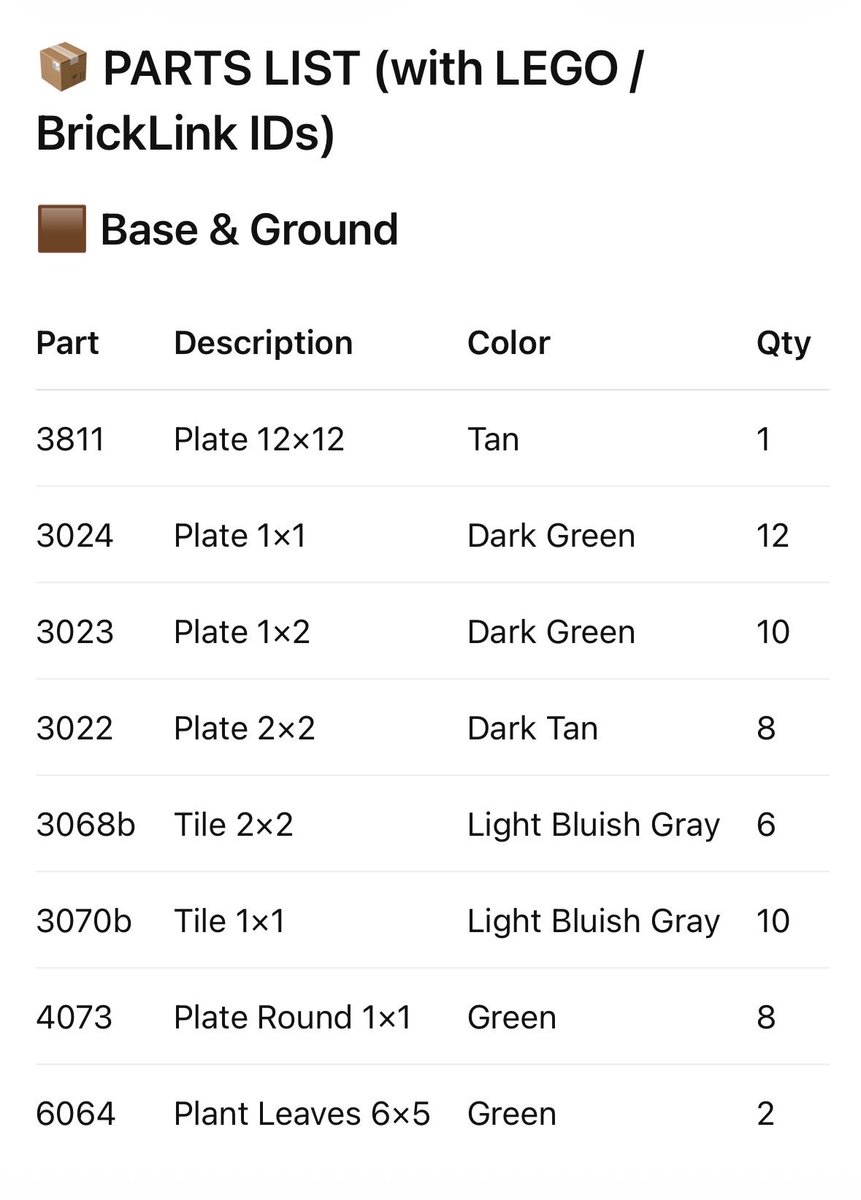
Halaman Inventaris Daftar Komponen LEGO
Perintah ini menghasilkan lembar inventaris komponen bergaya LEGO yang rapi dengan ID BrickLink, berguna untuk buku petunjuk, panduan perakitan, atau dokumentasi set khusus yang dapat dicetak.
Ini adalah contoh kasus GPT Image 2 untuk Grafis & Poster . Gunakan contoh siap salin di bawah ini untuk menghasilkan visual serupa, dan tinjau atribusi Awesome GPT Image 2 Prompts serta hak penggunaan komersial sebelum digunakan kembali.
Butuh seluruh rangkaian prompt? Gunakan Grafis & Poster Untuk contoh terkait lainnya, kunjungi pusat topik, atau buka GPT Image 2 katalog cepat untuk indeks contoh lengkap, struktur yang dapat digunakan kembali, dan atribusi sumber.
Free 1K preview
Generate one preview image instantly, no sign-up required.
2591/4000
Mengingatkan
Prompt siap salin
{
  "type": "infografis daftar bagian LEGO",
  "subject": "lembar inventaris cetak bersih untuk build LEGO khusus",
  "style": "grafik manual instruksi minimalis, latar belakang putih datar, tipografi sans-serif hitam tajam, pembatas baris abu-abu muda halus, tata letak editorial",
  "page": {
    "orientation": "potret",
    "background": "putih",
    "margin": "besar"
  },
  "header": {
    "icon_count": 2,
    "icons": [
      "emoji/ikon paket kardus kecil di kiri atas",
      "ikon contoh warna persegi coklat kecil sebelum judul bagian"
    ],
    "title": "DAFTAR BAGIAN (dengan ID LEGO / BrickLink)",
    "section_title": "{argument name=\"section title\" default=\"Dasar & Tanah\"}"
  },
  "table": {
    "columns": [
      "Bagian",
      "Deskripsi",
      "Warna",
      "Jumlah"
    ],
    "row_count": 8,
    "rows": [
      {
        "Part": "3811",
        "Description": "Pelat 12×12",
        "Color": "Coklat Muda",
        "Qty": "1"
      },
      {
        "Part": "3024",
        "Description": "Pelat 1×1",
        "Color": "Hijau Tua",
        "Qty": "12"
      },
      {
        "Part": "3023",
        "Description": "Pelat 1×2",
        "Color": "Hijau Tua",
        "Qty": "10"
      },
      {
        "Part": "3022",
        "Description": "Pelat 2×2",
        "Color": "Coklat Tua",
        "Qty": "8"
      },
      {
        "Part": "3068b",
        "Description": "Ubin 2×2",
        "Color": "Abu-abu Kebiruan Muda",
        "Qty": "6"
      },
      {
        "Part": "3070b",
        "Description": "Ubin 1×1",
        "Color": "Abu-abu Kebiruan Muda",
        "Qty": "10"
      },
      {
        "Part": "4073",
        "Description": "Pelat Bulat 1×1",
        "Color": "Hijau",
        "Qty": "8"
      },
      {
        "Part": "6064",
        "Description": "Daun Tanaman 6×5",
        "Color": "Hijau",
        "Qty": "2"
      }
    ]
  },
  "customization": {
    "title": "{argument name=\"headline text\" default=\"DAFTAR BAGIAN (dengan ID LEGO / BrickLink)\"}",
    "section": "{argument name=\"section title\" default=\"Dasar & Tanah\"}",
    "accent_color": "{argument name=\"accent color\" default=\"coklat\"}",
    "page_style": "{argument name=\"document style\" default=\"lembar inventaris manual instruksi LEGO\"}"
  },
  "composition": "judul sejajar kiri atas, label bagian langsung di bawah, tabel 4 kolom besar di tengah dengan baris berjarak sama, semua teks rata kiri kecuali kolom jumlah secara visual sempit di sebelah kanan",
  "quality": "mockup siap cetak resolusi tinggi, rendering teks seperti vektor yang tajam"
}
Variabel perintah
Placeholder argumen yang dapat diedit ditemukan dalam prompt, beserta nilai defaultnya.
Variabel
section title
Bawaan
Base & Ground
Variabel
headline text
Bawaan
PARTS LIST (with LEGO / BrickLink IDs)
Variabel
accent color
Bawaan
brown
Variabel
document style
Bawaan
LEGO instruction manual inventory sheet
Best for
- - Grafis & Poster visual exploration
- - Image generation and reference-image edits
- - Reusable briefs that keep source attribution visible
Change these parts
- - Subject, product, character, or scene
- - Aspect ratio, camera, lighting, and background
- - Brand, text, color, and output constraints
Recommended model and settings
- - Model: gpt-image-2
- - Input mode: Teks ke Gambar
- - Aspect ratio: source
- - Commercial status: review original source
How to use this prompt
- 1. Copy the prompt and preserve its structure for the first test.
- 2. Replace the subject, context, and publishing channel.
- 3. Change one camera, lighting, or style variable per iteration.
- 4. Inspect the output, source, text, and rights before reuse.
Limitations, source, and reuse cautions
- - Generated output is an editable draft, not factual, legal, or rights evidence.
- - Review the linked source, people, brands, logos, text, and third-party media before commercial use.
Diimpor dari Awesome GPT Image 2 Prompts . Atribusi diperlukan. Status penggunaan komersial adalah allowed ; tinjau hak sumber sebelum penggunaan berbayar.
Lebih banyak kasus dalam kategori ini
Diprioritaskan berdasarkan kategori, kompatibilitas mode input, kualitas, dan risiko yang lebih rendah.






Catatan penggunaan kembali dan sumber
Gunakan perintah ini dengan aman setelah melihat pratinjau kasus.
- 1.Salin perintah tersebut atau buka langsung di Dovoo dengan tombol pembuatan.
- 2.Sesuaikan variabel, rasio aspek, dan gambar referensi untuk kebutuhan Anda sendiri.
- 3.Sebelum mempublikasikan atau menggunakan untuk tujuan berbayar, verifikasi hak sumber, persyaratan atribusi, dan risiko merek atau citra.