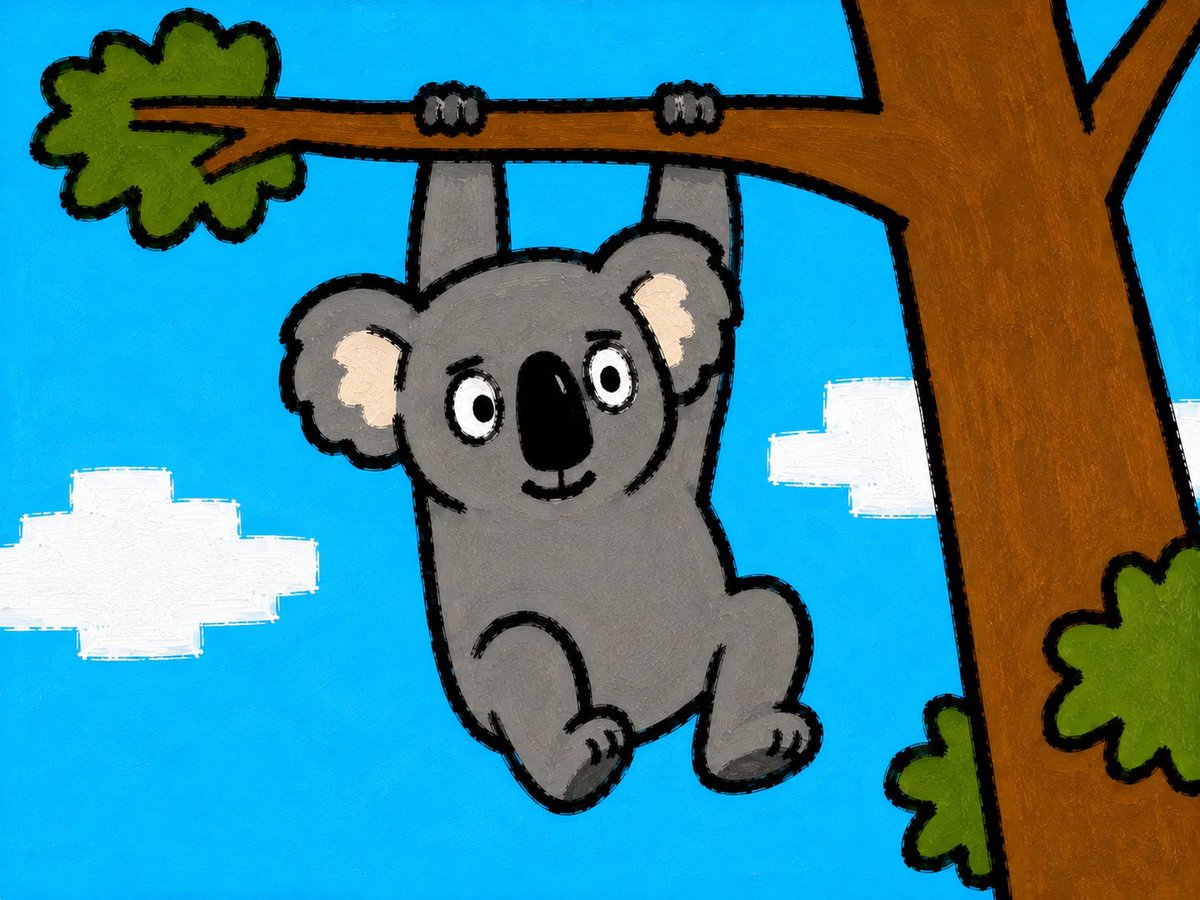
Cartoon Koala Hanging From Tree
A simple childlike crayon-style illustration of a smiling koala hanging from a tree branch against a bright blue sky.
Ini adalah contoh kasus GPT Image 2 untuk Ilustrasi & Seni . Gunakan contoh siap salin di bawah ini untuk menghasilkan visual serupa, dan tinjau atribusi Awesome GPT Image 2 Prompts serta hak penggunaan komersial sebelum digunakan kembali.
Butuh seluruh rangkaian prompt? Gunakan Ilustrasi & Seni Untuk contoh terkait lainnya, kunjungi pusat topik, atau buka GPT Image 2 katalog cepat untuk indeks contoh lengkap, struktur yang dapat digunakan kembali, dan atribusi sumber.
Free 1K preview
Generate one preview image instantly, no sign-up required.
1289/4000
Mengingatkan
Prompt siap salin
Create a simple childlike acrylic or crayon-style illustration of a cute {argument name="animal" default="koala"} hanging from a horizontal tree branch with both arms. Use a bright cyan-blue sky background with exactly 2 blocky white clouds, one larger cloud on the left edge and one smaller cloud near the right-center. The koala is centered slightly left, gray with a rounded body, round head, large round ears with pale cream inner ear patches, oval white eyes with black pupils, a large vertical black oval nose, a small smiling mouth, and two bent legs with small feet. Show exactly 2 gray hands gripping the branch from above, each with small dark claw marks. On the right side, include a thick brown tree trunk rising vertically and splitting into branches at the top, with a horizontal branch extending left across the upper third of the image. Add exactly 3 green leafy clusters: one attached to the far left end of the branch, one small cluster near the lower right side of the trunk, and one partial cluster on the far right edge. Style everything with thick uneven black outlines, visible brush texture, flat bold colors, slightly rough hand-painted edges, and a playful preschool picture-book look. Use a landscape 4:3 composition, no text, no realistic shading, no watermark.Variabel perintah
Placeholder argumen yang dapat diedit ditemukan dalam prompt, beserta nilai defaultnya.
Variabel
animal
Bawaan
koala
Best for
- - Ilustrasi & Seni visual exploration
- - Image generation and reference-image edits
- - Reusable briefs that keep source attribution visible
Change these parts
- - Subject, product, character, or scene
- - Aspect ratio, camera, lighting, and background
- - Brand, text, color, and output constraints
Recommended model and settings
- - Model: gpt-image-2
- - Input mode: Teks ke Gambar
- - Aspect ratio: source
- - Commercial status: review original source
How to use this prompt
- 1. Copy the prompt and preserve its structure for the first test.
- 2. Replace the subject, context, and publishing channel.
- 3. Change one camera, lighting, or style variable per iteration.
- 4. Inspect the output, source, text, and rights before reuse.
Limitations, source, and reuse cautions
- - Generated output is an editable draft, not factual, legal, or rights evidence.
- - Review the linked source, people, brands, logos, text, and third-party media before commercial use.
Diimpor dari Awesome GPT Image 2 Prompts . Atribusi diperlukan. Status penggunaan komersial adalah allowed ; tinjau hak sumber sebelum penggunaan berbayar.
Lebih banyak kasus dalam kategori ini
Diprioritaskan berdasarkan kategori, kompatibilitas mode input, kualitas, dan risiko yang lebih rendah.

Catatan penggunaan kembali dan sumber
Gunakan perintah ini dengan aman setelah melihat pratinjau kasus.
- 1.Salin perintah tersebut atau buka langsung di Dovoo dengan tombol pembuatan.
- 2.Sesuaikan variabel, rasio aspek, dan gambar referensi untuk kebutuhan Anda sendiri.
- 3.Sebelum mempublikasikan atau menggunakan untuk tujuan berbayar, verifikasi hak sumber, persyaratan atribusi, dan risiko merek atau citra.