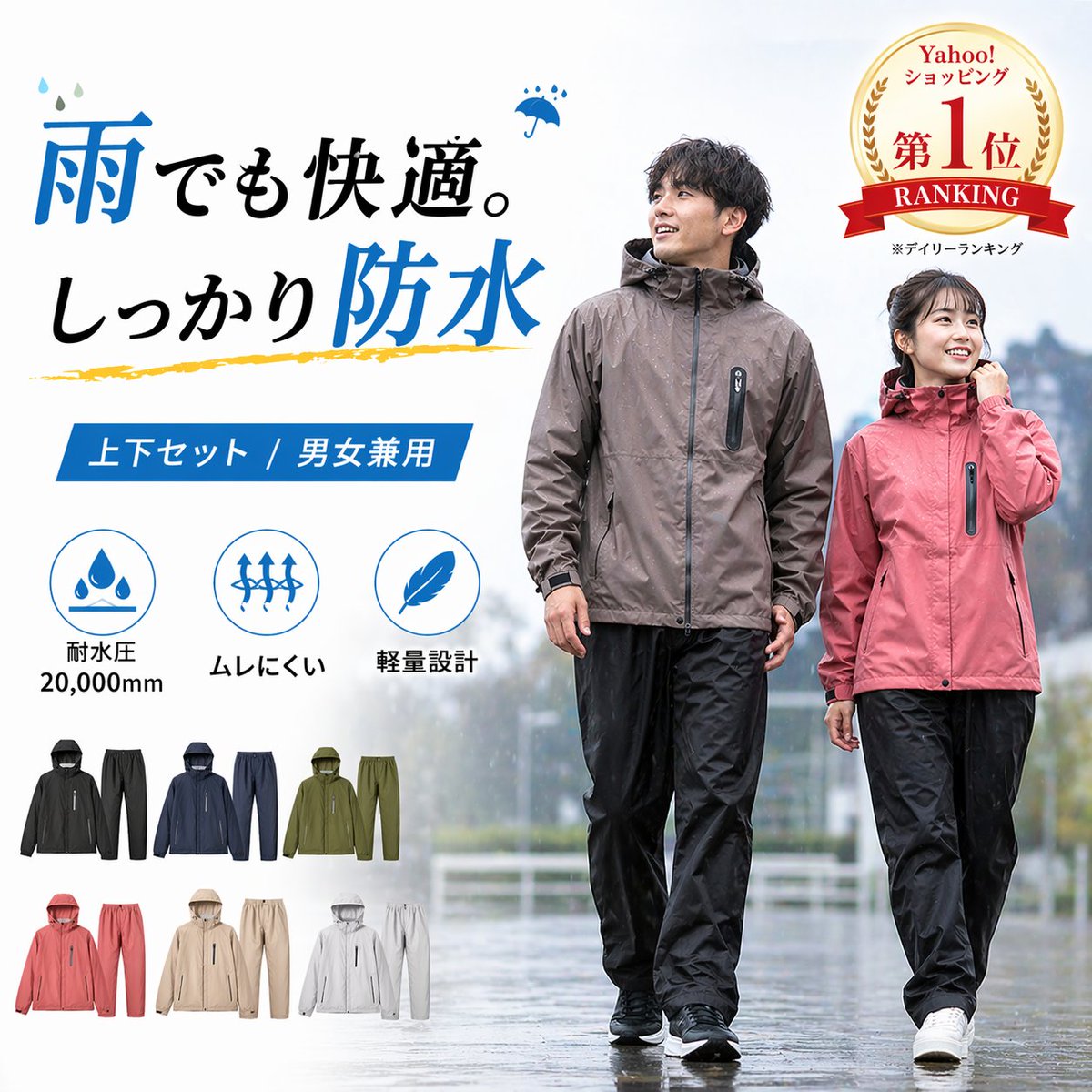
Iklan Pakaian Hujan Tahan Air Jepang
Prompt ini menghasilkan gambar hero e-commerce Jepang yang elegan untuk setelan jas hujan tahan air unisex, yang cocok untuk daftar produk di marketplace online dan iklan produk.
Ini adalah contoh kasus GPT Image 2 untuk Produk & Komersial . Gunakan contoh siap salin di bawah ini untuk menghasilkan visual serupa, dan tinjau atribusi Awesome GPT Image 2 Prompts serta hak penggunaan komersial sebelum digunakan kembali.
Butuh seluruh rangkaian prompt? Gunakan Produk & Komersial Untuk contoh terkait lainnya, kunjungi pusat topik, atau buka GPT Image 2 katalog cepat untuk indeks contoh lengkap, struktur yang dapat digunakan kembali, dan atribusi sumber.
Free 1K preview
Generate one preview image instantly, no sign-up required.
1995/4000
Mengingatkan
Prompt siap salin
A clean Japanese e-commerce promotional poster for a waterproof rainwear set, square format, bright high-key product ad style. Show 2 adult models walking outdoors on a wet pavement in light rain with a soft blurred background: 1 taller male model wearing a taupe-brown hooded waterproof jacket and black rain pants, and 1 shorter female model wearing a dusty pink hooded waterproof jacket and black rain pants. Both outfits are lightweight rain suits with zip-front jackets, subtle fabric sheen, visible water droplets on the surface, and casual sneakers. Faces are de-emphasized and not the focus. Use a white and pale gray background layout with the models placed center-right and full body visible. On the left side, large bold Japanese headline text in a mix of black and vivid blue reads exactly: "雨でも快適。しっかり防水" with small blue raindrop accents and a small umbrella icon near the text, plus a yellow brushstroke underline accent beneath the second line. Beneath the headline, add a blue ribbon-style banner with white Japanese text: "上下セット / 男女兼用". Below that, place exactly 3 circular blue feature icons in a horizontal row with Japanese labels: 1) water drops icon with text "耐水圧 20,000mm", 2) upward stretch arrows icon with text "ムレにくい", 3) feather icon with text "軽量設計". At the bottom left, display exactly 6 small product color variants as miniature jacket-and-pants set thumbnails arranged in 2 rows of 3. The 6 colorways are: black set, navy set, olive green set, pink set, beige set, and light gray set. In the top right corner, add a gold laurel award badge with red ribbons and Japanese text reading "Yahoo! ショッピング 第1位 RANKING" with smaller text beneath indicating a daily ranking note. Overall style: polished Japanese marketplace listing hero image, realistic apparel photography composited with clean graphic design, commercial catalog quality, waterproof outdoor lifestyle feel, soft overcast lighting, crisp typography, premium but accessible consumer product presentation.
Best for
- - Produk & Komersial visual exploration
- - Image generation and reference-image edits
- - Reusable briefs that keep source attribution visible
Change these parts
- - Subject, product, character, or scene
- - Aspect ratio, camera, lighting, and background
- - Brand, text, color, and output constraints
Recommended model and settings
- - Model: gpt-image-2
- - Input mode: Teks ke Gambar
- - Aspect ratio: source
- - Commercial status: review original source
How to use this prompt
- 1. Copy the prompt and preserve its structure for the first test.
- 2. Replace the subject, context, and publishing channel.
- 3. Change one camera, lighting, or style variable per iteration.
- 4. Inspect the output, source, text, and rights before reuse.
Limitations, source, and reuse cautions
- - Generated output is an editable draft, not factual, legal, or rights evidence.
- - Review the linked source, people, brands, logos, text, and third-party media before commercial use.
Diimpor dari Awesome GPT Image 2 Prompts . Atribusi diperlukan. Status penggunaan komersial adalah allowed ; tinjau hak sumber sebelum penggunaan berbayar.
Lebih banyak kasus dalam kategori ini
Diprioritaskan berdasarkan kategori, kompatibilitas mode input, kualitas, dan risiko yang lebih rendah.






Catatan penggunaan kembali dan sumber
Gunakan perintah ini dengan aman setelah melihat pratinjau kasus.
- 1.Salin perintah tersebut atau buka langsung di Dovoo dengan tombol pembuatan.
- 2.Sesuaikan variabel, rasio aspek, dan gambar referensi untuk kebutuhan Anda sendiri.
- 3.Sebelum mempublikasikan atau menggunakan untuk tujuan berbayar, verifikasi hak sumber, persyaratan atribusi, dan risiko merek atau citra.