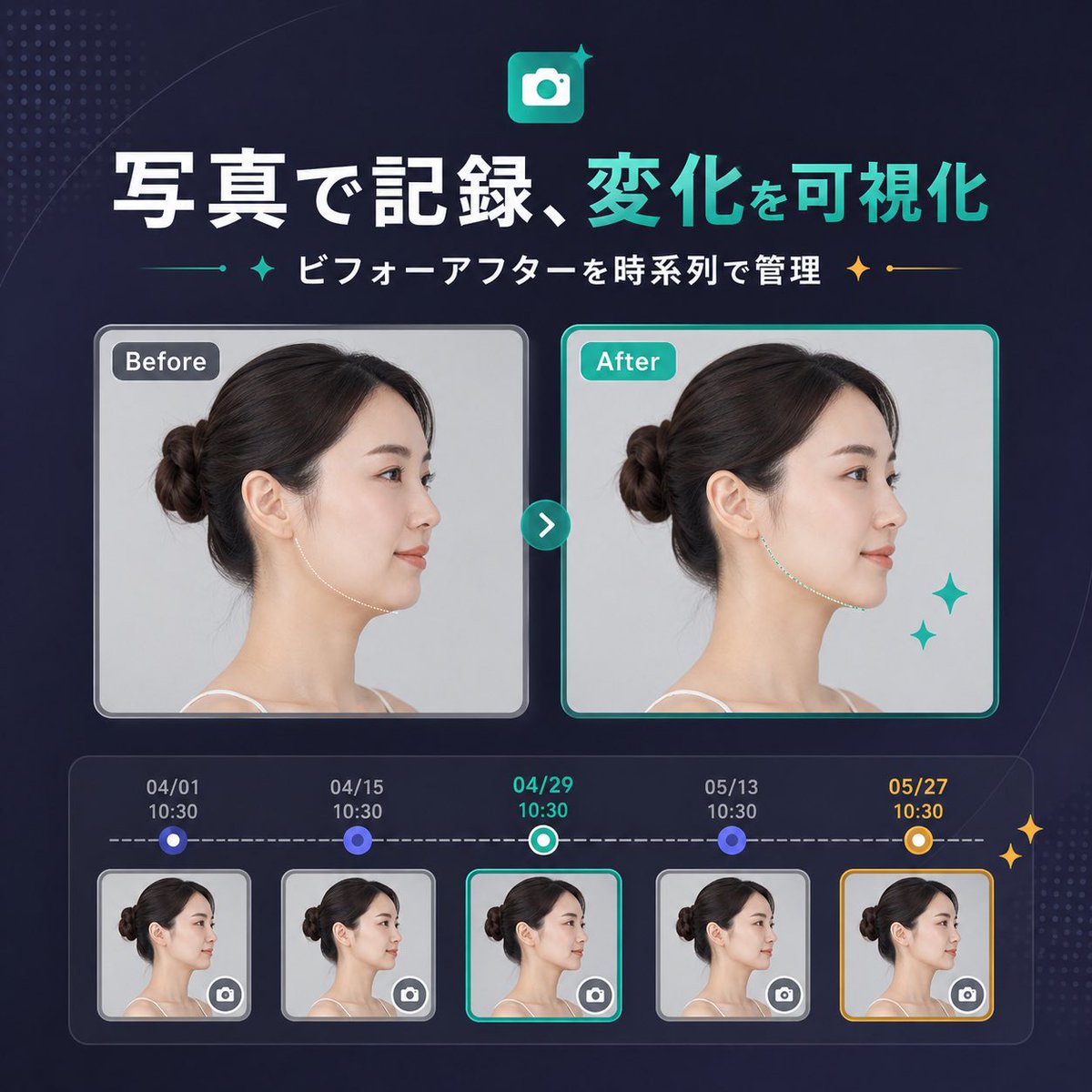
Banner Sebelum-Sesudah SaaS Jepang
Banner pemasaran SaaS berbentuk persegi yang elegan dalam bahasa Jepang, menampilkan perbandingan foto sebelum dan sesudah dengan garis waktu lima langkah, cocok untuk pengumuman pembaruan produk atau halaman arahan (landing page).
Ini adalah contoh kasus GPT Image 2 untuk Grafis & Poster . Gunakan contoh siap salin di bawah ini untuk menghasilkan visual serupa, dan tinjau atribusi Awesome GPT Image 2 Prompts serta hak penggunaan komersial sebelum digunakan kembali.
Perintah ini dirancang untuk beberapa gambar referensi. Kita akan membuka Dovoo dengan perintah dan gambar pratinjau yang tersedia; tambahkan referensi yang tersisa di Dovoo sebelum menghasilkan gambar.
Free 1K preview
Generate one preview image instantly, no sign-up required.
Free text preview doesn’t preserve reference-image consistency.
Mengingatkan
Prompt siap salin
{
  "type": "SaaS feature update banner infographic",
  "style": "clean modern Japanese tech marketing, premium UI, dark navy gradient background, subtle dotted halftone texture in the top-left and bottom-right corners, soft curved line accents, glossy neon teal highlights, polished high-quality product announcement visual",
  "canvas": {
    "aspect_ratio": "1:1"
  },
  "headline": {
    "icon": "rounded square app icon with a white camera symbol on a teal gradient background, small sparkle accent",
    "title": "{argument name=\"headline text\" default=\"写真で記録、変化を可視化\"}",
    "subtitle": "{argument name=\"subtitle text\" default=\"ビフォーアフターを時系列で管理\"}",
    "language": "Chinese",
    "title_style": "large bold sans-serif, first phrase in white and second phrase in bright teal",
    "subtitle_style": "medium bold sans-serif in white with teal and gold sparkle-divider ornaments on both sides"
  },
  "layout": {
    "sections": [
      {
        "title": "comparison cards",
        "position": "center",
        "count": 2,
        "labels": [
          "Before",
          "After"
        ]
      },
      {
        "title": "timeline entries",
        "position": "bottom",
        "count": 5,
        "labels": [
          "04/01 10:30",
          "04/15 10:30",
          "04/29 10:30",
          "05/13 10:30",
          "05/27 10:30"
        ]
      }
    ],
    "centerpiece": "side-by-side before and after portrait cards connected by a circular teal arrow button",
    "bottom_panel": "rounded rectangular timeline module with five dated thumbnails connected by a dashed horizontal progress line"
  },
  "comparison": {
    "subject": "same adult woman in left-facing side profile with dark brown hair in a neat low bun, light skin, thin shoulder strap top, studio lighting, pale gray background",
    "privacy": "face area covered by a vertical rectangular blur block in both large cards and all five thumbnails",
    "before_card": {
      "label": "Before",
      "frame": "rounded rectangle with light gray border and soft shadow",
      "image": "neutral clinical-style portrait"
    },
    "after_card": {
      "label": "After",
      "frame": "rounded rectangle with bright teal border and soft shadow",
      "image": "similar portrait with a subtly refined jawline/neck contour to imply visible improvement",
      "decorations": "2 teal sparkle stars near the lower-right of the after card"
    },
    "connector": "small circular teal button centered between cards with a white right-pointing chevron"
  },
  "timeline": {
    "panel_style": "dark translucent rounded container with inner glow",
    "line": "white dashed horizontal line",
    "entries": [
      {
        "date": "04/01",
        "time": "10:30",
        "state": "small circular blue node above thumbnail",
        "thumbnail": "woman side-profile thumbnail with blur block and tiny camera icon button in bottom-right corner",
        "frame": "light gray rounded border"
      },
      {
        "date": "04/15",
        "time": "10:30",
        "state": "small circular blue node above thumbnail",
        "thumbnail": "woman side-profile thumbnail with blur block and tiny camera icon button in bottom-right corner",
        "frame": "light gray rounded border"
      },
      {
        "date": "04/29",
        "time": "10:30",
        "state": "current selection with teal-and-white ring node",
        "thumbnail": "woman side-profile thumbnail with blur block and tiny camera icon button in bottom-right corner",
        "frame": "bright teal rounded border"
      },
      {
        "date": "05/13",
        "time": "10:30",
        "state": "small circular blue node above thumbnail",
        "thumbnail": "woman side-profile thumbnail with blur block and tiny camera icon button in bottom-right corner",
        "frame": "light gray rounded border"
      },
      {
        "date": "05/27",
        "time": "10:30",
        "state": "highlighted milestone with gold-and-white ring node",
        "thumbnail": "woman side-profile thumbnail with blur block and tiny camera icon button in bottom-right corner",
        "frame": "gold rounded border"
      }
    ],
    "extra_decorations": "2 small gold sparkle stars on the far right edge of the timeline panel"
  },
  "color_palette": {
    "background": "deep navy to indigo gradient",
    "primary": "bright teal",
    "secondary": "white",
    "accent": "gold",
    "support": "soft gray and blue-violet"
  },
  "rendering": "crisp vector-meets-UI design with embedded realistic portrait photography, balanced spacing, centered composition, startup landing-page banner quality"
}
Variabel perintah
Placeholder argumen yang dapat diedit ditemukan dalam prompt, beserta nilai defaultnya.
Best for
- - Grafis & Poster visual exploration
- - Image generation and reference-image edits
- - Reusable briefs that keep source attribution visible
Change these parts
- - Subject, product, character, or scene
- - Aspect ratio, camera, lighting, and background
- - Brand, text, color, and output constraints
Recommended model and settings
- - Model: gpt-image-2
- - Input mode: Konversi Gambar Berganda ke Gambar
- - Aspect ratio: source
- - Commercial status: review original source
How to use this prompt
- 1. Copy the prompt and preserve its structure for the first test.
- 2. Replace the subject, context, and publishing channel.
- 3. Change one camera, lighting, or style variable per iteration.
- 4. Inspect the output, source, text, and rights before reuse.
Limitations, source, and reuse cautions
- - Generated output is an editable draft, not factual, legal, or rights evidence.
- - Review the linked source, people, brands, logos, text, and third-party media before commercial use.
Lebih banyak kasus dalam kategori ini
Diprioritaskan berdasarkan kategori, kompatibilitas mode input, kualitas, dan risiko yang lebih rendah.






Catatan penggunaan kembali dan sumber
Gunakan perintah ini dengan aman setelah melihat pratinjau kasus.
- 1.Salin perintah tersebut atau buka langsung di Dovoo dengan tombol pembuatan.
- 2.Sesuaikan variabel, rasio aspek, dan gambar referensi untuk kebutuhan Anda sendiri.
- 3.Sebelum mempublikasikan atau menggunakan untuk tujuan berbayar, verifikasi hak sumber, persyaratan atribusi, dan risiko merek atau citra.