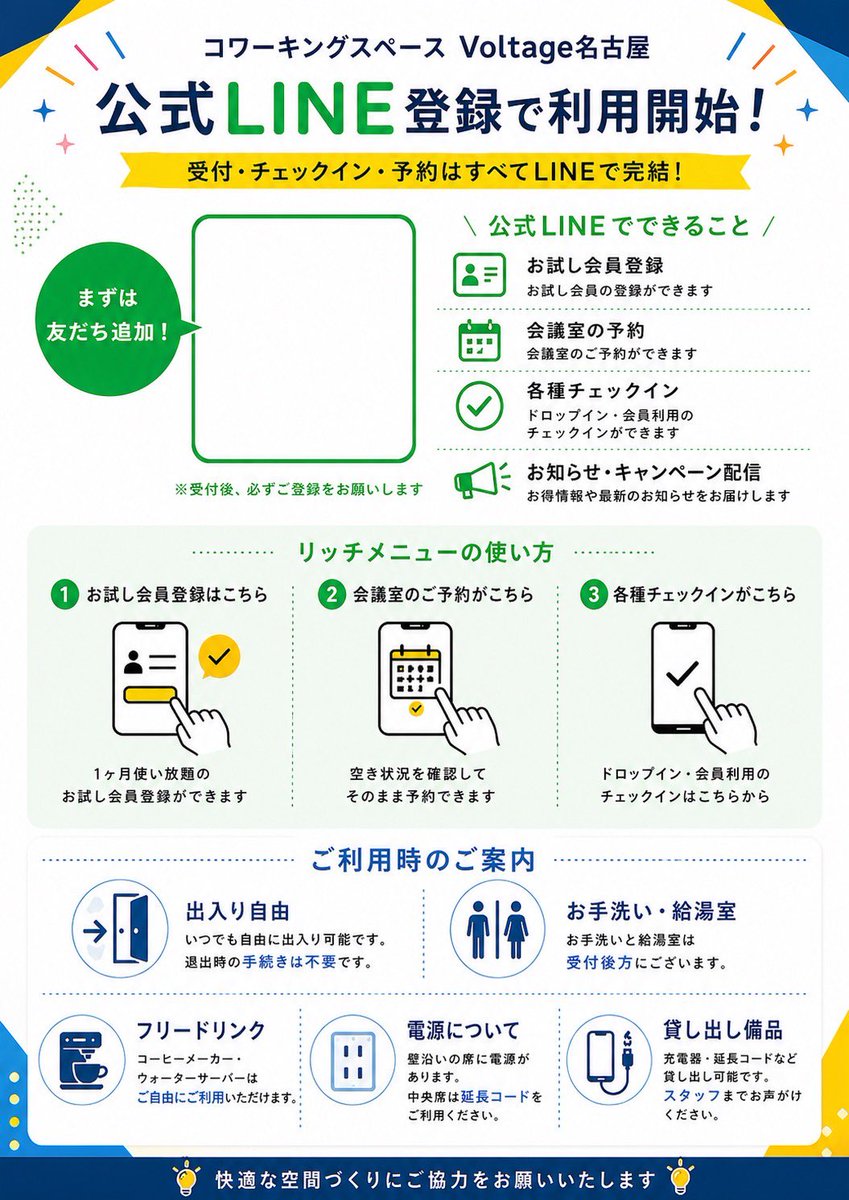
Poster Pendaftaran LINE Jepang
Poster promosi Jepang yang bersih untuk ruang kerja bersama (coworking space) yang menjelaskan pendaftaran, reservasi, check-in, dan panduan fasilitas berbasis LINE, ideal untuk papan nama toko atau materi cetak di area resepsionis.
Ini adalah contoh kasus GPT Image 2 untuk Grafis & Poster . Gunakan contoh siap salin di bawah ini untuk menghasilkan visual serupa, dan tinjau atribusi Awesome GPT Image 2 Prompts serta hak penggunaan komersial sebelum digunakan kembali.
Free 1K preview
Generate one preview image instantly, no sign-up required.
Mengingatkan
Prompt siap salin
{
  "type": "Japanese promotional poster flyer",
  "purpose": "LINE registration guide for a coworking space",
  "style": "clean corporate flat design, modern Japanese advertising layout, vector icons, white background with bold blue and green accents, high readability, print-ready poster composition",
  "brand": {
    "name": "Voltage Nagoya",
    "category": "coworking space",
    "header": "コワーキングスペース {argument name=\"venue name\" default=\"Voltage Nagoya\"}"
  },
  "layout": {
    "orientation": "portrait",
    "sections": [
      {
        "title": "公式LINE登録で利用開始!",
        "position": "top header",
        "count": 2,
        "labels": [
          "公式LINE登録で利用開始!",
          "受付・チェックイン・予約はすべてLINEで完結!"
        ]
      },
      {
        "title": "main signup area",
        "position": "upper middle",
        "count": 3,
        "labels": [
          "まずは友だち追加!",
          "QR code placeholder",
          "※受付後、必ずご登録をお願いします"
        ]
      },
      {
        "title": "公式LINEでできること",
        "position": "upper right",
        "count": 4,
        "labels": [
          "お試し会員登録",
          "会議室の予約",
          "各種チェックイン",
          "お知らせ・キャンペーン配信"
        ]
      },
      {
        "title": "リッチメニューの使い方",
        "position": "middle",
        "count": 3,
        "labels": [
          "1 お試し会員登録はこちら",
          "2 会議室のご予約がこちら",
          "3 各種チェックインがこちら"
        ]
      },
      {
        "title": "ご利用時のご案内",
        "position": "lower middle",
        "count": 5,
        "labels": [
          "出入り自由",
          "お手洗い・給湯室",
          "フリードリンク",
          "電源について",
          "貸し出し備品"
        ]
      },
      {
        "title": "footer message",
        "position": "bottom",
        "count": 1,
        "labels": [
          "快適な空間づくりにご協力をお願いいたします"
        ]
      }
    ]
  },
  "content_blocks": {
    "line_features": [
      {
        "icon": "ID card profile icon in green outline",
        "heading": "お試し会員登録",
        "text": "お試し会員の登録ができます"
      },
      {
        "icon": "calendar icon in green outline",
        "heading": "会議室の予約",
        "text": "会議室のご予約ができます"
      },
      {
        "icon": "check circle icon in green outline",
        "heading": "各種チェックイン",
        "text": "ドロップイン・会員利用のチェックインができます"
      },
      {
        "icon": "megaphone icon in green outline",
        "heading": "お知らせ・キャンペーン配信",
        "text": "お得情報や最新のお知らせをお届けします"
      }
    ],
    "rich_menu_steps": [
      {
        "step": 1,
        "heading": "お試し会員登録はこちら",
        "visual": "smartphone screen showing profile form, yellow button, hand tapping, yellow LINE-style check bubble",
        "text": "1ヶ月使い放題の お試し会員登録ができます"
      },
      {
        "step": 2,
        "heading": "会議室のご予約がこちら",
        "visual": "smartphone screen with calendar, hand tapping date",
        "text": "空き状況を確認して そのまま予約できます"
      },
      {
        "step": 3,
        "heading": "各種チェックインがこちら",
        "visual": "smartphone screen with large check mark, hand tapping",
        "text": "ドロップイン・会員利用の チェックインはこちらから"
      }
    ],
    "facility_info": [
      {
        "heading": "出入り自由",
        "icon": "open door with arrow",
        "text": "いつでも自由に出入り可能です。 退出時の手続きは不要です。"
      },
      {
        "heading": "お手洗い・給湯室",
        "icon": "restroom male and female symbols",
        "text": "お手洗いと給湯室は 受付後方にございます。"
      },
      {
        "heading": "フリードリンク",
        "icon": "coffee machine cup",
        "text": "コーヒーメーカー、ウォーターサーバーは ご自由にご利用いただけます。"
      },
      {
        "heading": "電源について",
        "icon": "electrical outlet",
        "text": "壁沿いの席に電源があります。 中央席は延長コードを ご利用ください。"
      },
      {
        "heading": "貸し出し備品",
        "icon": "charging cable or power bank device",
        "text": "充電器・延長コードなど 貸し出し可能です。 スタッフまでお声がけください。"
      }
    ]
  },
  "visual_details": {
    "top_decorations": "small colorful confetti strokes and sparkles near top corners",
    "frame": "subtle geometric blue and yellow corner shapes around the poster edges",
    "main_colors": [
      "deep blue",
      "bright LINE green",
      "yellow",
      "white",
      "light gray"
    ],
    "typography": "bold Japanese sans-serif headline, large green emphasis on LINE, smaller black explanatory text, section headers in green and blue",
    "icons": "simple outlined vector icons with consistent stroke weight",
    "qr_area": "large empty rounded rectangle placeholder bordered in green for {argument name=\"QR code area\" default=\"official LINE QR code\"}",
    "speech_circle": "solid green circular callout on left with white text 'まずは友だち追加!'"
  },
  "customizable_fields": {
    "headline": "{argument name=\"main headline\" default=\"公式LINE登録で利用開始!\"}",
    "subheadline": "{argument name=\"subheadline text\" default=\"受付・チェックイン・予約はすべてLINEで完結!\"}",
    "brand_green": "{argument name=\"accent green\" default=\"LINE green\"}",
    "footer_note": "{argument name=\"footer message\" default=\"快適な空間づくりにご協力をお願いいたします\"}"
  }
}
Variabel perintah
Placeholder argumen yang dapat diedit ditemukan dalam prompt, beserta nilai defaultnya.
Best for
- - Grafis & Poster visual exploration
- - Image generation and reference-image edits
- - Reusable briefs that keep source attribution visible
Change these parts
- - Subject, product, character, or scene
- - Aspect ratio, camera, lighting, and background
- - Brand, text, color, and output constraints
Recommended model and settings
- - Model: gpt-image-2
- - Input mode: Teks ke Gambar
- - Aspect ratio: source
- - Commercial status: review original source
How to use this prompt
- 1. Copy the prompt and preserve its structure for the first test.
- 2. Replace the subject, context, and publishing channel.
- 3. Change one camera, lighting, or style variable per iteration.
- 4. Inspect the output, source, text, and rights before reuse.
Limitations, source, and reuse cautions
- - Generated output is an editable draft, not factual, legal, or rights evidence.
- - Review the linked source, people, brands, logos, text, and third-party media before commercial use.
Lebih banyak kasus dalam kategori ini
Diprioritaskan berdasarkan kategori, kompatibilitas mode input, kualitas, dan risiko yang lebih rendah.






Catatan penggunaan kembali dan sumber
Gunakan perintah ini dengan aman setelah melihat pratinjau kasus.
- 1.Salin perintah tersebut atau buka langsung di Dovoo dengan tombol pembuatan.
- 2.Sesuaikan variabel, rasio aspek, dan gambar referensi untuk kebutuhan Anda sendiri.
- 3.Sebelum mempublikasikan atau menggunakan untuk tujuan berbayar, verifikasi hak sumber, persyaratan atribusi, dan risiko merek atau citra.