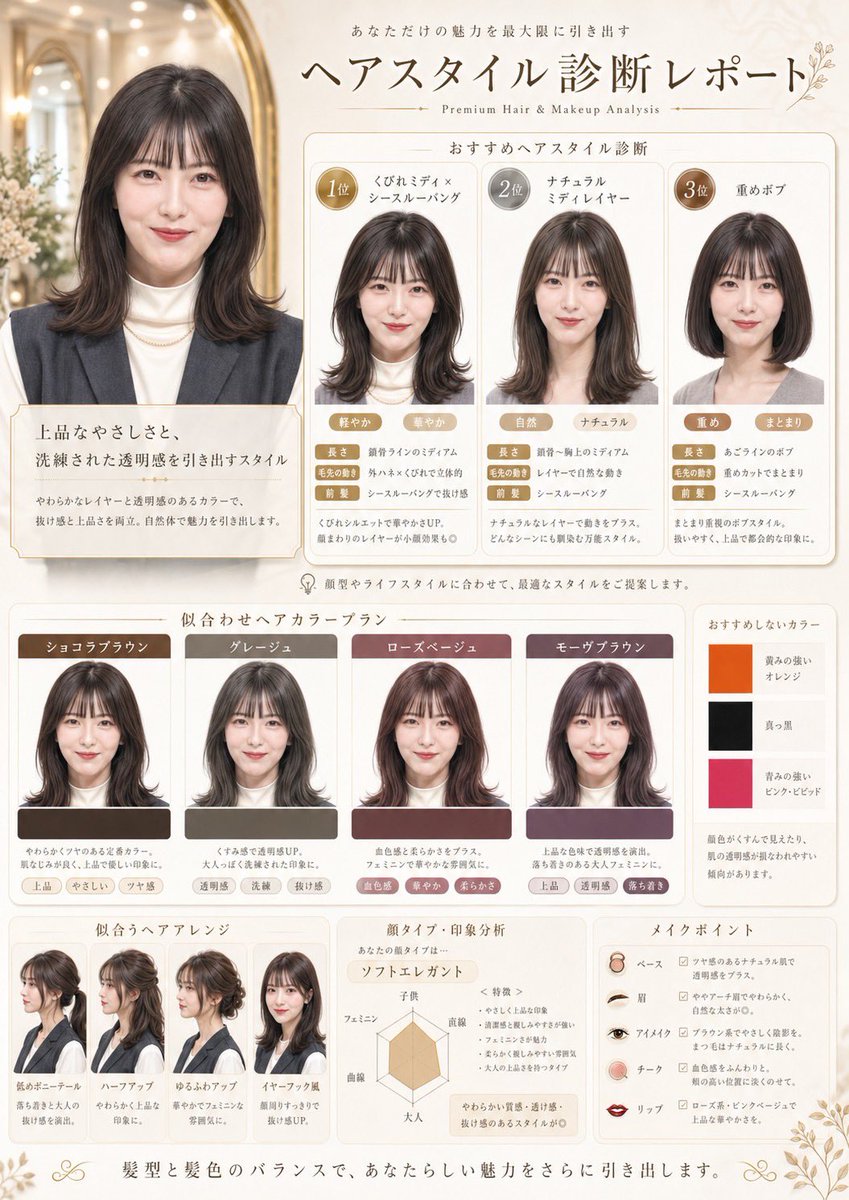
Poster Salon Diagnosis Rambut Jepang
Perintah ini mengubah satu potret menjadi tata letak laporan analisis gaya rambut ala salon Jepang premium untuk pemasaran kecantikan atau konten perubahan penampilan.
Ini adalah contoh kasus GPT Image 2 untuk Mode & Kecantikan . Gunakan contoh siap salin di bawah ini untuk menghasilkan visual serupa, dan tinjau atribusi Awesome GPT Image 2 Prompts serta hak penggunaan komersial sebelum digunakan kembali.
Butuh seluruh rangkaian prompt? Gunakan Mode & Kecantikan Untuk contoh terkait lainnya, kunjungi pusat topik, atau buka GPT Image 2 katalog cepat untuk indeks contoh lengkap, struktur yang dapat digunakan kembali, dan atribusi sumber.
Free 1K preview
Generate one preview image instantly, no sign-up required.
Free text preview doesn’t preserve reference-image consistency.
1502/4000
Mengingatkan
Prompt siap salin
Using the provided reference image, turn it into a refined Japanese beauty-salon hairstyle diagnosis poster. Keep the same person, outfit, hair color, and realistic studio-photo look, but place her portrait as the main before-style image in an elegant cream-and-gold editorial layout. Add Japanese headline text at the top reading "ヘアスタイル診断レポート" with a small English subtitle "Premium Hair & Makeup Analysis" and supporting Japanese copy above it. Create 4 ranked hairstyle recommendation panels under the title: 1) "くびれミディ×シースルーバング", 2) "ナチュラルミディレイヤー", 3) "重めボブ", plus the large original/main portrait panel at left with explanatory Japanese text. In each recommendation panel, generate a realistic edited version of the same woman with the suggested haircut, using circular rank badges and multiple small trait tags. Add a color recommendation section titled "似合わせヘアカラープラン" with 4 color cards showing the same woman recolored in these shades: "ショコラブラウン", "グレージュ", "ローズベージュ", "モーヴブラウン". Also add 1 slim side panel titled "おすすめしないカラー" with 3 stacked swatches and labels: "黄みの強いオレンジ", "真っ黒", "青みの強いピンク・ビビッド". At the bottom, add 3 additional sections: "似合うヘアアレンジ" with 4 hairstyle arrangement examples of the same woman, "顔タイプ・印象分析" with a radar chart and Japanese notes, and "メイクポイント" with 5 makeup item rows labeled "ベース", "眉", "アイメイク", "チーク", "リップ". Use soft luxury salon branding, thin gold borders, rounded white panels, subtle floral corner ornaments, and a clean premium magazine-like composition.
Best for
- - Mode & Kecantikan visual exploration
- - Image generation and reference-image edits
- - Reusable briefs that keep source attribution visible
Change these parts
- - Subject, product, character, or scene
- - Aspect ratio, camera, lighting, and background
- - Brand, text, color, and output constraints
Recommended model and settings
- - Model: gpt-image-2
- - Input mode: Gambar ke Gambar
- - Aspect ratio: source
- - Commercial status: review original source
How to use this prompt
- 1. Copy the prompt and preserve its structure for the first test.
- 2. Replace the subject, context, and publishing channel.
- 3. Change one camera, lighting, or style variable per iteration.
- 4. Inspect the output, source, text, and rights before reuse.
Limitations, source, and reuse cautions
- - Generated output is an editable draft, not factual, legal, or rights evidence.
- - Review the linked source, people, brands, logos, text, and third-party media before commercial use.
Diimpor dari Awesome GPT Image 2 Prompts . Atribusi diperlukan. Status penggunaan komersial adalah allowed ; tinjau hak sumber sebelum penggunaan berbayar.
Lebih banyak kasus dalam kategori ini
Diprioritaskan berdasarkan kategori, kompatibilitas mode input, kualitas, dan risiko yang lebih rendah.

Surreal Macro Fashion Illusion
Gambar ke Gambar

Fashion Studio Portrait with Blue Rim Lighting
Teks ke Gambar

Spring Editorial Fashion Collage
Teks ke Gambar

New Chinese-Style Editorial Portrait
Teks ke Gambar

Multi-Pose Wavy Dark Hair Portrait
Gambar ke Gambar

Split Face Horror Transformation
Gambar ke Gambar
Catatan penggunaan kembali dan sumber
Gunakan perintah ini dengan aman setelah melihat pratinjau kasus.
- 1.Salin perintah tersebut atau buka langsung di Dovoo dengan tombol pembuatan.
- 2.Sesuaikan variabel, rasio aspek, dan gambar referensi untuk kebutuhan Anda sendiri.
- 3.Sebelum mempublikasikan atau menggunakan untuk tujuan berbayar, verifikasi hak sumber, persyaratan atribusi, dan risiko merek atau citra.