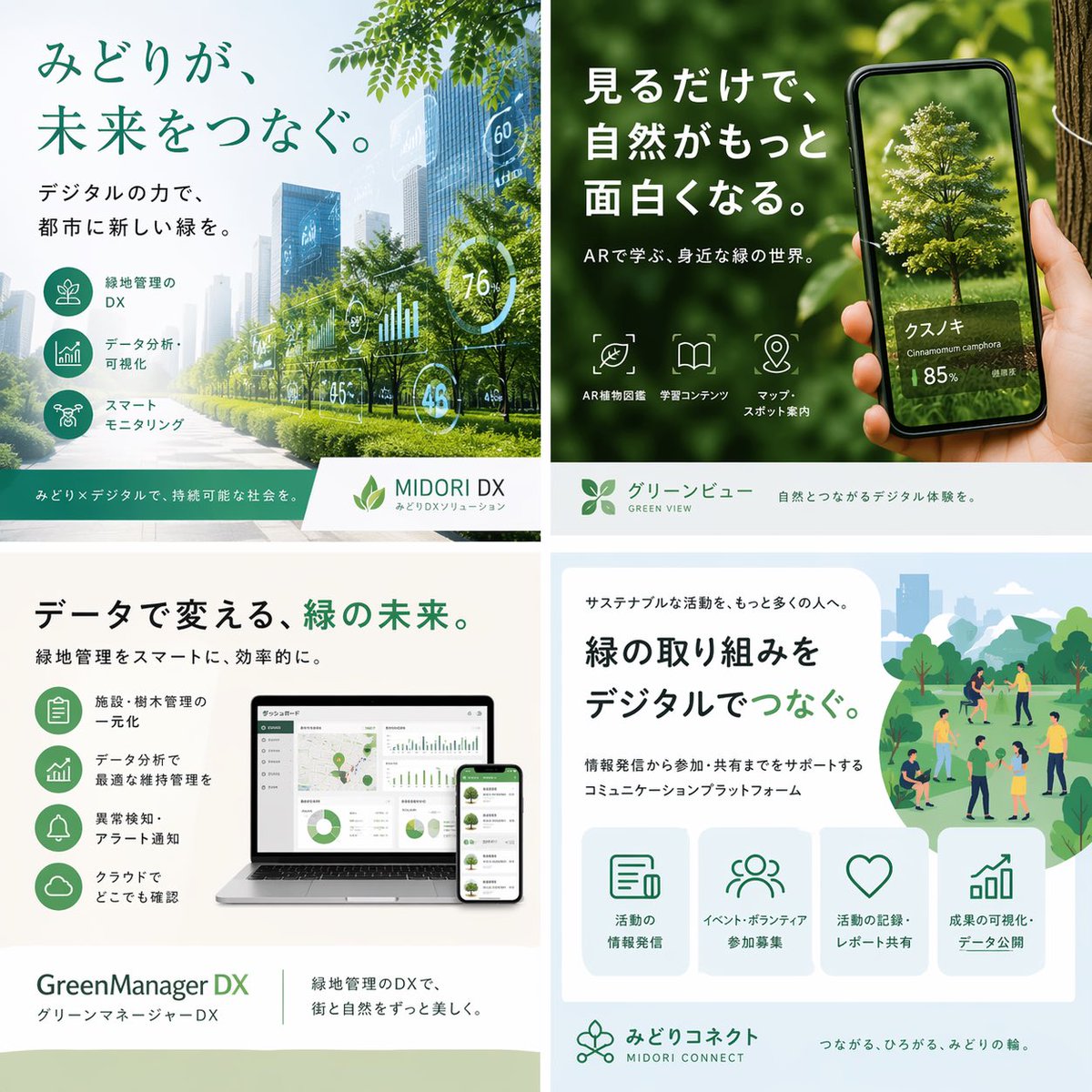
Kolase Promosi Teknologi Hijau Jepang
Kolase pemasaran Jepang berbentuk persegi yang dipoles, menampilkan empat layanan digital ramah lingkungan, ideal untuk membuat ulang brosur perusahaan, unggahan media sosial, atau visual presentasi untuk teknologi keberlanjutan.
Ini adalah contoh kasus GPT Image 2 untuk Produk & Komersial . Gunakan contoh siap salin di bawah ini untuk menghasilkan visual serupa, dan tinjau atribusi Awesome GPT Image 2 Prompts serta hak penggunaan komersial sebelum digunakan kembali.
Butuh seluruh rangkaian prompt? Gunakan Produk & Komersial Untuk contoh terkait lainnya, kunjungi pusat topik, atau buka GPT Image 2 katalog cepat untuk indeks contoh lengkap, struktur yang dapat digunakan kembali, dan atribusi sumber.
Free 1K preview
Generate one preview image instantly, no sign-up required.
3781/4000
Mengingatkan
Prompt siap salin
{
  "type": "Japanese promotional 2x2 brochure collage for green-tech digital services",
  "style": "clean corporate advertising, modern eco-friendly branding, soft natural lighting, realistic photocomposite with minimal AI artifacts, white and green color palette, polished Japanese typography, square layout",
  "canvas": {
    "aspect_ratio": "1:1",
    "size": "1536x1536"
  },
  "layout": {
    "grid": "2x2",
    "count": 4,
    "sections": [
      {
        "position": "top-left",
        "title": "みどりが、未来をつなぐ。",
        "subtitle": "デジタルの力で、都市に新しい緑を。",
        "scene": "a bright futuristic city boulevard lined with healthy green trees and landscaped medians, glass skyscrapers fading into light haze, semi-transparent dashboard overlays floating over the street with circular and bar-chart analytics such as 60, 76, 45, and 48",
        "features": {
          "count": 3,
          "labels": [
            "緑地管理のDX",
            "データ分析・可視化",
            "スマートモニタリング"
          ]
        },
        "brand_bar": {
          "product_name": "MIDORI DX",
          "tagline": "みどりメディカルで、持続可能な社会を。",
          "sublabel": "みどりDXソリューション"
        }
      },
      {
        "position": "top-right",
        "title": "見るだけで、自然がもっと面白くなる。",
        "subtitle": "ARで学ぶ、身近な緑の世界。",
        "scene": "close-up of a hand holding a smartphone in front of lush green foliage and a tree trunk, the phone screen showing an AR-style identified tree with a realistic isolated tree model",
        "screen_text": {
          "main_name": "クスノキ",
          "latin_name": "Cinnamomum camphora",
          "confidence": "85%"
        },
        "features": {
          "count": 3,
          "labels": [
            "AR Plant Encyclopedia",
            "学習コンテンツ",
            "マップ・スポット案内"
          ]
        },
        "brand_bar": {
          "product_name": "グリーンビュー",
          "english_name": "GREEN VIEW",
          "tagline": "自然とつながるデジタル体験を。"
        }
      },
      {
        "position": "bottom-left",
        "title": "データで変える、緑の未来。",
        "subtitle": "緑地管理をスマートに、効率的に。",
        "scene": "a laptop and smartphone mockup on a clean desk, both displaying green-themed analytics dashboards with maps, pie charts, line graphs, and management panels",
        "features": {
          "count": 4,
          "labels": [
            "施設・樹木管理の一元化",
            "データ分析で最適な維持管理を",
            "異常検知・アラート通知",
            "クラウドでどこでも確認"
          ]
        },
        "brand_bar": {
          "product_name": "GreenManager DX",
          "japanese_name": "グリーンマネージャーDX",
          "tagline": "緑地管理のDXで、街と自然をずっと美しく。"
        }
      },
      {
        "position": "bottom-right",
        "title": "緑の取り組みをデジタルでつなぐ。",
        "subtitle": "サステナブルな活動を、もっと多くの人へ。",
        "description": "情報発信から参加・共有までをサポートするコミュニケーションプラットフォーム",
        "scene": "flat illustrated park scene in soft greens and blues with small groups of people walking, talking, volunteering, and gathering among trees, paths, shrubs, and distant city buildings",
        "features": {
          "count": 4,
          "labels": [
            "活動の情報発信",
            "イベント・ボランティア参加募集",
            "活動の記録・レポート共有",
            "成果の可視化・データ公開"
          ]
        },
        "brand_bar": {
          "product_name": "みどりコネクト",
          "english_name": "MIDORI CONNECT",
          "tagline": "つながる、ひろがる、みどりの輪。"
        }
      }
    ]
  },
  "design_notes": {
    "typography": "large bold Japanese sans-serif headlines, smaller clean sans-serif body text, green emphasis on key words",
    "iconography": "simple line icons inside rounded green circles or outlined tiles",
    "branding": "consistent leaf motifs and eco-tech visual language",
    "mood": "optimistic, innovative, sustainable, approachable corporate marketing"
  }
}
Best for
- - Produk & Komersial visual exploration
- - Image generation and reference-image edits
- - Reusable briefs that keep source attribution visible
Change these parts
- - Subject, product, character, or scene
- - Aspect ratio, camera, lighting, and background
- - Brand, text, color, and output constraints
Recommended model and settings
- - Model: gpt-image-2
- - Input mode: Teks ke Gambar
- - Aspect ratio: source
- - Commercial status: review original source
How to use this prompt
- 1. Copy the prompt and preserve its structure for the first test.
- 2. Replace the subject, context, and publishing channel.
- 3. Change one camera, lighting, or style variable per iteration.
- 4. Inspect the output, source, text, and rights before reuse.
Limitations, source, and reuse cautions
- - Generated output is an editable draft, not factual, legal, or rights evidence.
- - Review the linked source, people, brands, logos, text, and third-party media before commercial use.
Diimpor dari Awesome GPT Image 2 Prompts . Atribusi diperlukan. Status penggunaan komersial adalah allowed ; tinjau hak sumber sebelum penggunaan berbayar.
Lebih banyak kasus dalam kategori ini
Diprioritaskan berdasarkan kategori, kompatibilitas mode input, kualitas, dan risiko yang lebih rendah.






Catatan penggunaan kembali dan sumber
Gunakan perintah ini dengan aman setelah melihat pratinjau kasus.
- 1.Salin perintah tersebut atau buka langsung di Dovoo dengan tombol pembuatan.
- 2.Sesuaikan variabel, rasio aspek, dan gambar referensi untuk kebutuhan Anda sendiri.
- 3.Sebelum mempublikasikan atau menggunakan untuk tujuan berbayar, verifikasi hak sumber, persyaratan atribusi, dan risiko merek atau citra.