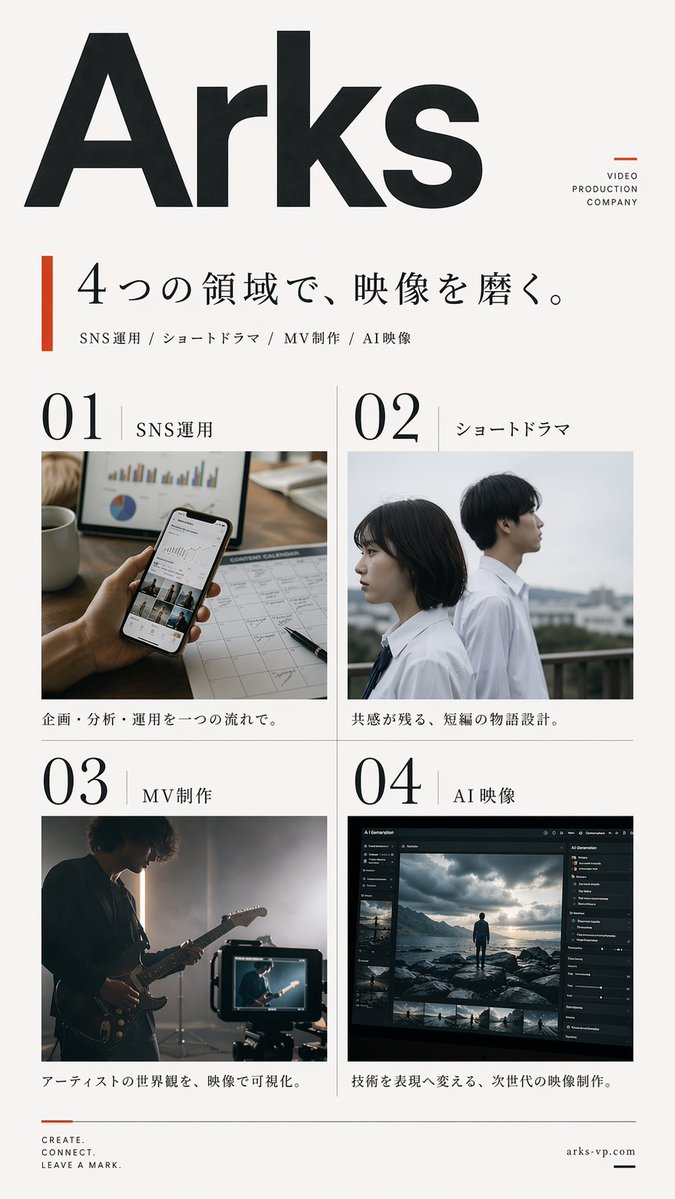
Poster Produksi Video Jepang
Poster promosi perusahaan Jepang minimalis yang menampilkan empat layanan produksi video, cocok untuk branding agensi, gambaran umum layanan, dan materi rekrutmen atau PR.
Ini adalah contoh kasus GPT Image 2 untuk Grafis & Poster . Gunakan contoh siap salin di bawah ini untuk menghasilkan visual serupa, dan tinjau atribusi Awesome GPT Image 2 Prompts serta hak penggunaan komersial sebelum digunakan kembali.
Free 1K preview
Generate one preview image instantly, no sign-up required.
Free text preview doesn’t preserve reference-image consistency.
Mengingatkan
Prompt siap salin
Create a clean, premium Japanese corporate poster for a {argument name="company name" default="Arks"} video production company, in a minimalist editorial layout on an off-white background with lots of negative space. Portrait orientation, A4-like poster proportions. At the very top left, place an oversized bold black sans-serif logotype reading {argument name="company name" default="Arks"}, spanning nearly the full width of the page. In the upper right, add a small stacked brand mark in thin uppercase letters: "VIDEO" on one line, "PRODUCTION" on the next, "COMPANY" on the third, with a small burnt-orange geometric accent nearby. Below the logo, add a vertical burnt-orange bar on the left and a large elegant Japanese headline in black Mincho-style serif: {argument name="headline text" default="4つの領域で、映像を磨く。"}. Directly underneath, add a smaller service line in Japanese with slash separators: "SNS運用 / ショートドラマ / MV制作 / AI映像". The main body is a 2 by 2 grid of exactly 4 service panels with thin light-gray divider lines. Each panel has a large black editorial number and a Japanese label. Panel 1 label: "SNS運用" with the number "01"; image shows a close-up hand holding a smartphone displaying social media analytics, on a desk with charts, a calendar sheet, a pen, and a coffee mug, in warm natural office lighting; caption below in Japanese: "企画・分析・運用を一つの流れで。" Panel 2 label: "ショートドラマ" with the number "02"; image shows exactly 2 Japanese high-school-age students in white shirts standing outdoors on a rooftop or balcony, one female and one male, side-profile composition, muted overcast daylight, cinematic shallow depth of field; caption below: "共感が残る、短編の物語設計。" Panel 3 label: "MV制作" with the number "03"; image shows a moody musician playing electric guitar in a dim studio, backlit by soft haze, with a camera monitor in the foreground showing the same performer; caption below: "アーティストの世界観を、映像で可視化。" Panel 4 label: "AI映像" with the number "04"; image shows a dark professional AI video-generation or image-editing software interface on a monitor, with a cinematic scene of a lone figure standing on rocks under dramatic clouds, plus thumbnail timeline images and side control panels; caption below: "技術を表現へ変える、次世代の映像制作。" At the bottom left, place a small three-line English slogan in uppercase: {argument name="tagline text" default="CREATE.\nCONNECT.\nLEAVE A MARK."} with a small burnt-orange line accent above it. At the bottom right, place the website {argument name="website" default="arks-vp.com"} in small serif text with a short black horizontal line beside it. Use a refined mix of bold modern sans-serif for the large logo and numbers, and elegant Japanese serif for headlines and labels. Color palette: black, charcoal, warm off-white, light gray rules, and restrained burnt-orange accents. The overall feel should be realistic, polished, contemporary, Japanese editorial advertising design, with accurate Japanese typography and natural image tones.Variabel perintah
Placeholder argumen yang dapat diedit ditemukan dalam prompt, beserta nilai defaultnya.
Best for
- - Grafis & Poster visual exploration
- - Image generation and reference-image edits
- - Reusable briefs that keep source attribution visible
Change these parts
- - Subject, product, character, or scene
- - Aspect ratio, camera, lighting, and background
- - Brand, text, color, and output constraints
Recommended model and settings
- - Model: gpt-image-2
- - Input mode: Gambar ke Gambar
- - Aspect ratio: source
- - Commercial status: review original source
How to use this prompt
- 1. Copy the prompt and preserve its structure for the first test.
- 2. Replace the subject, context, and publishing channel.
- 3. Change one camera, lighting, or style variable per iteration.
- 4. Inspect the output, source, text, and rights before reuse.
Limitations, source, and reuse cautions
- - Generated output is an editable draft, not factual, legal, or rights evidence.
- - Review the linked source, people, brands, logos, text, and third-party media before commercial use.
Lebih banyak kasus dalam kategori ini
Diprioritaskan berdasarkan kategori, kompatibilitas mode input, kualitas, dan risiko yang lebih rendah.






Catatan penggunaan kembali dan sumber
Gunakan perintah ini dengan aman setelah melihat pratinjau kasus.
- 1.Salin perintah tersebut atau buka langsung di Dovoo dengan tombol pembuatan.
- 2.Sesuaikan variabel, rasio aspek, dan gambar referensi untuk kebutuhan Anda sendiri.
- 3.Sebelum mempublikasikan atau menggunakan untuk tujuan berbayar, verifikasi hak sumber, persyaratan atribusi, dan risiko merek atau citra.