Infografis Peran Alat AI Jepang
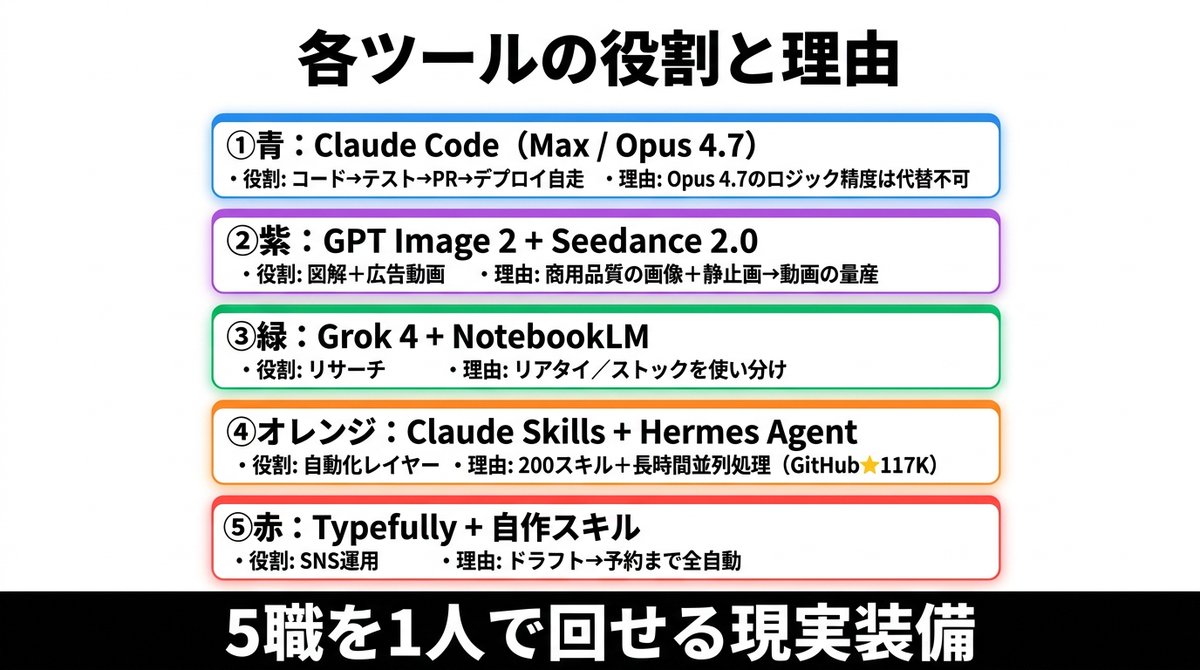
Slide infografis Jepang yang bersih dan rapi, menampilkan lima tumpukan alat AI berkode warna beserta peran dan alasannya, ideal untuk unggahan media sosial, presentasi, dan komentar bisnis.
Ini adalah contoh kasus GPT Image 2 untuk Grafis & Poster . Gunakan contoh siap salin di bawah ini untuk menghasilkan visual serupa, dan tinjau atribusi Awesome GPT Image 2 Prompts serta hak penggunaan komersial sebelum digunakan kembali.
Butuh seluruh rangkaian prompt? Gunakan Grafis & Poster Untuk contoh terkait lainnya, kunjungi pusat topik, atau buka GPT Image 2 katalog cepat untuk indeks contoh lengkap, struktur yang dapat digunakan kembali, dan atribusi sumber.
Free 1K preview
Generate one preview image instantly, no sign-up required.
3407/4000
Mengingatkan
Prompt siap salin
{
  "type": "Japanese infographic poster",
  "style": "clean business presentation slide, minimalist flat design, crisp vector-like typography, white background with subtle light gray tone, centered composition, high contrast, social-media-friendly landscape layout",
  "canvas": {
    "aspect_ratio": "2:1",
    "size": "wide horizontal"
  },
  "headline": {
    "text": "{argument name=\"headline text\" default=\"各ツールの役割と理由\"}",
    "position": "top center",
    "font": "bold Japanese sans-serif",
    "color": "black",
    "size": "very large"
  },
  "layout": {
    "sections": [
      {
        "title": "① Blue: Claude Code (Max / Opus 4.7)",
        "position": "upper middle",
        "count": 2,
        "labels": [
          "・役割: コード→テスト→PR→デプロイ自走",
          "・理由: Opus 4.7のロジック精度は代替不可"
        ],
        "container": "rounded white rectangle with blue outline, faint blue glow, soft drop shadow"
      },
      {
        "title": "② Purple: GPT Image 2 + Seedance 2.0",
        "position": "upper mid-lower",
        "count": 2,
        "labels": [
          "・役割: 図解+広告動画",
          "・理由: 商用品質の画像+静止画→動画の量産"
        ],
        "container": "rounded white rectangle with purple outline, faint purple glow, soft drop shadow"
      },
      {
        "title": "③ Green: Grok 4 + NotebookLM",
        "position": "center",
        "count": 2,
        "labels": [
          "・役割: リサーチ",
          "・理由: リアタイ/ストックを使い分け"
        ],
        "container": "rounded white rectangle with green outline, faint green glow, soft drop shadow"
      },
      {
        "title": "④オレンジ:Claude Skills + Hermes Agent",
        "position": "lower mid-upper",
        "count": 2,
        "labels": [
          "・役割: 自動化レイヤー",
          "・理由: 200スキル+長時間並列処理(GitHub★117K)"
        ],
        "container": "rounded white rectangle with orange outline, faint orange glow, soft drop shadow"
      },
      {
        "title": "⑤赤:Typefully + 自作スキル",
        "position": "lower middle",
        "count": 2,
        "labels": [
          "・役割: SNS運用",
          "・理由: ドラフト→予約まで全自動"
        ],
        "container": "rounded white rectangle with red outline, faint red glow, soft drop shadow"
      }
    ],
    "section_count": 5,
    "arrangement": "five evenly spaced horizontal cards stacked vertically in the center, all same width, each with rounded corners and colored border matching the numbered color name"
  },
  "footer": {
    "text": "{argument name=\"footer text\" default=\"5職を1人で回せる現実装備\"}",
    "position": "bottom full width",
    "background": "solid black bar",
    "font": "extra bold Japanese sans-serif",
    "color": "white",
    "size": "very large"
  },
  "typography": {
    "body_font": "bold Japanese sans-serif",
    "body_color": "black",
    "emphasis": "tool names in heavier bold, compact spacing, left-aligned inside each card"
  },
  "colors": {
    "card_borders": [
      "blue",
      "purple",
      "green",
      "orange",
      "red"
    ],
    "background": "white to very light gray",
    "text": "black",
    "footer_bg": "black",
    "footer_text": "white"
  },
  "customization": {
    "item_1_tool": "{argument name=\"first tool line\" default=\"Claude Code(Max / Opus 4.7)\"}",
    "item_2_tool": "{argument name=\"second tool line\" default=\"GPT Image 2 + Seedance 2.0\"}",
    "item_3_tool": "{argument name=\"third tool line\" default=\"Grok 4 + NotebookLM\"}"
  }
}
Variabel perintah
Placeholder argumen yang dapat diedit ditemukan dalam prompt, beserta nilai defaultnya.
Variabel
headline text
Bawaan
各ツールの役割と理由
Variabel
footer text
Bawaan
5職を1人で回せる現実装備
Variabel
first tool line
Bawaan
Claude Code(Max / Opus 4.7)
Variabel
second tool line
Bawaan
GPT Image 2 + Seedance 2.0
Variabel
third tool line
Bawaan
Grok 4 + NotebookLM
Best for
- - Grafis & Poster visual exploration
- - Image generation and reference-image edits
- - Reusable briefs that keep source attribution visible
Change these parts
- - Subject, product, character, or scene
- - Aspect ratio, camera, lighting, and background
- - Brand, text, color, and output constraints
Recommended model and settings
- - Model: gpt-image-2
- - Input mode: Teks ke Gambar
- - Aspect ratio: source
- - Commercial status: review original source
How to use this prompt
- 1. Copy the prompt and preserve its structure for the first test.
- 2. Replace the subject, context, and publishing channel.
- 3. Change one camera, lighting, or style variable per iteration.
- 4. Inspect the output, source, text, and rights before reuse.
Limitations, source, and reuse cautions
- - Generated output is an editable draft, not factual, legal, or rights evidence.
- - Review the linked source, people, brands, logos, text, and third-party media before commercial use.
Diimpor dari Awesome GPT Image 2 Prompts . Atribusi diperlukan. Status penggunaan komersial adalah allowed ; tinjau hak sumber sebelum penggunaan berbayar.
Lebih banyak kasus dalam kategori ini
Diprioritaskan berdasarkan kategori, kompatibilitas mode input, kualitas, dan risiko yang lebih rendah.






Catatan penggunaan kembali dan sumber
Gunakan perintah ini dengan aman setelah melihat pratinjau kasus.
- 1.Salin perintah tersebut atau buka langsung di Dovoo dengan tombol pembuatan.
- 2.Sesuaikan variabel, rasio aspek, dan gambar referensi untuk kebutuhan Anda sendiri.
- 3.Sebelum mempublikasikan atau menggunakan untuk tujuan berbayar, verifikasi hak sumber, persyaratan atribusi, dan risiko merek atau citra.