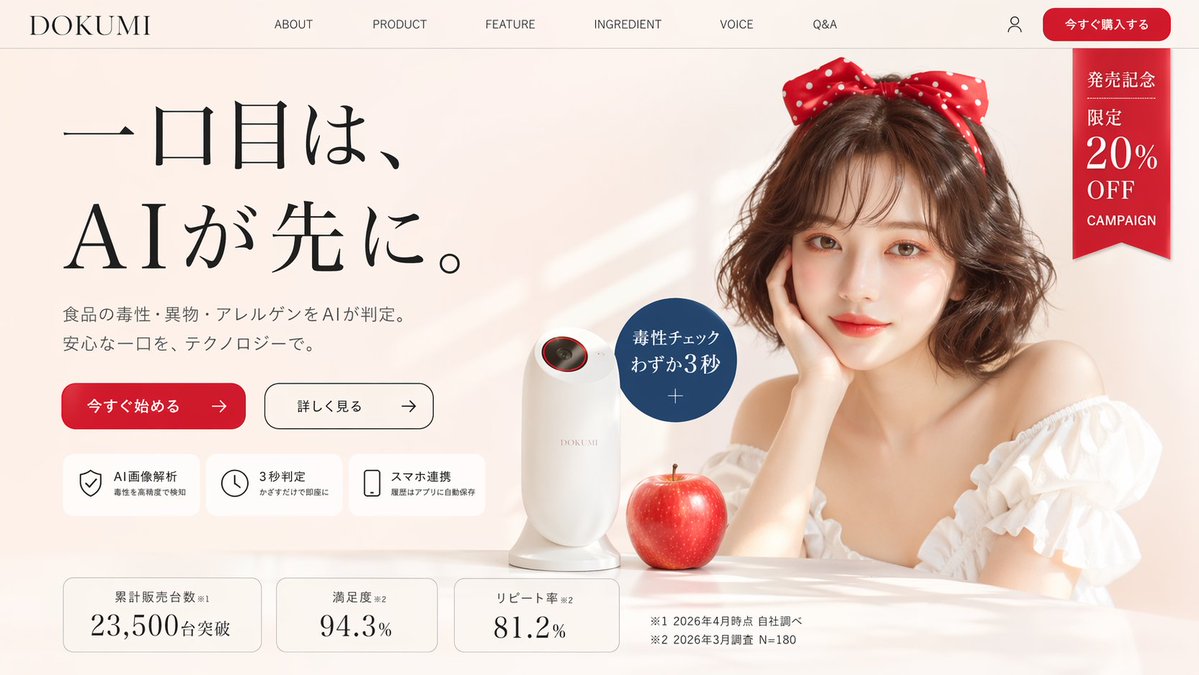
Hero Halaman Landing Produk AI Jepang
Gambar hero e-commerce Jepang premium untuk pemindai keamanan pangan AI fiktif, cocok untuk halaman arahan startup dan pemasaran produk konseptual.
Ini adalah contoh kasus GPT Image 2 untuk Produk & Komersial . Gunakan contoh siap salin di bawah ini untuk menghasilkan visual serupa, dan tinjau atribusi Awesome GPT Image 2 Prompts serta hak penggunaan komersial sebelum digunakan kembali.
Butuh seluruh rangkaian prompt? Gunakan Produk & Komersial Untuk contoh terkait lainnya, kunjungi pusat topik, atau buka GPT Image 2 katalog cepat untuk indeks contoh lengkap, struktur yang dapat digunakan kembali, dan atribusi sumber.
Free 1K preview
Generate one preview image instantly, no sign-up required.
3491/4000
Mengingatkan
Prompt siap salin
Create a polished Japanese landing page hero image for a fictional premium consumer tech product brand called {argument name="brand name" default="DOKUMI"}. The page should look like a modern beauty-tech and food-safety product website, in a soft warm beige and ivory palette with elegant editorial styling, lots of whitespace, and subtle luxury cosmetics branding. Use a wide desktop web layout screenshot with a top navigation bar, a large left-aligned headline block, and a right-side lifestyle product photo composition.

The top header contains 8 visible navigation elements in a single row: the brand logo text "DOKUMI" at far left, then "ABOUT", "PRODUCT", "FEATURE", "INGREDIENT", "VOICE", "Q&A", then a small user account icon, and a rounded red call-to-action button labeled "今すぐ購入する" at the far right. Beneath the button area on the upper right, add a vertical red ribbon badge with white Japanese text reading exactly 4 stacked text groups: "発売記念", "限定", "20%", "OFF", plus small "CAMPAIGN" text below.

The hero section is split into two main columns. On the left, place a very large Japanese headline in elegant Mincho-style serif typography over three lines: "一口目は、", then "AIが先に。" with dramatic scale and generous spacing. Below it, add a smaller two-line Japanese subheading describing AI-based detection of food toxins, foreign substances, and allergens before eating, in a refined gray tone. Under that, place 2 horizontal CTA buttons: a filled red rounded button labeled "今すぐ始める" with a right arrow, and a white outlined rounded button labeled "詳しく見る" with a right arrow.

Below the buttons, add a row of 3 rounded white feature cards with thin borders and simple black line icons. The 3 cards are: 1) shield icon with title "AI画像解析" and a smaller subtitle about detecting toxins with high precision, 2) clock icon with title "3秒判定" and a smaller subtitle about instant results just by holding it up, 3) smartphone icon with title "スマホ連携" and a smaller subtitle about automatic history saving in the app.

At the bottom of the hero, add a row of 3 statistic cards with rounded corners and thin borders. The 3 cards read: 1) "累計販売台数※1" with large number "23,500" and smaller "台突破", 2) "満足度※2" with large number "94.3%", 3) "リピート率※2" with large number "81.2%". To the right of these cards, place 2 small footnote lines in Japanese: "※1 2026年4月時点 自社調べ" and "※2 2026年3月調査 N=180".

On the right side, create a soft, glamorous lifestyle photo scene. Show a stylish young woman with shoulder-length softly curled brown hair, fair skin, and a large red polka-dot bow headband. She wears an off-shoulder white ruffled blouse and rests her face lightly on one hand at a glossy tabletop. Show every face clearly with natural, detailed facial features. In front of her on the table sits a sleek white handheld scanner device with a rounded vertical body and a small dark lens opening near the top rim accented in red. Next to the device is a realistic glossy red apple. Near the device, overlay a dark blue circular callout badge with white Japanese text reading "毒性チェック" and "わずか3秒", with a small plus sign beneath.

Use soft natural window light from the left, faint diagonal light streaks on the background wall, gentle shadows, realistic product rendering, and a premium e-commerce LP aesthetic. The composition should feel clean, aspirational, and slightly playful, like a startup landing page for an unusual AI gadget. Include all visible Japanese text exactly where specified.
Variabel perintah
Placeholder argumen yang dapat diedit ditemukan dalam prompt, beserta nilai defaultnya.
Variabel
brand name
Bawaan
DOKUMI
Best for
- - Produk & Komersial visual exploration
- - Image generation and reference-image edits
- - Reusable briefs that keep source attribution visible
Change these parts
- - Subject, product, character, or scene
- - Aspect ratio, camera, lighting, and background
- - Brand, text, color, and output constraints
Recommended model and settings
- - Model: gpt-image-2
- - Input mode: Teks ke Gambar
- - Aspect ratio: source
- - Commercial status: review original source
How to use this prompt
- 1. Copy the prompt and preserve its structure for the first test.
- 2. Replace the subject, context, and publishing channel.
- 3. Change one camera, lighting, or style variable per iteration.
- 4. Inspect the output, source, text, and rights before reuse.
Limitations, source, and reuse cautions
- - Generated output is an editable draft, not factual, legal, or rights evidence.
- - Review the linked source, people, brands, logos, text, and third-party media before commercial use.
Diimpor dari Awesome GPT Image 2 Prompts . Atribusi diperlukan. Status penggunaan komersial adalah allowed ; tinjau hak sumber sebelum penggunaan berbayar.
Lebih banyak kasus dalam kategori ini
Diprioritaskan berdasarkan kategori, kompatibilitas mode input, kualitas, dan risiko yang lebih rendah.






Catatan penggunaan kembali dan sumber
Gunakan perintah ini dengan aman setelah melihat pratinjau kasus.
- 1.Salin perintah tersebut atau buka langsung di Dovoo dengan tombol pembuatan.
- 2.Sesuaikan variabel, rasio aspek, dan gambar referensi untuk kebutuhan Anda sendiri.
- 3.Sebelum mempublikasikan atau menggunakan untuk tujuan berbayar, verifikasi hak sumber, persyaratan atribusi, dan risiko merek atau citra.