İstanbul
Gambar prompt Nano Banana Pro yang bersumber dari repositori Awesome Nano Banana Pro Prompts, dengan pratinjau gambar dan catatan tinjauan penggunaan kembali.
Ini adalah contoh kasus Nano Banana Pro untuk Potret & Karakter . Gunakan contoh siap salin di bawah ini untuk menghasilkan visual serupa, dan tinjau atribusi Awesome Nano Banana Pro Prompts serta hak penggunaan komersial sebelum digunakan kembali.
Butuh seluruh rangkaian prompt? Gunakan Potret & Karakter Untuk contoh terkait lainnya, kunjungi pusat topik, atau buka Nano Banana Pro katalog cepat untuk indeks contoh lengkap, struktur yang dapat digunakan kembali, dan atribusi sumber.
Mengingatkan
Prompt siap salin
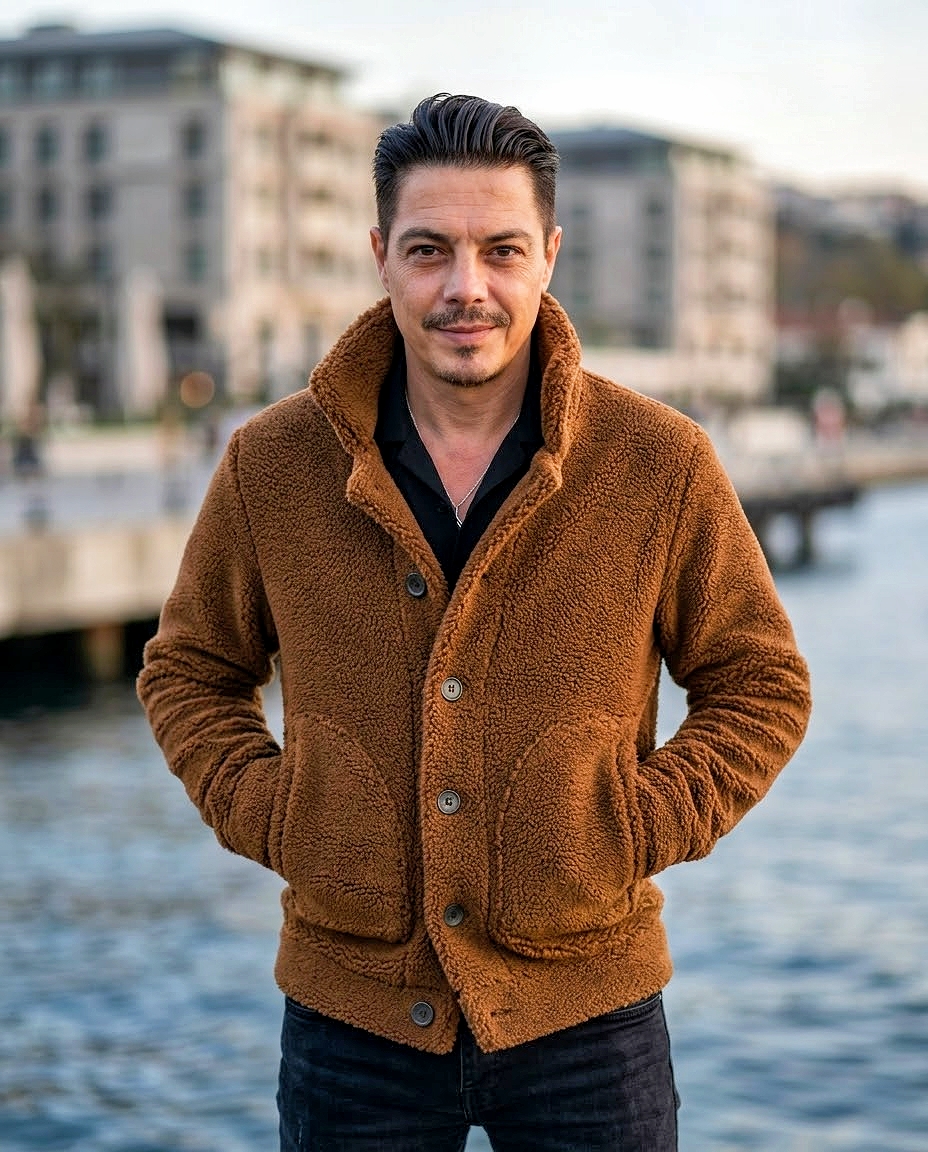
Fotoğrafını yüklediğim adam ilk fotoğraftaki kombini birebir aynısını giysin altına pantolon olarak Siyah kot giysin.
Arka plan Rixos Tersanenin sahil kısmı olsun ve net değil flu gözüksün.
Adamın elleri ceketin cebinde kameraya doğru cool pozunu versin. Gülme sırıtma kesinlikle istemiyorum,minik bir tebessüm hoş olabilir.
ULTRA gerçekçi yüksek çözünürlüklü bir fotoğraf istiyorum.
Kesinlikle yapay zekada yapıldığı belli olmasın.
Adamın yüzünü güzelleştirme orjinal ne ise onu kullan.
Boyut 4:5 olacak şekilde tasarla.
Best for
- - Potret & Karakter visual exploration
- - Image generation and reference-image edits
- - Reusable briefs that keep source attribution visible
Change these parts
- - Subject, product, character, or scene
- - Aspect ratio, camera, lighting, and background
- - Brand, text, color, and output constraints
Recommended model and settings
- - Model: nano-banana-pro
- - Input mode: Teks ke Gambar
- - Aspect ratio: square
- - Commercial status: restricted
How to use this prompt
- 1. Copy the prompt and preserve its structure for the first test.
- 2. Replace the subject, context, and publishing channel.
- 3. Change one camera, lighting, or style variable per iteration.
- 4. Inspect the output, source, text, and rights before reuse.
Limitations, source, and reuse cautions
- - Generated output is an editable draft, not factual, legal, or rights evidence.
- - Review the linked source, people, brands, logos, text, and third-party media before commercial use.
Diimpor dari Awesome Nano Banana Pro Prompts . Atribusi diperlukan. Status penggunaan komersial adalah restricted ; tinjau hak sumber sebelum penggunaan berbayar.
Lebih banyak kasus dalam kategori ini
Diprioritaskan berdasarkan kategori, kompatibilitas mode input, kualitas, dan risiko yang lebih rendah.
Catatan penggunaan kembali dan sumber
Gunakan perintah ini dengan aman setelah melihat pratinjau kasus.
- 1.Salin perintah tersebut atau buka langsung di Dovoo dengan tombol pembuatan.
- 2.Sesuaikan variabel, rasio aspek, dan gambar referensi untuk kebutuhan Anda sendiri.
- 3.Sebelum mempublikasikan atau menggunakan untuk tujuan berbayar, verifikasi hak sumber, persyaratan atribusi, dan risiko merek atau citra.