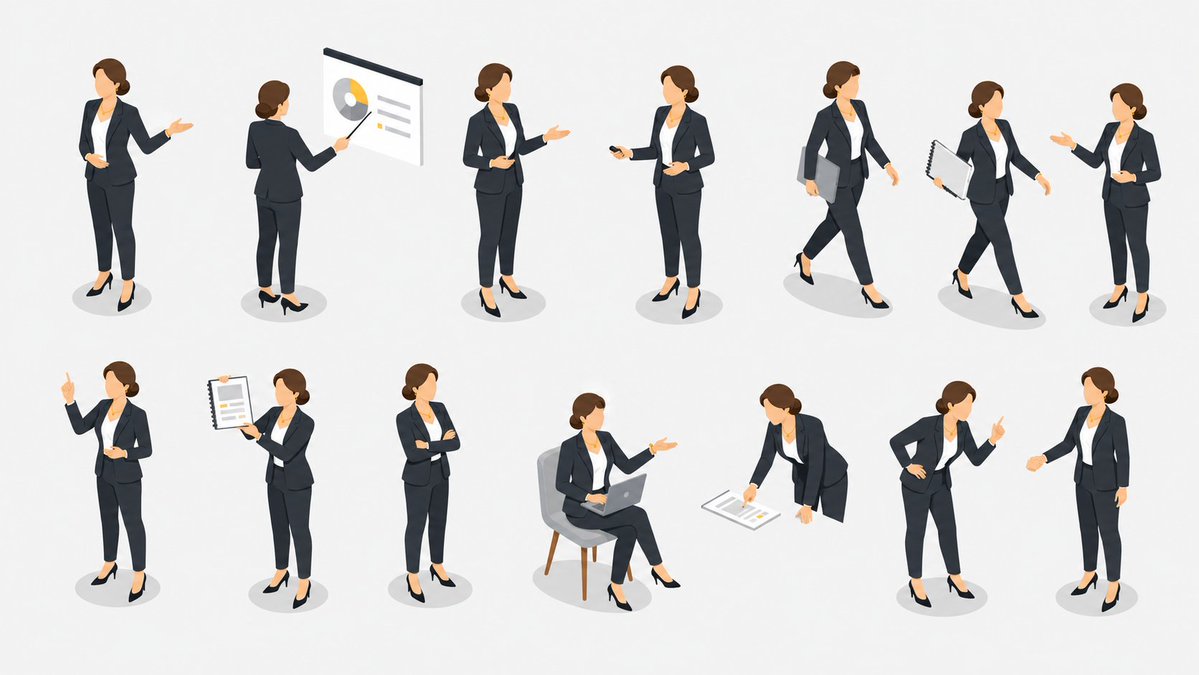
Set Pose Presenter Bisnis Isometrik
Lembar aset vektor isometrik yang bersih menampilkan satu presenter bisnis dalam 13 pose kantor dan presentasi untuk slide, situs web, dan grafik perusahaan.
Ini adalah contoh kasus GPT Image 2 untuk Ilustrasi & Seni . Gunakan contoh siap salin di bawah ini untuk menghasilkan visual serupa, dan tinjau atribusi Awesome GPT Image 2 Prompts serta hak penggunaan komersial sebelum digunakan kembali.
Butuh seluruh rangkaian prompt? Gunakan Ilustrasi & Seni Untuk contoh terkait lainnya, kunjungi pusat topik, atau buka GPT Image 2 katalog cepat untuk indeks contoh lengkap, struktur yang dapat digunakan kembali, dan atribusi sumber.
Free 1K preview
Generate one preview image instantly, no sign-up required.
2572/4000
Mengingatkan
Prompt siap salin
Goal: Create an isometric vector illustration set of the same {argument name="character type" default="professional businesswoman presenter"} in many presentation and office situations, arranged like a clean pose library on a white background.

Canvas: Wide horizontal 16:9 canvas, bright white or very light gray background, no borders, no title, no captions, no watermark. Use soft oval gray floor shadows under each figure.

Visual style: Polished modern isometric people illustration, semi-flat vector style with subtle gradients and soft shading. The character has a simplified faceless face, light skin, brown hair tied in a low bun, navy business suit, white blouse, cropped trousers, and black high heels. Keep proportions consistent across all poses and use the same outfit throughout.

Layout: Arrange exactly 13 separate full-body figures in two rows with generous spacing, like a presentation asset sheet. Top row contains 7 figures; bottom row contains 6 figures. All figures face slightly different isometric angles and remain isolated with no overlapping.

Pose count and details: Include exactly 13 discrete poses: 1) standing presenter facing forward with one hand open in a welcoming gesture, 2) rear-view presenter pointing with a stick at a wall presentation board showing a pie chart and lines, 3) standing presenter holding a small object or remote and gesturing to the side, 4) standing presenter holding a remote in one hand and gesturing with the other, 5) walking businesswoman carrying a gray folder under one arm, 6) walking businesswoman holding a spiral notebook or report, 7) standing businesswoman gesturing as if speaking to someone, 8) standing figure raising one index finger to make a point, 9) standing figure holding up a spiral report sheet with chart lines, 10) standing figure with arms crossed confidently, 11) seated figure on a gray chair using an open laptop while gesturing, 12) leaning forward and pointing to papers or charts on the floor, 13) standing figure leaning slightly with one hand on hip and the other index finger raised.

Subject customization: Keep the character recognizable as the same person in every pose, but allow the overall character to be changed to {argument name="character appearance" default="light-skinned woman with brown hair in a low bun"}. Use {argument name="outfit" default="dark navy suit, white blouse, black heels"}. Optional props should match a {argument name="presentation theme" default="corporate business presentation"}. Keep the illustration clean, minimal, and presentation-ready.
Variabel perintah
Placeholder argumen yang dapat diedit ditemukan dalam prompt, beserta nilai defaultnya.
Variabel
character type
Bawaan
professional businesswoman presenter
Variabel
character appearance
Bawaan
light-skinned woman with brown hair in a low bun
Variabel
outfit
Bawaan
dark navy suit, white blouse, black heels
Variabel
presentation theme
Bawaan
corporate business presentation
Best for
- - Ilustrasi & Seni visual exploration
- - Image generation and reference-image edits
- - Reusable briefs that keep source attribution visible
Change these parts
- - Subject, product, character, or scene
- - Aspect ratio, camera, lighting, and background
- - Brand, text, color, and output constraints
Recommended model and settings
- - Model: gpt-image-2
- - Input mode: Teks ke Gambar
- - Aspect ratio: source
- - Commercial status: review original source
How to use this prompt
- 1. Copy the prompt and preserve its structure for the first test.
- 2. Replace the subject, context, and publishing channel.
- 3. Change one camera, lighting, or style variable per iteration.
- 4. Inspect the output, source, text, and rights before reuse.
Limitations, source, and reuse cautions
- - Generated output is an editable draft, not factual, legal, or rights evidence.
- - Review the linked source, people, brands, logos, text, and third-party media before commercial use.
Diimpor dari Awesome GPT Image 2 Prompts . Atribusi diperlukan. Status penggunaan komersial adalah allowed ; tinjau hak sumber sebelum penggunaan berbayar.
Lebih banyak kasus dalam kategori ini
Diprioritaskan berdasarkan kategori, kompatibilitas mode input, kualitas, dan risiko yang lebih rendah.

Grumpy Rhino Storybook Illustration
Teks ke Gambar

Surreal 3D Chess Match Artwork
Teks ke Gambar

Transparent Earbuds on Stone Pedestal
Teks ke Gambar

Martial Arts Legend Character Bible Sheet
Teks ke Gambar

Pink Hijab Mirror Selfie Portrait
Teks ke Gambar

Fashion Studio Portrait with Blue Rim Lighting
Teks ke Gambar
Catatan penggunaan kembali dan sumber
Gunakan perintah ini dengan aman setelah melihat pratinjau kasus.
- 1.Salin perintah tersebut atau buka langsung di Dovoo dengan tombol pembuatan.
- 2.Sesuaikan variabel, rasio aspek, dan gambar referensi untuk kebutuhan Anda sendiri.
- 3.Sebelum mempublikasikan atau menggunakan untuk tujuan berbayar, verifikasi hak sumber, persyaratan atribusi, dan risiko merek atau citra.