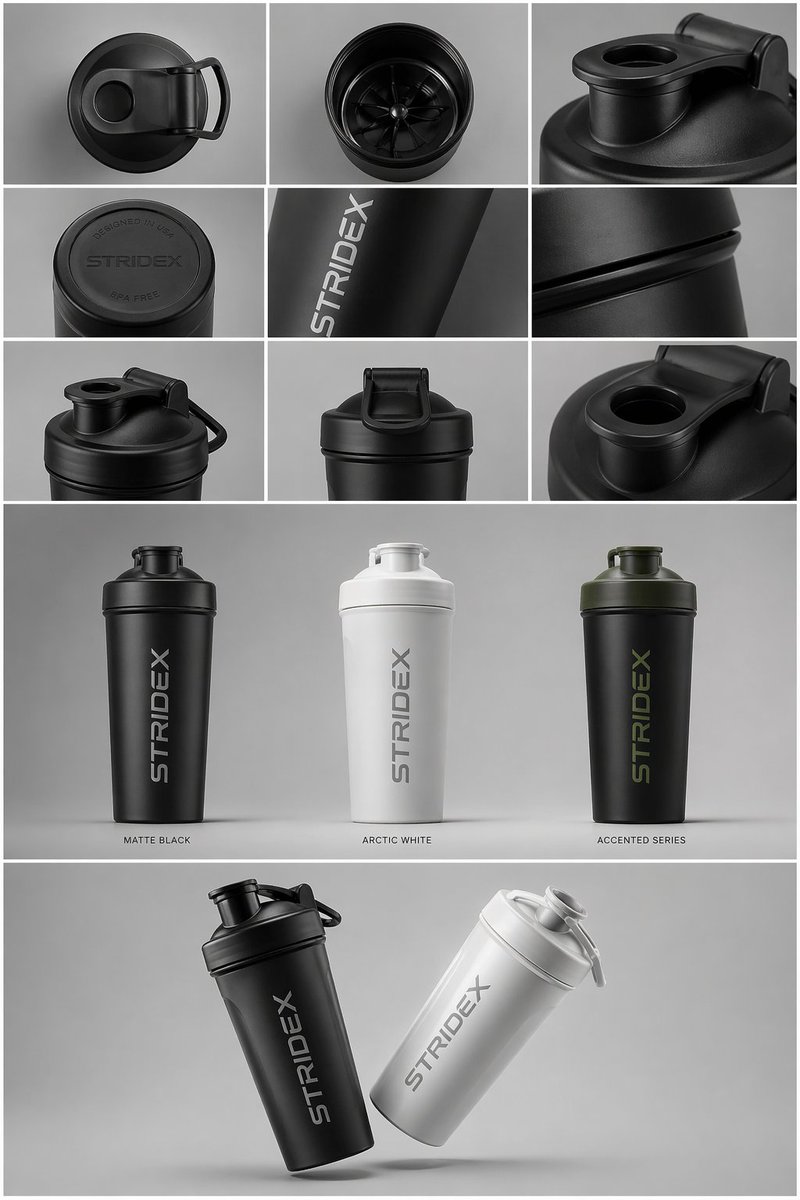
Lembar Presentasi Desain Industri
Sebuah contoh tata letak yang kompleks untuk lembar desain industri yang menampilkan produk dari berbagai sudut dalam sistem grid.
Ini adalah contoh kasus GPT Image 2 untuk Produk & Komersial . Gunakan contoh siap salin di bawah ini untuk menghasilkan visual serupa, dan tinjau atribusi Awesome GPT Image 2 Prompts serta hak penggunaan komersial sebelum digunakan kembali.
Butuh seluruh rangkaian prompt? Gunakan Produk & Komersial Untuk contoh terkait lainnya, kunjungi pusat topik, atau buka GPT Image 2 katalog cepat untuk indeks contoh lengkap, struktur yang dapat digunakan kembali, dan atribusi sumber.
Free 1K preview
Generate one preview image instantly, no sign-up required.
Free text preview doesn’t preserve reference-image consistency.
1200/4000
Mengingatkan
Prompt siap salin
Core Subject: [{argument name="reference" default="use the uploaded image"}, keep the details, typography and structure locked 100%]

Layout & Composition: A {argument name="presentation type" default="professional industrial design presentation sheet"}. The image should be organized into a clean grid system.

Top Row: A 3x3 layout showing top-down flat lay views and close-up macro details of materials.

Middle Section: Three hero shots of the product standing upright in different color ways (Matte Black, Arctic White, and accented variants). The products should be slightly tilted to show depth and form.

Bottom Section: A dynamic "floating" composition featuring two products overlapping at opposing angles to showcase the front and side profiles simultaneously.

Environment & Lighting: Set against a minimalist, neutral studio gray background. Soft top-down lighting with realistic contact shadows. High-end product photography aesthetic.

Style & Finish: Matte textures, clean silhouettes, and sharp edges. Leave designated blank areas on the product surfaces for "Placeholder Branding" and "Graphic Mockups." 4k resolution, Unreal Engine 5 render style, hyper-realistic, clean aesthetic.
Variabel perintah
Placeholder argumen yang dapat diedit ditemukan dalam prompt, beserta nilai defaultnya.
Variabel
reference
Bawaan
use the uploaded image
Variabel
presentation type
Bawaan
professional industrial design presentation sheet
Best for
- - Produk & Komersial visual exploration
- - Image generation and reference-image edits
- - Reusable briefs that keep source attribution visible
Change these parts
- - Subject, product, character, or scene
- - Aspect ratio, camera, lighting, and background
- - Brand, text, color, and output constraints
Recommended model and settings
- - Model: gpt-image-2
- - Input mode: Gambar ke Gambar
- - Aspect ratio: source
- - Commercial status: review original source
How to use this prompt
- 1. Copy the prompt and preserve its structure for the first test.
- 2. Replace the subject, context, and publishing channel.
- 3. Change one camera, lighting, or style variable per iteration.
- 4. Inspect the output, source, text, and rights before reuse.
Limitations, source, and reuse cautions
- - Generated output is an editable draft, not factual, legal, or rights evidence.
- - Review the linked source, people, brands, logos, text, and third-party media before commercial use.
Diimpor dari Awesome GPT Image 2 Prompts . Atribusi diperlukan. Status penggunaan komersial adalah allowed ; tinjau hak sumber sebelum penggunaan berbayar.
Lebih banyak kasus dalam kategori ini
Diprioritaskan berdasarkan kategori, kompatibilitas mode input, kualitas, dan risiko yang lebih rendah.






Catatan penggunaan kembali dan sumber
Gunakan perintah ini dengan aman setelah melihat pratinjau kasus.
- 1.Salin perintah tersebut atau buka langsung di Dovoo dengan tombol pembuatan.
- 2.Sesuaikan variabel, rasio aspek, dan gambar referensi untuk kebutuhan Anda sendiri.
- 3.Sebelum mempublikasikan atau menggunakan untuk tujuan berbayar, verifikasi hak sumber, persyaratan atribusi, dan risiko merek atau citra.