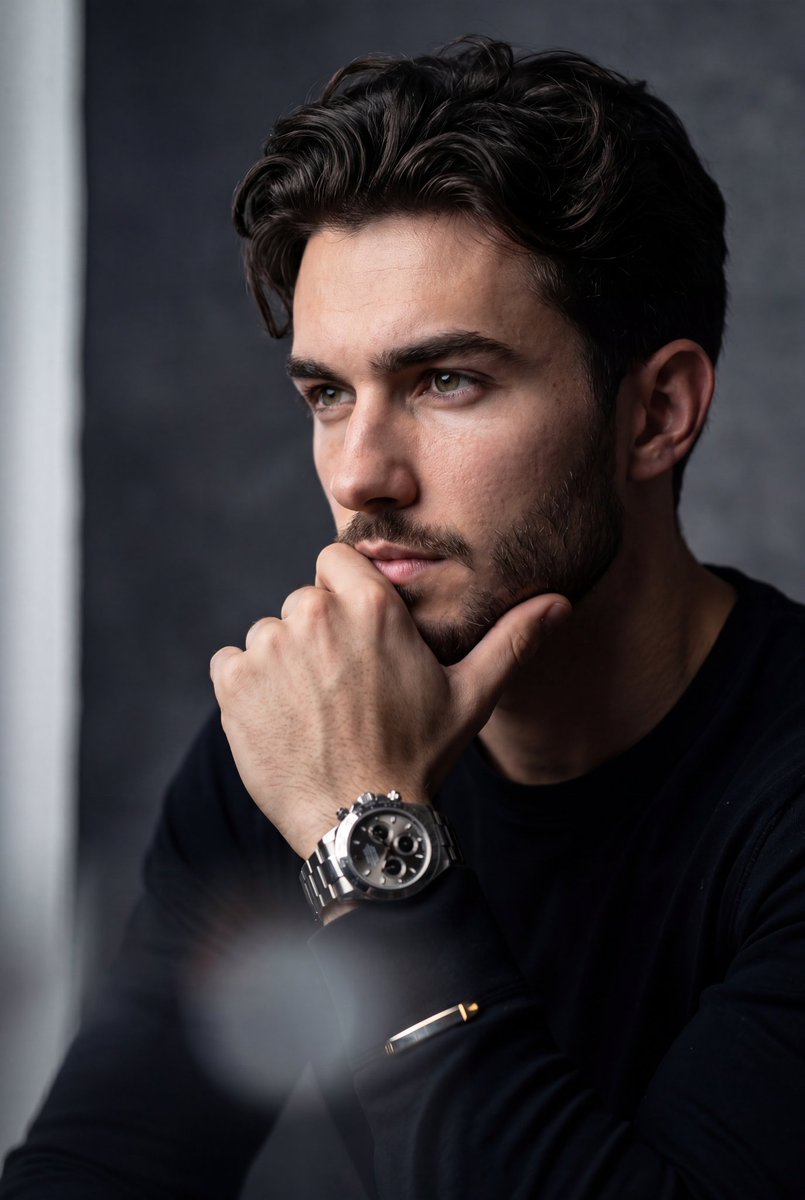
Potret Stoik Hiper-Realistis
Sebuah contoh foto potret komersial sinematik yang menampilkan subjek dalam pose penuh pertimbangan dengan pencahayaan samping yang dramatis dan fokus pada detail mewah seperti jam tangan kronograf.
Ini adalah contoh kasus GPT Image 2 untuk Potret & Karakter . Gunakan contoh siap salin di bawah ini untuk menghasilkan visual serupa, dan tinjau atribusi Awesome GPT Image 2 Prompts serta hak penggunaan komersial sebelum digunakan kembali.
Free 1K preview
Generate one preview image instantly, no sign-up required.
Free text preview doesn’t preserve reference-image consistency.
Mengingatkan
Prompt siap salin
A hyper-realistic, cinematic medium close-up portrait of the uploaded person. The subject is positioned with their torso angled slightly forward, but their head is turned to the side, looking off-camera to the left with a deeply contemplative, serious, and stoic expression. One hand is raised, resting gently against the chin and lower lip in a classic "thinking" gesture, fingers softly curled. On the wrist is a {argument name="accessory" default="prominent, luxurious metallic chronograph watch"} with complex dial details. The subject is wearing a {argument name="outfit" default="sleek, dark black long-sleeved shirt or suit jacket"} that blends into the shadows, with metallic cuff accents catching the light. Background: A minimalist, moody, {argument name="background" default="textured charcoal-grey gradient backdrop"}, featuring a soft, faint vertical strip of light on the far left edge. Camera Angle & Photography: Eye-level angle, amazing high-end commercial portrait photography. Lighting, Editing & Effects: Dramatic chiaroscuro side-lighting illuminating the right side of the subject's face while casting deep, rich shadows on the left. The image features a shallow depth of field with sharp focus on the visible eye and the luxury watch. There is a distinct, heavy foreground blur (a hazy, soft white/grey light leak effect) obscuring the very bottom and bottom-left corner of the frame to create atmospheric depth. High-contrast editing, moody cinematic color grading, and a highly polished, premium aesthetic. ar 4:5Variabel perintah
Placeholder argumen yang dapat diedit ditemukan dalam prompt, beserta nilai defaultnya.
Best for
- - Potret & Karakter visual exploration
- - Image generation and reference-image edits
- - Reusable briefs that keep source attribution visible
Change these parts
- - Subject, product, character, or scene
- - Aspect ratio, camera, lighting, and background
- - Brand, text, color, and output constraints
Recommended model and settings
- - Model: gpt-image-2
- - Input mode: Gambar ke Gambar
- - Aspect ratio: source
- - Commercial status: review original source
How to use this prompt
- 1. Copy the prompt and preserve its structure for the first test.
- 2. Replace the subject, context, and publishing channel.
- 3. Change one camera, lighting, or style variable per iteration.
- 4. Inspect the output, source, text, and rights before reuse.
Limitations, source, and reuse cautions
- - Generated output is an editable draft, not factual, legal, or rights evidence.
- - Review the linked source, people, brands, logos, text, and third-party media before commercial use.
Lebih banyak kasus dalam kategori ini
Diprioritaskan berdasarkan kategori, kompatibilitas mode input, kualitas, dan risiko yang lebih rendah.






Catatan penggunaan kembali dan sumber
Gunakan perintah ini dengan aman setelah melihat pratinjau kasus.
- 1.Salin perintah tersebut atau buka langsung di Dovoo dengan tombol pembuatan.
- 2.Sesuaikan variabel, rasio aspek, dan gambar referensi untuk kebutuhan Anda sendiri.
- 3.Sebelum mempublikasikan atau menggunakan untuk tujuan berbayar, verifikasi hak sumber, persyaratan atribusi, dan risiko merek atau citra.