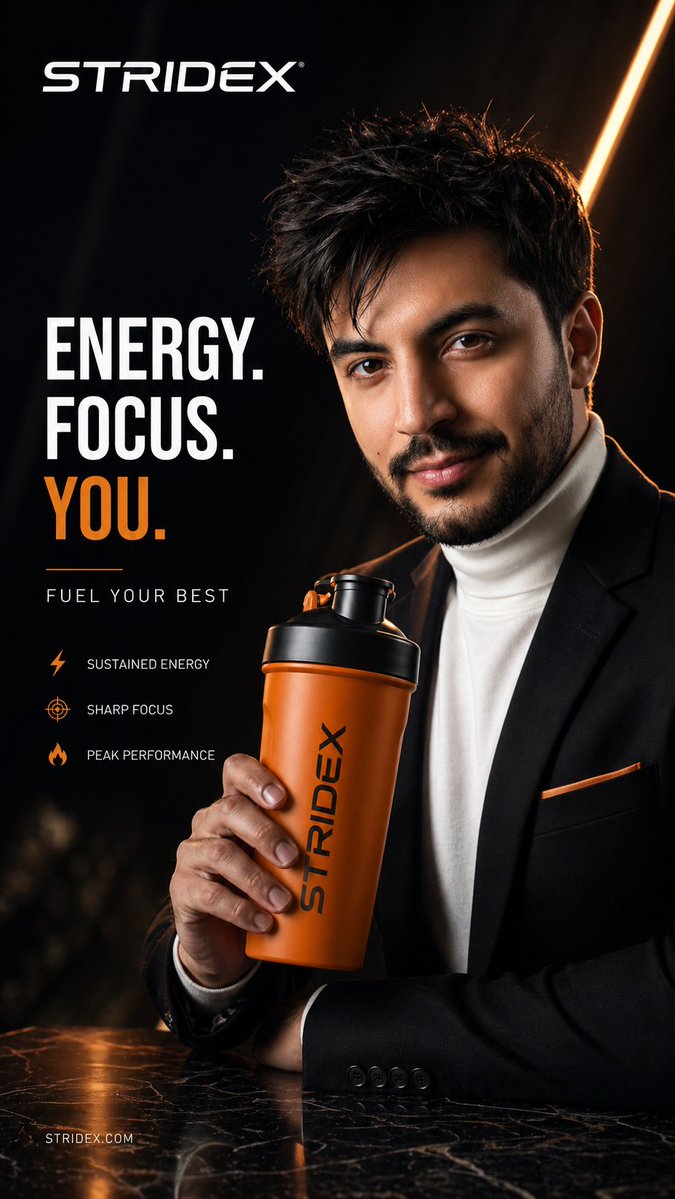
Iklan Komersial Hiper-Realistis
Sebuah contoh desain iklan komersial fesyen kelas atas yang menggunakan referensi subjek untuk menciptakan poster editorial bergaya Vogue yang apik.
Ini adalah contoh kasus GPT Image 2 untuk Produk & Komersial . Gunakan contoh siap salin di bawah ini untuk menghasilkan visual serupa, dan tinjau atribusi Awesome GPT Image 2 Prompts serta hak penggunaan komersial sebelum digunakan kembali.
Free 1K preview
Generate one preview image instantly, no sign-up required.
Free text preview doesn’t preserve reference-image consistency.
Mengingatkan
Prompt siap salin
Ultra-luxury commercial advertisement poster featuring {argument name="subject" default="[SUBJECT from reference image]"} holding/using {argument name="product" default="[PRODUCT from reference image]"}, hyper-realistic, cinematic lighting, sharp focus, 8K resolution. The subject is styled with high-fashion editorial aesthetics — flawless skin, dramatic lighting, confident expression, premium wardrobe matching brand identity. The product is the hero element — perfectly lit with glossy reflections, studio-grade highlights, positioned prominently in the foreground. Background: {argument name="background style" default="minimal yet sophisticated (e.g. dark gradient/marble texture / futuristic environment/luxury interior)"}, subtle depth of field. Lighting: softbox + rim lighting + subtle glow accents, high contrast, luxury commercial photography style. Color grading: rich, deep tones with gold/black/white palette (or brand colors), cinematic LUT. Composition: rule of thirds, negative space reserved for branding and tagline. Add elegant typography: brand logo at top, bold tagline, minimal clean sans-serif font, premium layout. Style references: high-end fashion campaign, luxury brand advertising, Vogue-style editorial, Apple-level product photography. --ar 9:16 --quality 2 --stylize 250 --v 6.Variabel perintah
Placeholder argumen yang dapat diedit ditemukan dalam prompt, beserta nilai defaultnya.
Best for
- - Produk & Komersial visual exploration
- - Image generation and reference-image edits
- - Reusable briefs that keep source attribution visible
Change these parts
- - Subject, product, character, or scene
- - Aspect ratio, camera, lighting, and background
- - Brand, text, color, and output constraints
Recommended model and settings
- - Model: gpt-image-2
- - Input mode: Gambar ke Gambar
- - Aspect ratio: source
- - Commercial status: review original source
How to use this prompt
- 1. Copy the prompt and preserve its structure for the first test.
- 2. Replace the subject, context, and publishing channel.
- 3. Change one camera, lighting, or style variable per iteration.
- 4. Inspect the output, source, text, and rights before reuse.
Limitations, source, and reuse cautions
- - Generated output is an editable draft, not factual, legal, or rights evidence.
- - Review the linked source, people, brands, logos, text, and third-party media before commercial use.
Lebih banyak kasus dalam kategori ini
Diprioritaskan berdasarkan kategori, kompatibilitas mode input, kualitas, dan risiko yang lebih rendah.






Catatan penggunaan kembali dan sumber
Gunakan perintah ini dengan aman setelah melihat pratinjau kasus.
- 1.Salin perintah tersebut atau buka langsung di Dovoo dengan tombol pembuatan.
- 2.Sesuaikan variabel, rasio aspek, dan gambar referensi untuk kebutuhan Anda sendiri.
- 3.Sebelum mempublikasikan atau menggunakan untuk tujuan berbayar, verifikasi hak sumber, persyaratan atribusi, dan risiko merek atau citra.