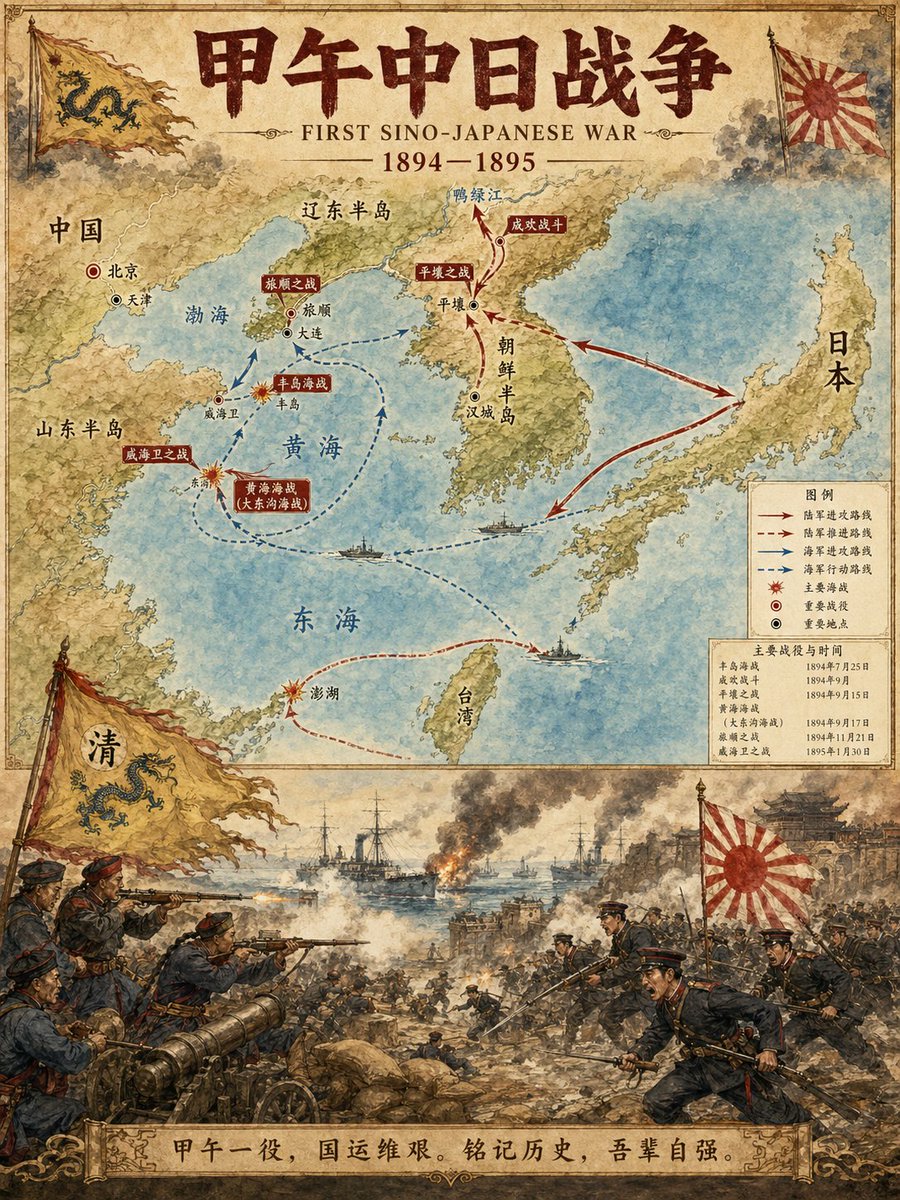
Ilustrator Peta Peristiwa Sejarah
Sebuah prompt khusus yang dirancang untuk menghasilkan infografis sejarah profesional. Prompt ini membuat tata letak vertikal dua bagian: bagian atas menampilkan peta detail dengan rute dan lokasi penting, sementara bagian bawah menggambarkan ilustrasi adegan dramatis dari peristiwa tersebut dalam gaya cat air.
Ini adalah contoh kasus GPT Image 2 untuk Ilustrasi & Seni . Gunakan contoh siap salin di bawah ini untuk menghasilkan visual serupa, dan tinjau atribusi Awesome GPT Image 2 Prompts serta hak penggunaan komersial sebelum digunakan kembali.
Free 1K preview
Generate one preview image instantly, no sign-up required.
Free text preview doesn’t preserve reference-image consistency.
Mengingatkan
Prompt siap salin
Historical Event Map Illustrator

You are a professional historical infographic designer. Based on the historical [Subject] specified by the user, generate a vertical, two-part map and scene illustration that matches the watercolor/illustrative style of the reference image.

Layout Structure:
1. Top Half:
Detailed map showing routes of the historical event, key locations, and directional arrows.
Clear labeling of cities, regions, and water bodies.
Marking of major battle sites and important stations.
2. Bottom Half:
Vivid, dramatic scene illustration.
Depicting key moments of the historical event (battles, marches, significant events, etc.).
3. Title/Header:
Bold title displaying "{argument name="historical event" default="FIRST SINO-JAPANESE WAR"}"
Includes subtitles and dates.
Visual Style Requirements:
Warm watercolor illustration texture.
Accurate historical details.
Clear typographic design.
Vertical format.
4K Ultra HD resolution.
Direct image generation.

Subject: {argument name="subject" default="FIRST SINO-JAPANESE WAR"}
Ratio: {argument name="aspect ratio" default="3:4"}
Variabel perintah
Placeholder argumen yang dapat diedit ditemukan dalam prompt, beserta nilai defaultnya.
Best for
- - Ilustrasi & Seni visual exploration
- - Image generation and reference-image edits
- - Reusable briefs that keep source attribution visible
Change these parts
- - Subject, product, character, or scene
- - Aspect ratio, camera, lighting, and background
- - Brand, text, color, and output constraints
Recommended model and settings
- - Model: gpt-image-2
- - Input mode: Gambar ke Gambar
- - Aspect ratio: source
- - Commercial status: review original source
How to use this prompt
- 1. Copy the prompt and preserve its structure for the first test.
- 2. Replace the subject, context, and publishing channel.
- 3. Change one camera, lighting, or style variable per iteration.
- 4. Inspect the output, source, text, and rights before reuse.
Limitations, source, and reuse cautions
- - Generated output is an editable draft, not factual, legal, or rights evidence.
- - Review the linked source, people, brands, logos, text, and third-party media before commercial use.
Lebih banyak kasus dalam kategori ini
Diprioritaskan berdasarkan kategori, kompatibilitas mode input, kualitas, dan risiko yang lebih rendah.






Catatan penggunaan kembali dan sumber
Gunakan perintah ini dengan aman setelah melihat pratinjau kasus.
- 1.Salin perintah tersebut atau buka langsung di Dovoo dengan tombol pembuatan.
- 2.Sesuaikan variabel, rasio aspek, dan gambar referensi untuk kebutuhan Anda sendiri.
- 3.Sebelum mempublikasikan atau menggunakan untuk tujuan berbayar, verifikasi hak sumber, persyaratan atribusi, dan risiko merek atau citra.