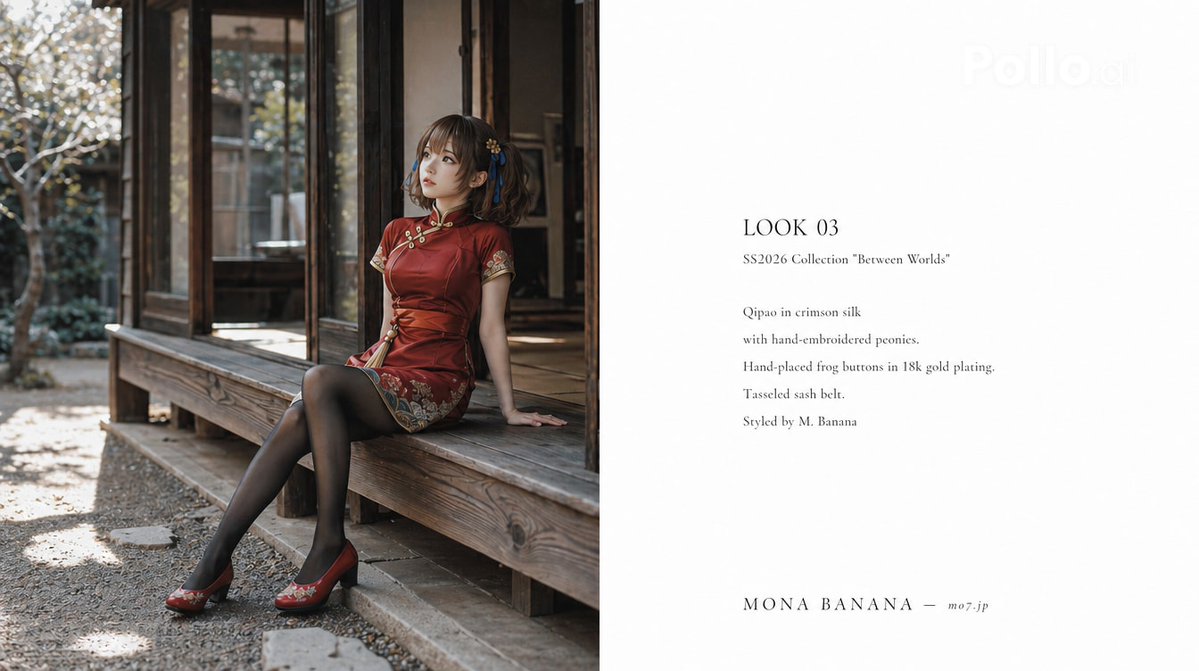
Tampilan Buku Busana Kelas Atas
Panduan canggih untuk membuat tata letak majalah fesyen profesional, lengkap dengan instruksi gaya fotografi dan tipografi tata letak spesifik.
Ini adalah contoh kasus GPT Image 2 untuk Mode & Kecantikan . Gunakan contoh siap salin di bawah ini untuk menghasilkan visual serupa, dan tinjau atribusi Awesome GPT Image 2 Prompts serta hak penggunaan komersial sebelum digunakan kembali.
Butuh seluruh rangkaian prompt? Gunakan Mode & Kecantikan Untuk contoh terkait lainnya, kunjungi pusat topik, atau buka GPT Image 2 katalog cepat untuk indeks contoh lengkap, struktur yang dapat digunakan kembali, dan atribusi sumber.
Free 1K preview
Generate one preview image instantly, no sign-up required.
955/4000
Mengingatkan
Prompt siap salin
A lookbook spread page (16:9) for the Spring/Summer 2026 collection of the high-fashion brand "{argument name="brand name" default="MONA BANANA"}". Left page (left 1/2): A full-body shot of a character sitting on the veranda of an old Japanese house, gazing into the distance. Natural light only, stylish editorial photography style. Photorealistic quality, film camera texture. Right page (right 1/2): The following text on a white background (thin serif font, English): 'LOOK 03 SS2026 Collection "Between Worlds" Qipao in crimson silk with hand-embroidered peonies. Hand-placed frog buttons in 18k gold plating. Tasseled sash belt. Styled by M. Banana' At the bottom: '{argument name="brand name" default="MONA BANANA"} ─ https://t.co/1sj0qOokTG'. Overall style should resemble the 'intellectual and artistic fashion magazine spread' seen in Marni, Sacai, and Comme des Garçons lookbooks. A finish indistinguishable from a real high-end brand lookbook.Variabel perintah
Placeholder argumen yang dapat diedit ditemukan dalam prompt, beserta nilai defaultnya.
Variabel
brand name
Bawaan
MONA BANANA
Best for
- - Mode & Kecantikan visual exploration
- - Image generation and reference-image edits
- - Reusable briefs that keep source attribution visible
Change these parts
- - Subject, product, character, or scene
- - Aspect ratio, camera, lighting, and background
- - Brand, text, color, and output constraints
Recommended model and settings
- - Model: gpt-image-2
- - Input mode: Teks ke Gambar
- - Aspect ratio: source
- - Commercial status: review original source
How to use this prompt
- 1. Copy the prompt and preserve its structure for the first test.
- 2. Replace the subject, context, and publishing channel.
- 3. Change one camera, lighting, or style variable per iteration.
- 4. Inspect the output, source, text, and rights before reuse.
Limitations, source, and reuse cautions
- - Generated output is an editable draft, not factual, legal, or rights evidence.
- - Review the linked source, people, brands, logos, text, and third-party media before commercial use.
Diimpor dari Awesome GPT Image 2 Prompts . Atribusi diperlukan. Status penggunaan komersial adalah allowed ; tinjau hak sumber sebelum penggunaan berbayar.
Lebih banyak kasus dalam kategori ini
Diprioritaskan berdasarkan kategori, kompatibilitas mode input, kualitas, dan risiko yang lebih rendah.

Spring Editorial Fashion Collage
Teks ke Gambar

Fashion Studio Portrait with Blue Rim Lighting
Teks ke Gambar

New Chinese-Style Editorial Portrait
Teks ke Gambar

Surreal Macro Fashion Illusion
Gambar ke Gambar

Pink Hijab Mirror Selfie Portrait
Teks ke Gambar

Transparent Earbuds on Stone Pedestal
Teks ke Gambar
Catatan penggunaan kembali dan sumber
Gunakan perintah ini dengan aman setelah melihat pratinjau kasus.
- 1.Salin perintah tersebut atau buka langsung di Dovoo dengan tombol pembuatan.
- 2.Sesuaikan variabel, rasio aspek, dan gambar referensi untuk kebutuhan Anda sendiri.
- 3.Sebelum mempublikasikan atau menggunakan untuk tujuan berbayar, verifikasi hak sumber, persyaratan atribusi, dan risiko merek atau citra.