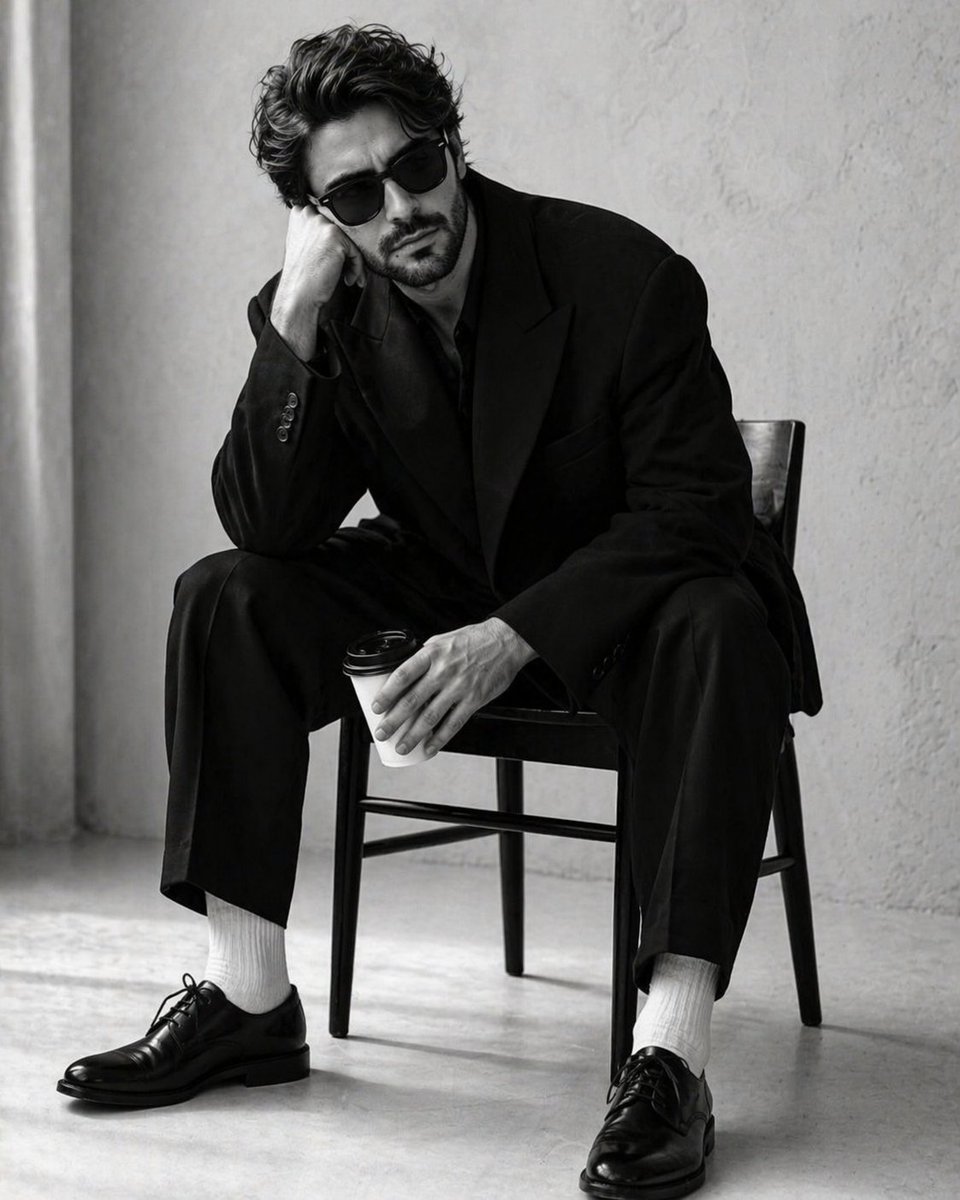
Potret Studio Monokrom Kontras Tinggi
Petunjuk yang sangat detail untuk menghasilkan potret mode hitam-putih minimalis dan profesional berdasarkan subjek yang sudah ada.
Ini adalah contoh kasus GPT Image 2 untuk Mode & Kecantikan . Gunakan contoh siap salin di bawah ini untuk menghasilkan visual serupa, dan tinjau atribusi Awesome GPT Image 2 Prompts serta hak penggunaan komersial sebelum digunakan kembali.
Butuh seluruh rangkaian prompt? Gunakan Mode & Kecantikan Untuk contoh terkait lainnya, kunjungi pusat topik, atau buka GPT Image 2 katalog cepat untuk indeks contoh lengkap, struktur yang dapat digunakan kembali, dan atribusi sumber.
Free 1K preview
Generate one preview image instantly, no sign-up required.
Free text preview doesn’t preserve reference-image consistency.
1729/4000
Mengingatkan
Prompt siap salin
Create a 4:5 high-contrast, black-and-white studio portrait of a {argument name="subject" default="handsome man"} in the uploaded image. He is seated in a slumped, pensive posture on a {argument name="furniture" default="minimalist dark wooden chair"}. His right elbow rests on his knee, with his head leaning heavily into his palm, while his left hand loosely grips a white disposable coffee cup with a black plastic lid. He is wearing classic black Wayfarer-style sunglasses, hiding his eyes and adding to the stoic, moody atmosphere.Suit: An oversized, structured black blazer and matching wide-leg trousers. The fabric is a heavy, matte wool. Four small black buttons are visible on the sleeve cuff. Footwear: Crisp, bright white ribbed cotton socks creating a sharp visual break between the dark trousers and shoes. Shoes: Highly polished black leather Oxford shoes with thin laces and a slight sheen on the toe box. Background: A minimalist, sterile studio setting with a {argument name="background" default="light grey or off-white textured plaster wall"}. A soft, vertical shadow or curtain edge is visible on the far left. Lighting: Soft, diffused side-lighting that creates gentle gradients on the man's face and deep, dramatic folds in the oversized suit. The lighting emphasizes the high-contrast "black on white" aesthetic. Floor: A light, seamless studio floor that catches the soft shadows cast by the chair legs and the man's shoes. Color Grade: Pure monochrome (black and white) with a wide dynamic range—deep blacks and bright, clean whites. Film Quality: Sharp focus on the subject with a very subtle film grain, mimicking professional editorial fashion photography (reminiscent of 1990s minimalist campaigns).Variabel perintah
Placeholder argumen yang dapat diedit ditemukan dalam prompt, beserta nilai defaultnya.
Variabel
subject
Bawaan
handsome man
Variabel
furniture
Bawaan
minimalist dark wooden chair
Variabel
background
Bawaan
light grey or off-white textured plaster wall
Best for
- - Mode & Kecantikan visual exploration
- - Image generation and reference-image edits
- - Reusable briefs that keep source attribution visible
Change these parts
- - Subject, product, character, or scene
- - Aspect ratio, camera, lighting, and background
- - Brand, text, color, and output constraints
Recommended model and settings
- - Model: gpt-image-2
- - Input mode: Gambar ke Gambar
- - Aspect ratio: source
- - Commercial status: review original source
How to use this prompt
- 1. Copy the prompt and preserve its structure for the first test.
- 2. Replace the subject, context, and publishing channel.
- 3. Change one camera, lighting, or style variable per iteration.
- 4. Inspect the output, source, text, and rights before reuse.
Limitations, source, and reuse cautions
- - Generated output is an editable draft, not factual, legal, or rights evidence.
- - Review the linked source, people, brands, logos, text, and third-party media before commercial use.
Diimpor dari Awesome GPT Image 2 Prompts . Atribusi diperlukan. Status penggunaan komersial adalah allowed ; tinjau hak sumber sebelum penggunaan berbayar.
Lebih banyak kasus dalam kategori ini
Diprioritaskan berdasarkan kategori, kompatibilitas mode input, kualitas, dan risiko yang lebih rendah.

Surreal Macro Fashion Illusion
Gambar ke Gambar

Multi-Pose Wavy Dark Hair Portrait
Gambar ke Gambar

Split Face Horror Transformation
Gambar ke Gambar

Vintage Digital Camera Mirror Selfie
Gambar ke Gambar

Fashion Studio Portrait with Blue Rim Lighting
Teks ke Gambar

Spring Editorial Fashion Collage
Teks ke Gambar
Catatan penggunaan kembali dan sumber
Gunakan perintah ini dengan aman setelah melihat pratinjau kasus.
- 1.Salin perintah tersebut atau buka langsung di Dovoo dengan tombol pembuatan.
- 2.Sesuaikan variabel, rasio aspek, dan gambar referensi untuk kebutuhan Anda sendiri.
- 3.Sebelum mempublikasikan atau menggunakan untuk tujuan berbayar, verifikasi hak sumber, persyaratan atribusi, dan risiko merek atau citra.