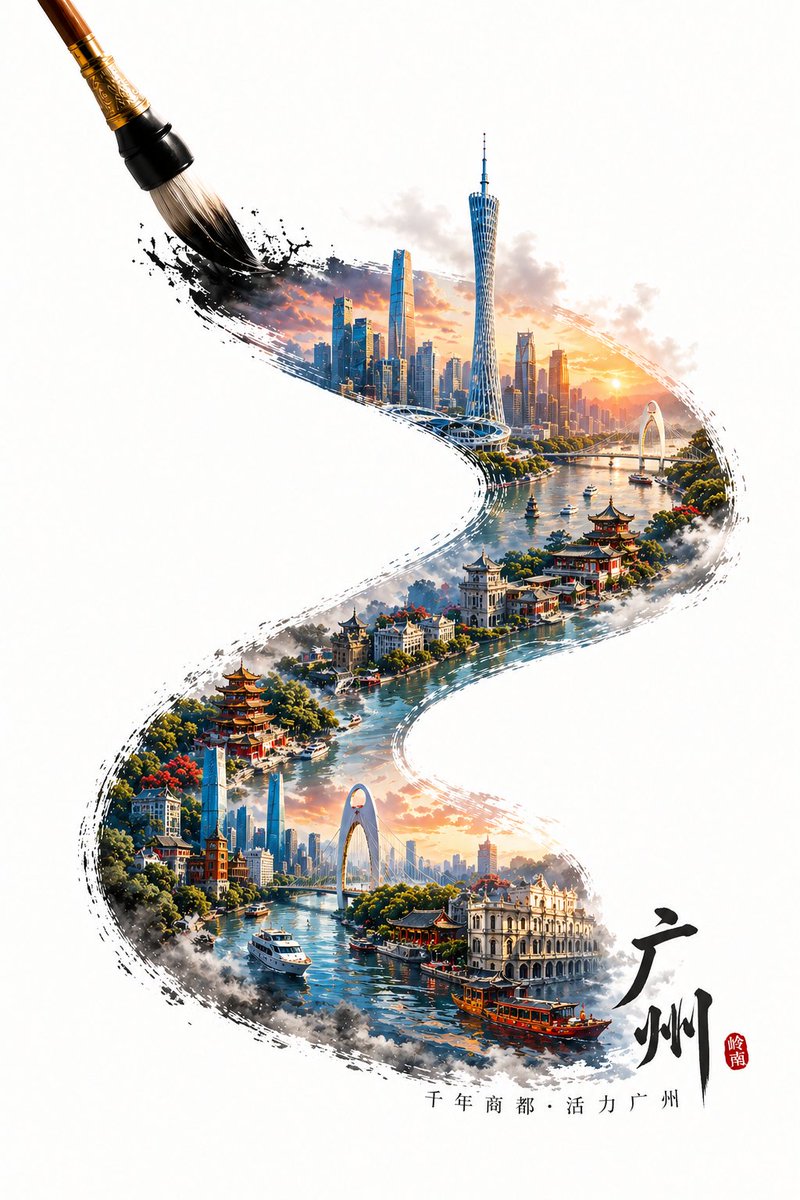
GPT Image 2 City Artistic Poster Prompt
Sebuah panduan canggih untuk membuat poster kota 3D dengan saturasi tinggi yang menggunakan sapuan kuas kaligrafi untuk membingkai lanskap miniatur landmark perkotaan dan arsitektur tradisional.
Ini adalah contoh kasus GPT Image 2 untuk Grafis & Poster . Gunakan contoh siap salin di bawah ini untuk menghasilkan visual serupa, dan tinjau atribusi Awesome GPT Image 2 Prompts serta hak penggunaan komersial sebelum digunakan kembali.
Butuh seluruh rangkaian prompt? Gunakan Grafis & Poster Untuk contoh terkait lainnya, kunjungi pusat topik, atau buka GPT Image 2 katalog cepat untuk indeks contoh lengkap, struktur yang dapat digunakan kembali, dan atribusi sumber.
Free 1K preview
Generate one preview image instantly, no sign-up required.
1487/4000
Mengingatkan
Prompt siap salin
A writing brush in the process of painting, tracing an S-shaped calligraphy stroke from the bottom right to the top left. Within the stroke is a microscopic landscape of landmarks from {argument name="city name" default="Guangzhou"}, styled as a 3D high-saturation poster. The content within the stroke features iconic buildings of {argument name="city name" default="Guangzhou"}, blending local traditional architecture with modern structures to create a visual layer of old and new. If the city has a water system (such as a river or bay), incorporate the corresponding water body into the stroke to create a misty and atmospheric feel, enhancing the sense of spatial depth. The stroke as a whole shows natural ink diffusion and edge fragmentation effects while maintaining clear urban structures and rich details. The tip of the brush is at the end of the stroke in the upper left corner, capturing a dynamic moment of "currently drawing." Outside the stroke is a large area of clean white space, highlighting an Oriental minimalist composition. Add text at the beginning of the stroke: {argument name="city name" default="Guangzhou"} and a {argument name="city slogan" default="short slogan for the city"}, with the text naturally arranged along the direction of the stroke. Overall style: A blend of traditional Chinese style and modern 3D art, high detail, high saturation but clean, vibrant colors, realistic physical lighting, HDR, 8K resolution, commercial-grade visual quality.Variabel perintah
Placeholder argumen yang dapat diedit ditemukan dalam prompt, beserta nilai defaultnya.
Variabel
city name
Bawaan
Guangzhou
Variabel
city slogan
Bawaan
short slogan for the city
Best for
- - Grafis & Poster visual exploration
- - Image generation and reference-image edits
- - Reusable briefs that keep source attribution visible
Change these parts
- - Subject, product, character, or scene
- - Aspect ratio, camera, lighting, and background
- - Brand, text, color, and output constraints
Recommended model and settings
- - Model: gpt-image-2
- - Input mode: Teks ke Gambar
- - Aspect ratio: source
- - Commercial status: review original source
How to use this prompt
- 1. Copy the prompt and preserve its structure for the first test.
- 2. Replace the subject, context, and publishing channel.
- 3. Change one camera, lighting, or style variable per iteration.
- 4. Inspect the output, source, text, and rights before reuse.
Limitations, source, and reuse cautions
- - Generated output is an editable draft, not factual, legal, or rights evidence.
- - Review the linked source, people, brands, logos, text, and third-party media before commercial use.
Diimpor dari Awesome GPT Image 2 Prompts . Atribusi diperlukan. Status penggunaan komersial adalah allowed ; tinjau hak sumber sebelum penggunaan berbayar.
Lebih banyak kasus dalam kategori ini
Diprioritaskan berdasarkan kategori, kompatibilitas mode input, kualitas, dan risiko yang lebih rendah.






Catatan penggunaan kembali dan sumber
Gunakan perintah ini dengan aman setelah melihat pratinjau kasus.
- 1.Salin perintah tersebut atau buka langsung di Dovoo dengan tombol pembuatan.
- 2.Sesuaikan variabel, rasio aspek, dan gambar referensi untuk kebutuhan Anda sendiri.
- 3.Sebelum mempublikasikan atau menggunakan untuk tujuan berbayar, verifikasi hak sumber, persyaratan atribusi, dan risiko merek atau citra.