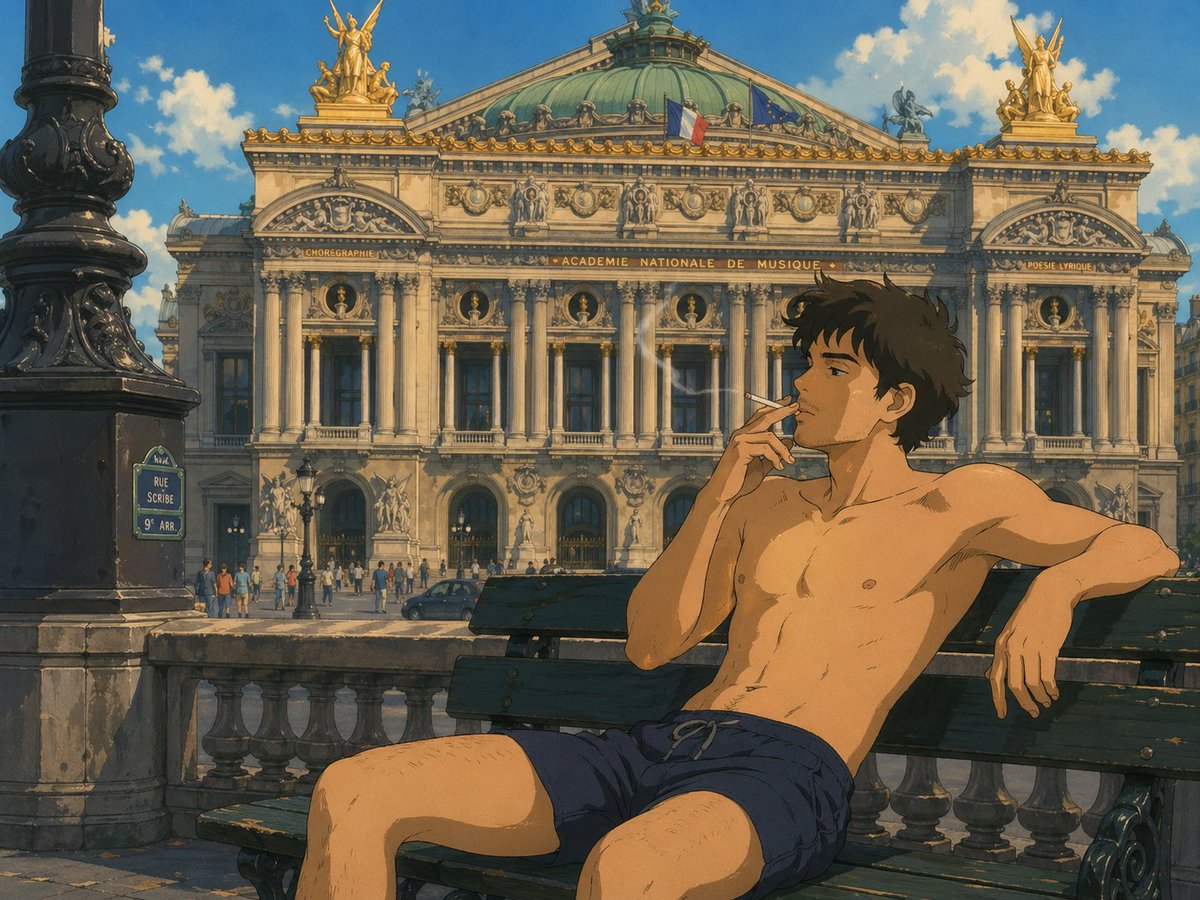
Pria Bergaya Ghibli di Opéra Garnier
Adegan anime yang terinspirasi oleh Studio Ghibli, menampilkan seorang pria bertelanjang dada merokok di bangku di depan Opéra Garnier, ideal untuk seni perjalanan sinematik atau ilustrasi karakter Paris yang bergaya.
Ini adalah contoh kasus GPT Image 2 untuk Anime & Game . Gunakan contoh siap salin di bawah ini untuk menghasilkan visual serupa, dan tinjau atribusi Awesome GPT Image 2 Prompts serta hak penggunaan komersial sebelum digunakan kembali.
Free 1K preview
Generate one preview image instantly, no sign-up required.
Mengingatkan
Prompt siap salin
A warm, painterly anime illustration in a Studio Ghibli-inspired style, showing a {argument name="subject type" default="young man"} sitting shirtless on a dark green wooden bench in front of the Palais Garnier opera house in Paris. He wears only {argument name="shorts color" default="navy blue"} drawstring shorts, has a slim athletic build, lightly tousled dark brown hair, and a relaxed, casual pose with one arm stretched along the bench backrest and the other hand delicately holding a lit cigarette near his mouth. His legs are apart in a natural seated posture, and thin wisps of smoke rise in the sunlit air. The background is a detailed frontal view of {argument name="landmark" default="the Opéra Garnier"}, rendered with ornate Beaux-Arts architecture, tall columns, sculpted figures, gilded rooftop statues, a green oxidized copper dome, and two visible flags on the roof: the French flag and the European Union flag. In the left foreground, include 1 large black ornate lamppost and 1 blue Paris street sign reading {argument name="street sign text" default="RUE SCRIBE 9e ARR."}. Add a stone balustrade between the bench and the street, a small crowd of pedestrians near the opera entrance, and 1 dark car on the road. Use bright afternoon sunlight, soft blue sky, fluffy white clouds, cinematic composition, hand-painted textures, nostalgic cel-animation color grading, and a serene, romantic European summer atmosphere.Variabel perintah
Placeholder argumen yang dapat diedit ditemukan dalam prompt, beserta nilai defaultnya.
Best for
- - Anime & Game visual exploration
- - Image generation and reference-image edits
- - Reusable briefs that keep source attribution visible
Change these parts
- - Subject, product, character, or scene
- - Aspect ratio, camera, lighting, and background
- - Brand, text, color, and output constraints
Recommended model and settings
- - Model: gpt-image-2
- - Input mode: Teks ke Gambar
- - Aspect ratio: source
- - Commercial status: review original source
How to use this prompt
- 1. Copy the prompt and preserve its structure for the first test.
- 2. Replace the subject, context, and publishing channel.
- 3. Change one camera, lighting, or style variable per iteration.
- 4. Inspect the output, source, text, and rights before reuse.
Limitations, source, and reuse cautions
- - Generated output is an editable draft, not factual, legal, or rights evidence.
- - Review the linked source, people, brands, logos, text, and third-party media before commercial use.
Lebih banyak kasus dalam kategori ini
Diprioritaskan berdasarkan kategori, kompatibilitas mode input, kualitas, dan risiko yang lebih rendah.






Catatan penggunaan kembali dan sumber
Gunakan perintah ini dengan aman setelah melihat pratinjau kasus.
- 1.Salin perintah tersebut atau buka langsung di Dovoo dengan tombol pembuatan.
- 2.Sesuaikan variabel, rasio aspek, dan gambar referensi untuk kebutuhan Anda sendiri.
- 3.Sebelum mempublikasikan atau menggunakan untuk tujuan berbayar, verifikasi hak sumber, persyaratan atribusi, dan risiko merek atau citra.