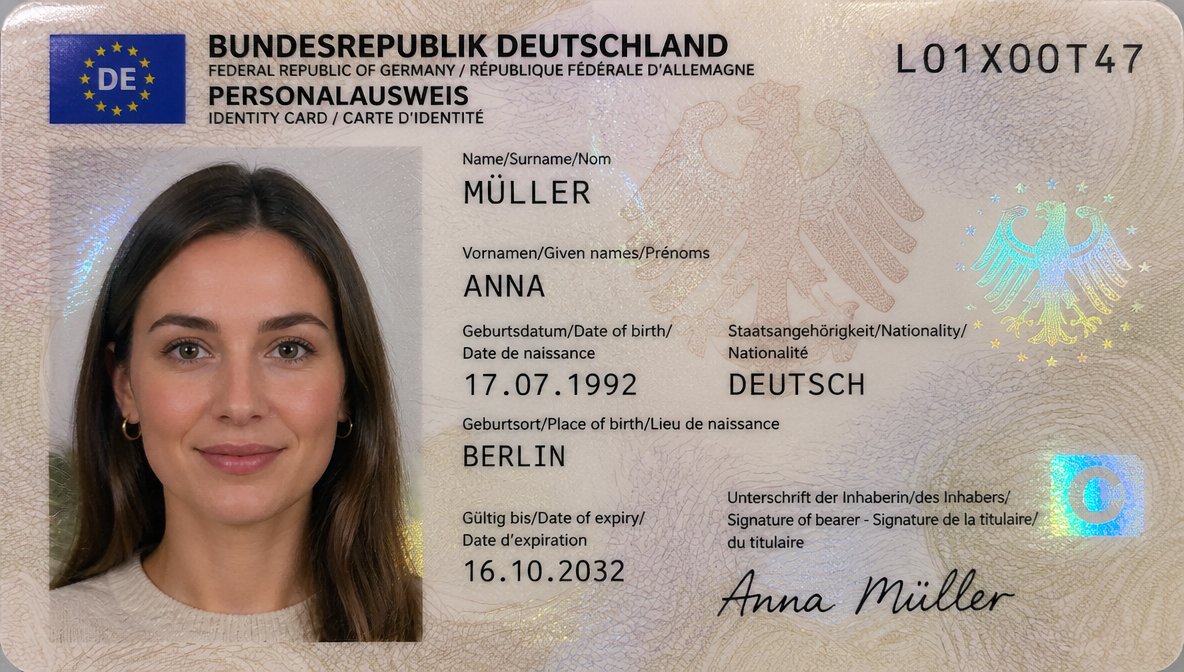
Transformasi Pemindaian Kartu Identitas Jerman
Perintah ini mengubah foto kartu identitas Jerman menjadi hasil pindaian dokumen resmi yang rapi dan realistis dengan data pribadi yang diperbarui dan tampilan foto paspor yang lebih bersih.
Ini adalah contoh kasus GPT Image 2 untuk Produk & Komersial . Gunakan contoh siap salin di bawah ini untuk menghasilkan visual serupa, dan tinjau atribusi Awesome GPT Image 2 Prompts serta hak penggunaan komersial sebelum digunakan kembali.
Free 1K preview
Generate one preview image instantly, no sign-up required.
Free text preview doesn’t preserve reference-image consistency.
Mengingatkan
Prompt siap salin
Using REFERENCE_0, recreate the same German ID card as a clean, realistic flat scan/passport-style document image instead of a photographed card on a dark table. Keep the person, card type, and overall identity-card layout, but remove the tabletop perspective, edge glare, and camera-phone look. Replace the photo area with a properly framed biometric portrait crop showing more of the shoulders and upper chest against a light neutral background, with soft even lighting suitable for an official ID photo. Update the card design to a more modern German ID appearance with a blue EU/DE flag block in the top-left, a cleaner cream security pattern, and holographic security elements including 2 eagle motifs and 1 blue square chip-like mark on the right. Keep the serial number as {argument name="document number" default="L01X00T47"}. Change the personal data to: surname MÜLLER, given name ANNA, date of birth {argument name="date of birth" default="17.07.1992"}, nationality DEUTSCH, place of birth {argument name="place of birth" default="BERLIN"}, expiry date {argument name="expiry date" default="16.10.2032"}, and signature {argument name="signature name" default="Anna Müller"}. Make it look like a high-resolution official ID card scan, sharp typography, realistic print texture, and subtle holographic reflections.Variabel perintah
Placeholder argumen yang dapat diedit ditemukan dalam prompt, beserta nilai defaultnya.
Best for
- - Produk & Komersial visual exploration
- - Image generation and reference-image edits
- - Reusable briefs that keep source attribution visible
Change these parts
- - Subject, product, character, or scene
- - Aspect ratio, camera, lighting, and background
- - Brand, text, color, and output constraints
Recommended model and settings
- - Model: gpt-image-2
- - Input mode: Gambar ke Gambar
- - Aspect ratio: source
- - Commercial status: review original source
How to use this prompt
- 1. Copy the prompt and preserve its structure for the first test.
- 2. Replace the subject, context, and publishing channel.
- 3. Change one camera, lighting, or style variable per iteration.
- 4. Inspect the output, source, text, and rights before reuse.
Limitations, source, and reuse cautions
- - Generated output is an editable draft, not factual, legal, or rights evidence.
- - Review the linked source, people, brands, logos, text, and third-party media before commercial use.
Lebih banyak kasus dalam kategori ini
Diprioritaskan berdasarkan kategori, kompatibilitas mode input, kualitas, dan risiko yang lebih rendah.






Catatan penggunaan kembali dan sumber
Gunakan perintah ini dengan aman setelah melihat pratinjau kasus.
- 1.Salin perintah tersebut atau buka langsung di Dovoo dengan tombol pembuatan.
- 2.Sesuaikan variabel, rasio aspek, dan gambar referensi untuk kebutuhan Anda sendiri.
- 3.Sebelum mempublikasikan atau menggunakan untuk tujuan berbayar, verifikasi hak sumber, persyaratan atribusi, dan risiko merek atau citra.