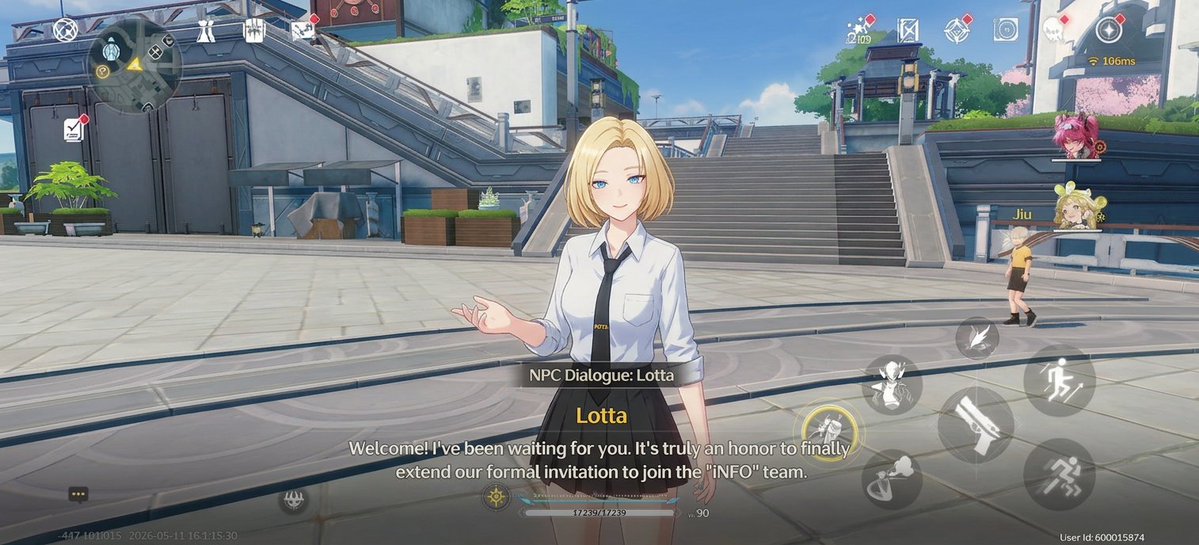
Cuplikan Layar Dialog RPG Anime
Menghasilkan adegan dialog RPG dunia terbuka bergaya gacha yang apik dengan NPC, lingkungan plaza futuristik, dan overlay HUD seluler lengkap.
Ini adalah contoh kasus GPT Image 2 untuk Anime & Game . Gunakan contoh siap salin di bawah ini untuk menghasilkan visual serupa, dan tinjau atribusi Awesome GPT Image 2 Prompts serta hak penggunaan komersial sebelum digunakan kembali.
Butuh seluruh rangkaian prompt? Gunakan Anime & Game Untuk contoh terkait lainnya, kunjungi pusat topik, atau buka GPT Image 2 katalog cepat untuk indeks contoh lengkap, struktur yang dapat digunakan kembali, dan atribusi sumber.
Free 1K preview
Generate one preview image instantly, no sign-up required.
4000/4000
Mengingatkan
Prompt siap salin
{
  "HUD overlay": {
    "bottom elements": [
      "chat bubble button at bottom-left",
      "faint build/version timestamp text",
      "center-bottom HP or stamina bar with numeric value",
      "small level indicator reading Lv. 90",
      "bottom-right user ID text"
    ],
    "bottom elements count": 5,
    "mobile game controls": "visible translucent virtual controls and action buttons over the 3D world",
    "right-side action buttons": [
      "large running or dodge button",
      "large weapon attack button shaped like a blade",
      "crouch or slide movement button",
      "jump or movement skill button with wing-like icon",
      "small ability button above the attack cluster",
      "small circular interaction/skill button",
      "lower-right sprint or evade icon"
    ],
    "right-side action buttons count": 7,
    "top-center elements": [
      "small currency or resource number",
      "map/mission icon",
      "diamond-shaped menu icon",
      "camera or settings-style icon",
      "additional small menu glyph"
    ],
    "top-center elements count": 5,
    "top-left elements": [
      "circular minimap",
      "small compass or navigation marker",
      "quest/document icon with red notification dot",
      "utility icon near the minimap",
      "top bar system icon cluster"
    ],
    "top-left elements count": 5,
    "top-right elements": [
      "red notification dot icon",
      "connection indicator showing 166ms",
      "character portrait of a pink-haired teammate",
      "character portrait of a blonde twin-bun teammate labeled Jiu"
    ],
    "top-right elements count": 4
  },
  "composition requirements": {
    "aspect ratio": "{argument name=\"aspect ratio\" default=\"16:9\"}",
    "avoid": "photorealism, medieval fantasy setting, painterly illustration, empty UI, close-up portrait crop, dark night lighting",
    "render quality": "crisp anime game screenshot, detailed futuristic environment, readable UI, realistic sunlight and soft shadows"
  },
  "dialogue UI": {
    "count": 3,
    "dialogue text": "{argument name=\"dialogue text\" default=\"Welcome! I've been waiting for you. It's truly an honor to finally extend our formal invitation to join the 'INFO' team.\"}",
    "elements": [
      "semi-transparent black label bar reading \"NPC Dialogue: Lotta\" above the dialogue text",
      "speaker name in yellow reading \"Lotta\"",
      "two-line white subtitle text reading \"Welcome! I've been waiting for you. It's truly an honor to finally extend our formal invitation to join the 'INFO' team.\""
    ]
  },
  "main character": {
    "appearance": "young anime woman with short blonde bob haircut, Show every face clearly with natural, detailed facial features, fair skin, slim build",
    "name": "{argument name=\"character name\" default=\"Lotta\"}",
    "outfit": "white button-up shirt with rolled sleeves, black necktie, black high-waisted pleated skirt, subtle school-uniform or office-uniform styling",
    "pose": "standing relaxed, one hand raised in a conversational open-palmed gesture, facing the viewer/player",
    "position": "center foreground",
    "role": "NPC speaker"
  },
  "scene": {
    "camera": "third-person dialogue camera at chest height, centered NPC in foreground, wide environmental view, slight depth of field, cinematic but still clearly a gameplay screenshot",
    "mood": "welcoming, clean, sunny, futuristic academy-city atmosphere",
    "setting": "bright futuristic campus plaza with pale stone paving, broad stairs rising in the background, metal railings, elevated walkways, angular concrete-and-steel architecture, planters, rooftop greenery, blue sky, soft daylight, a few pink flowering trees in the distance"
  },
  "secondary characters": {
    "count": 1,
    "description": "one small blonde NPC or player avatar visible at mid-right near a railing, walking away in the plaza"
  },
  "style": "high-end anime 3D game render similar to modern sci-fi urban titles, clean cel-shaded lighting, polished mobile game UI overlay, widescreen 16:9 gameplay capture",
  "type": "gacha open-world RPG dialogue screenshot"
}
Variabel perintah
Placeholder argumen yang dapat diedit ditemukan dalam prompt, beserta nilai defaultnya.
Variabel
character name
Bawaan
Lotta
Variabel
dialogue text
Bawaan
Welcome! I've been waiting for you. It's truly an honor to finally extend our formal invitation to join the 'INFO' team.
Variabel
aspect ratio
Bawaan
16:9
Best for
- - Anime & Game visual exploration
- - Image generation and reference-image edits
- - Reusable briefs that keep source attribution visible
Change these parts
- - Subject, product, character, or scene
- - Aspect ratio, camera, lighting, and background
- - Brand, text, color, and output constraints
Recommended model and settings
- - Model: gpt-image-2
- - Input mode: Teks ke Gambar
- - Aspect ratio: source
- - Commercial status: review original source
How to use this prompt
- 1. Copy the prompt and preserve its structure for the first test.
- 2. Replace the subject, context, and publishing channel.
- 3. Change one camera, lighting, or style variable per iteration.
- 4. Inspect the output, source, text, and rights before reuse.
Limitations, source, and reuse cautions
- - Generated output is an editable draft, not factual, legal, or rights evidence.
- - Review the linked source, people, brands, logos, text, and third-party media before commercial use.
Diimpor dari Awesome GPT Image 2 Prompts . Atribusi diperlukan. Status penggunaan komersial adalah allowed ; tinjau hak sumber sebelum penggunaan berbayar.
Lebih banyak kasus dalam kategori ini
Diprioritaskan berdasarkan kategori, kompatibilitas mode input, kualitas, dan risiko yang lebih rendah.






Catatan penggunaan kembali dan sumber
Gunakan perintah ini dengan aman setelah melihat pratinjau kasus.
- 1.Salin perintah tersebut atau buka langsung di Dovoo dengan tombol pembuatan.
- 2.Sesuaikan variabel, rasio aspek, dan gambar referensi untuk kebutuhan Anda sendiri.
- 3.Sebelum mempublikasikan atau menggunakan untuk tujuan berbayar, verifikasi hak sumber, persyaratan atribusi, dan risiko merek atau citra.