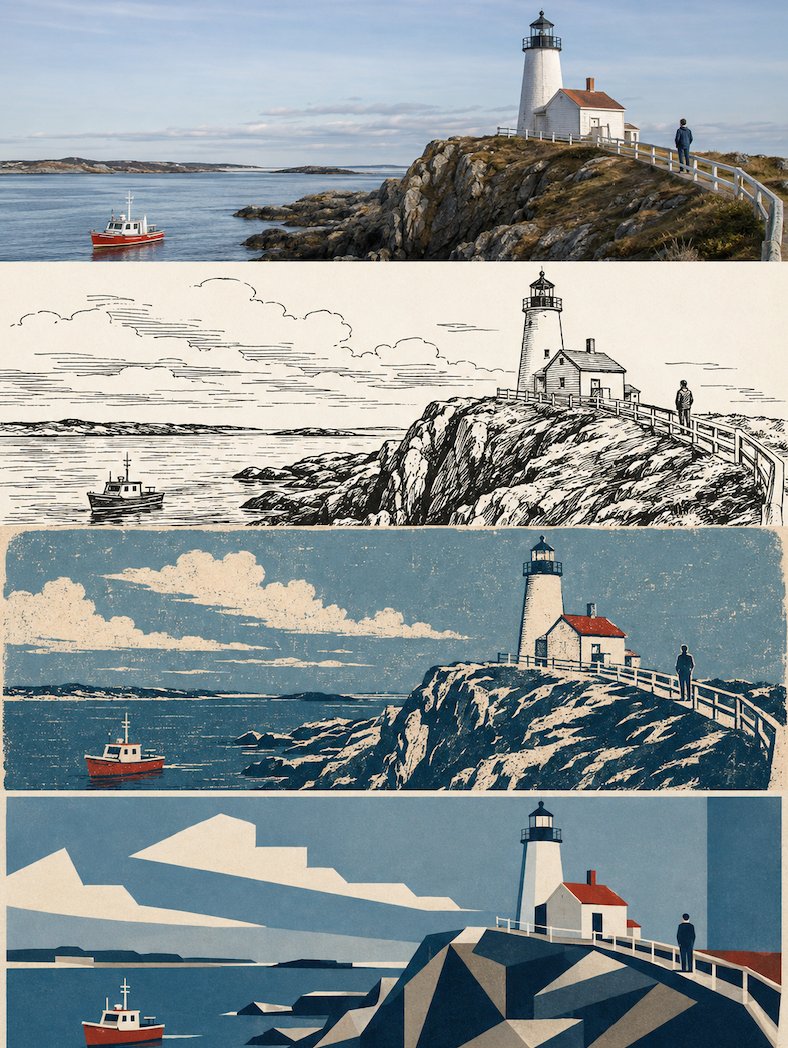
Multi-Layered Design Poster Transformation
A complex structural prompt that transforms an uploaded photo into a four-layered design poster with consistent subject across different styles.
Ini adalah contoh kasus GPT Image 2 untuk Grafis & Poster . Gunakan contoh siap salin di bawah ini untuk menghasilkan visual serupa, dan tinjau atribusi Awesome GPT Image 2 Prompts serta hak penggunaan komersial sebelum digunakan kembali.
Butuh seluruh rangkaian prompt? Gunakan Grafis & Poster Untuk contoh terkait lainnya, kunjungi pusat topik, atau buka GPT Image 2 katalog cepat untuk indeks contoh lengkap, struktur yang dapat digunakan kembali, dan atribusi sumber.
Free 1K preview
Generate one preview image instantly, no sign-up required.
Free text preview doesn’t preserve reference-image consistency.
1946/4000
Mengingatkan
Prompt siap salin
Please transform the scene from the uploaded photo into a sophisticated design poster on the current layer, without multi-image splicing, outputting each photo individually. 'No multi-image splicing' means: do not mix different uploaded photos into the same finished product; each uploaded photo must independently generate a complete four-layer style poster.

[Overall Format and Four-Layer Structure]
Overall 3:4 vertical composition. The image is strictly divided from top to bottom into four equal horizontal areas, with each area's height exactly 25% of the total, maintaining a 1:1:1:1 ratio. The layers are seamless, with no dividing lines, white gaps, or borders.

Since each layer is approximately a 3:1 extremely flat banner, the subject must be adapted horizontally within each layer: maintain stable subject position and visual focus, expanding horizontally to avoid vertical stretching, crushing, or cropping key parts. Environments like sky, walls, or ground can be extended naturally, but no blurred duplication background filling.

[Consistency Across Four Layers]
All four layers must originate from the same uploaded photo and same moment. Maintain strict consistency in subject identity, count, facial features, pose, movement, gaze, clothing, architectural structure, and narrative relationships.

[Layer 1 | Original Photography]
Faithfully preserves the authentic photography texture of the uploaded photo. Keep original identity, composition, lighting, and atmosphere. Only restrained high-end photographic color grading and exposure adjustments are allowed.

[Layer 2 | 1970s Animation Style Black and White Ink Drawing]
This layer occupies 25% of the height. All style instructions are executed within this 3:1 flat area. Maintain core subject relationships while translating to a black and white ink aesthetic.

[Source Style Full Translation]
Create a black and white... of {argument name="subject" default="[subject]"}
Variabel perintah
Placeholder argumen yang dapat diedit ditemukan dalam prompt, beserta nilai defaultnya.
Variabel
subject
Bawaan
[subject]
Best for
- - Grafis & Poster visual exploration
- - Image generation and reference-image edits
- - Reusable briefs that keep source attribution visible
Change these parts
- - Subject, product, character, or scene
- - Aspect ratio, camera, lighting, and background
- - Brand, text, color, and output constraints
Recommended model and settings
- - Model: gpt-image-2
- - Input mode: Gambar ke Gambar
- - Aspect ratio: source
- - Commercial status: review original source
How to use this prompt
- 1. Copy the prompt and preserve its structure for the first test.
- 2. Replace the subject, context, and publishing channel.
- 3. Change one camera, lighting, or style variable per iteration.
- 4. Inspect the output, source, text, and rights before reuse.
Limitations, source, and reuse cautions
- - Generated output is an editable draft, not factual, legal, or rights evidence.
- - Review the linked source, people, brands, logos, text, and third-party media before commercial use.
Diimpor dari Awesome GPT Image 2 Prompts . Atribusi diperlukan. Status penggunaan komersial adalah allowed ; tinjau hak sumber sebelum penggunaan berbayar.
Lebih banyak kasus dalam kategori ini
Diprioritaskan berdasarkan kategori, kompatibilitas mode input, kualitas, dan risiko yang lebih rendah.

Stylish Man Street Lamp Portrait
Gambar ke Gambar

Sci-Fi Cyan Lighting Effect
Gambar ke Gambar

Oversized Head Cartoon Caricature Prompt
Gambar ke GambarRisiko sedang

Luxury Travel Fashion Portrait Prompt
Teks ke Gambar

Boisterous Shrimpers Entering Pub
Teks ke Gambar

Tuxedo Cat Photo and Line Art Diptych
Teks ke Gambar
Catatan penggunaan kembali dan sumber
Gunakan perintah ini dengan aman setelah melihat pratinjau kasus.
- 1.Salin perintah tersebut atau buka langsung di Dovoo dengan tombol pembuatan.
- 2.Sesuaikan variabel, rasio aspek, dan gambar referensi untuk kebutuhan Anda sendiri.
- 3.Sebelum mempublikasikan atau menggunakan untuk tujuan berbayar, verifikasi hak sumber, persyaratan atribusi, dan risiko merek atau citra.