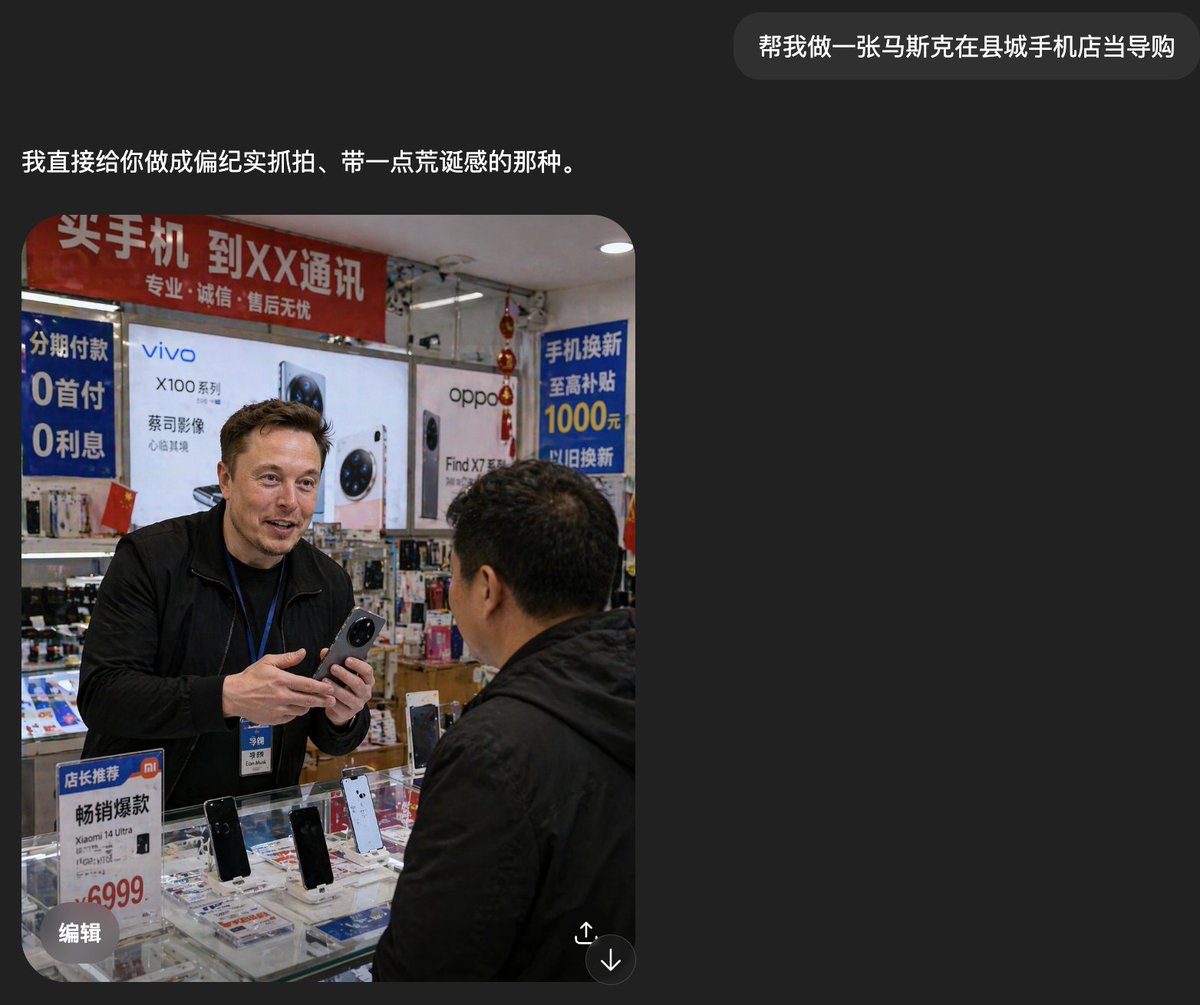
Petugas Asing di Toko Telepon Kabupaten
Prompt ini menghasilkan foto candid realistis seorang pegawai toko asing yang menjual ponsel di toko ponsel Cina yang ramai, berguna untuk gambar media sosial bergaya dokumenter.
Ini adalah contoh kasus GPT Image 2 untuk Interior & Arsitektur . Gunakan contoh siap salin di bawah ini untuk menghasilkan visual serupa, dan tinjau atribusi Awesome GPT Image 2 Prompts serta hak penggunaan komersial sebelum digunakan kembali.
Butuh seluruh rangkaian prompt? Gunakan Interior & Arsitektur Untuk contoh terkait lainnya, kunjungi pusat topik, atau buka GPT Image 2 katalog cepat untuk indeks contoh lengkap, struktur yang dapat digunakan kembali, dan atribusi sumber.
Free 1K preview
Generate one preview image instantly, no sign-up required.
1695/4000
Mengingatkan
Prompt siap salin
A realistic documentary-style smartphone photo inside a small county-town mobile phone shop in China, showing a candid sales interaction at the counter. A tall foreign man, about {argument name="shop clerk nationality" default="Russian"}, stands behind a glass display case wearing a black jacket and a blue employee lanyard with badge, holding a smartphone in both hands as if introducing it to a customer. Show every face clearly with natural, detailed facial features. In the foreground, a middle-aged Chinese male customer in a black jacket is seen from behind and slightly to the side, facing the clerk. The store is cramped, brightly lit, and visually cluttered with authentic retail details. Behind them are large smartphone brand posters and lightbox ads, including 2 major phone brand ads: vivo and oppo. There are 4 prominent Chinese promotional signs visible: a red overhead banner about buying phones and carrier service, a blue vertical installment-payment sign mentioning 0 down payment and 0 interest, a blue trade-in subsidy sign mentioning 1000 yuan, and a small counter sign promoting a Xiaomi model with a 6999 price. The glass counter contains multiple display phones, with 4 clearly visible upright demo phones on stands, plus scattered brochures and accessories beneath the glass. Add dense shelves of boxed accessories and hanging decorations in the background, with slightly messy composition, harsh indoor shop lighting, mild lens distortion, and the rough, unpolished realism of a casually taken phone snapshot. The mood should feel mundane, local, and faintly surreal because the foreign clerk appears completely integrated into an ordinary Chinese mobile phone store.Variabel perintah
Placeholder argumen yang dapat diedit ditemukan dalam prompt, beserta nilai defaultnya.
Variabel
shop clerk nationality
Bawaan
Russian
Best for
- - Interior & Arsitektur visual exploration
- - Image generation and reference-image edits
- - Reusable briefs that keep source attribution visible
Change these parts
- - Subject, product, character, or scene
- - Aspect ratio, camera, lighting, and background
- - Brand, text, color, and output constraints
Recommended model and settings
- - Model: gpt-image-2
- - Input mode: Teks ke Gambar
- - Aspect ratio: source
- - Commercial status: review original source
How to use this prompt
- 1. Copy the prompt and preserve its structure for the first test.
- 2. Replace the subject, context, and publishing channel.
- 3. Change one camera, lighting, or style variable per iteration.
- 4. Inspect the output, source, text, and rights before reuse.
Limitations, source, and reuse cautions
- - Generated output is an editable draft, not factual, legal, or rights evidence.
- - Review the linked source, people, brands, logos, text, and third-party media before commercial use.
Diimpor dari Awesome GPT Image 2 Prompts . Atribusi diperlukan. Status penggunaan komersial adalah allowed ; tinjau hak sumber sebelum penggunaan berbayar.
Lebih banyak kasus dalam kategori ini
Diprioritaskan berdasarkan kategori, kompatibilitas mode input, kualitas, dan risiko yang lebih rendah.






Catatan penggunaan kembali dan sumber
Gunakan perintah ini dengan aman setelah melihat pratinjau kasus.
- 1.Salin perintah tersebut atau buka langsung di Dovoo dengan tombol pembuatan.
- 2.Sesuaikan variabel, rasio aspek, dan gambar referensi untuk kebutuhan Anda sendiri.
- 3.Sebelum mempublikasikan atau menggunakan untuk tujuan berbayar, verifikasi hak sumber, persyaratan atribusi, dan risiko merek atau citra.