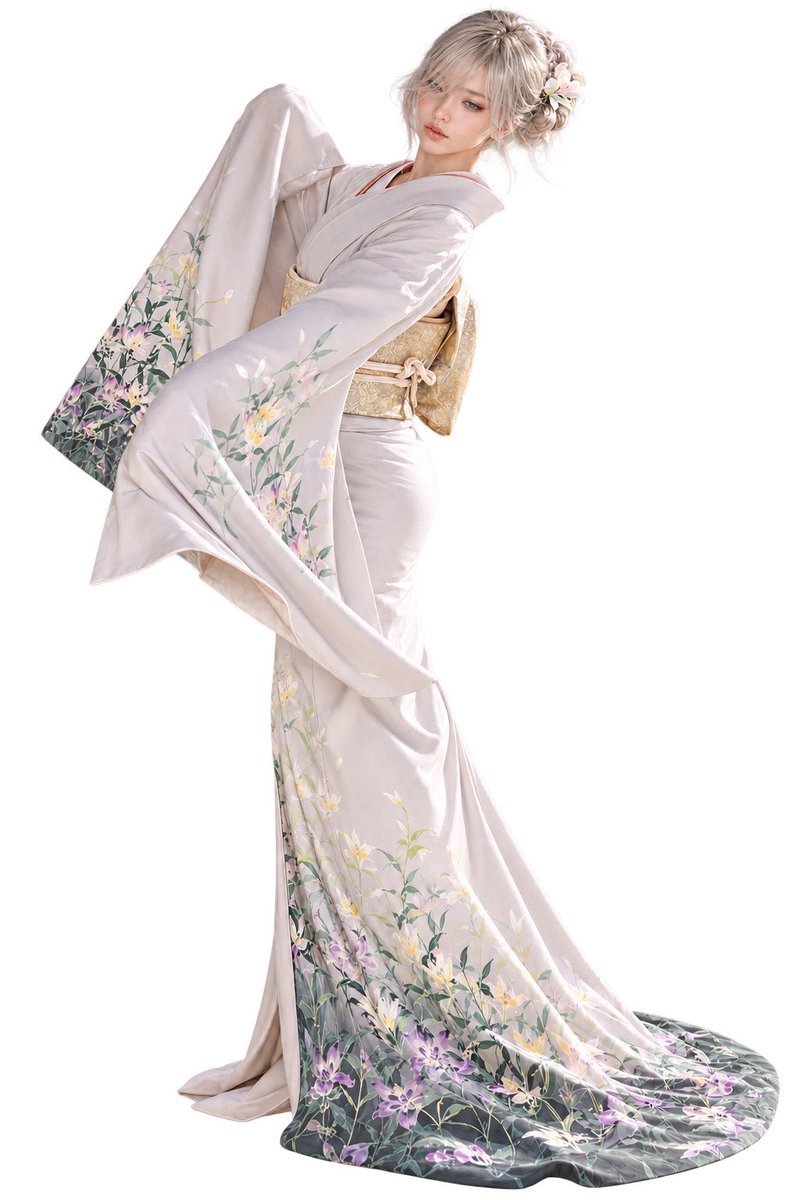
Elegant Furisode Character Cutout
Generates a full-body transparent-background character standee of an elegant woman in a floral lavender furisode kimono.
Ini adalah contoh kasus GPT Image 2 untuk Potret & Karakter . Gunakan contoh siap salin di bawah ini untuk menghasilkan visual serupa, dan tinjau atribusi Awesome GPT Image 2 Prompts serta hak penggunaan komersial sebelum digunakan kembali.
Butuh seluruh rangkaian prompt? Gunakan Potret & Karakter Untuk contoh terkait lainnya, kunjungi pusat topik, atau buka GPT Image 2 katalog cepat untuk indeks contoh lengkap, struktur yang dapat digunakan kembali, dan atribusi sumber.
Free 1K preview
Generate one preview image instantly, no sign-up required.
1431/4000
Mengingatkan
Prompt siap salin
Create a full-body, high-resolution character standee of {argument name="character name" default="Yuria"}, an elegant young woman with a soft porcelain complexion and {argument name="hair color" default="silvery ash-blonde"} hair styled in a loose low bun with wispy bangs and fine stray strands. She wears a luxurious pale lavender-gray furisode kimono with long flowing sleeves, a cream-and-gold obi tied at the back, and delicate floral hair ornaments with small white blossoms. The kimono has detailed botanical embroidery and painted patterns: green stems and leaves, white and yellow lilies, and purple flowers concentrated along the sleeve edges and lower hem, fading into a darker gray-green border at the bottom. Pose her in a graceful fashion-editorial stance, body angled diagonally, one long sleeve lifted outward and upward, the other sleeve draping forward, the train of the kimono pooling elegantly on the floor behind her. Her expression is calm, refined, and slightly melancholic, with soft makeup and downcast eyes. Use a semi-realistic anime / photoreal fashion illustration style with delicate fabric folds, luminous soft lighting, clean edges, and highly detailed hair, accessories, and textile contours. Isolate the character as a cutout on a {argument name="background type" default="transparent background with alpha channel"}; do not add scenery, props, text, watermark, border, or shadow-heavy background.Variabel perintah
Placeholder argumen yang dapat diedit ditemukan dalam prompt, beserta nilai defaultnya.
Variabel
character name
Bawaan
Yuria
Variabel
hair color
Bawaan
silvery ash-blonde
Variabel
background type
Bawaan
transparent background with alpha channel
Best for
- - Potret & Karakter visual exploration
- - Image generation and reference-image edits
- - Reusable briefs that keep source attribution visible
Change these parts
- - Subject, product, character, or scene
- - Aspect ratio, camera, lighting, and background
- - Brand, text, color, and output constraints
Recommended model and settings
- - Model: gpt-image-2
- - Input mode: Teks ke Gambar
- - Aspect ratio: source
- - Commercial status: review original source
How to use this prompt
- 1. Copy the prompt and preserve its structure for the first test.
- 2. Replace the subject, context, and publishing channel.
- 3. Change one camera, lighting, or style variable per iteration.
- 4. Inspect the output, source, text, and rights before reuse.
Limitations, source, and reuse cautions
- - Generated output is an editable draft, not factual, legal, or rights evidence.
- - Review the linked source, people, brands, logos, text, and third-party media before commercial use.
Diimpor dari Awesome GPT Image 2 Prompts . Atribusi diperlukan. Status penggunaan komersial adalah allowed ; tinjau hak sumber sebelum penggunaan berbayar.
Lebih banyak kasus dalam kategori ini
Diprioritaskan berdasarkan kategori, kompatibilitas mode input, kualitas, dan risiko yang lebih rendah.

GPT Image 2 Real-Life Character Street Snap
Teks ke Gambar

Studio Portrait of Woman with Sunglasses
Teks ke Gambar

Hell Hound Character Sheet Infographic
Teks ke Gambar

Cinematic Blue Backlit Portrait
Teks ke Gambar

GPT Image 2 Prompt: Garden Dappled Light
Teks ke Gambar

Street Selfie with Cat in Matching Cap
Teks ke Gambar
Catatan penggunaan kembali dan sumber
Gunakan perintah ini dengan aman setelah melihat pratinjau kasus.
- 1.Salin perintah tersebut atau buka langsung di Dovoo dengan tombol pembuatan.
- 2.Sesuaikan variabel, rasio aspek, dan gambar referensi untuk kebutuhan Anda sendiri.
- 3.Sebelum mempublikasikan atau menggunakan untuk tujuan berbayar, verifikasi hak sumber, persyaratan atribusi, dan risiko merek atau citra.