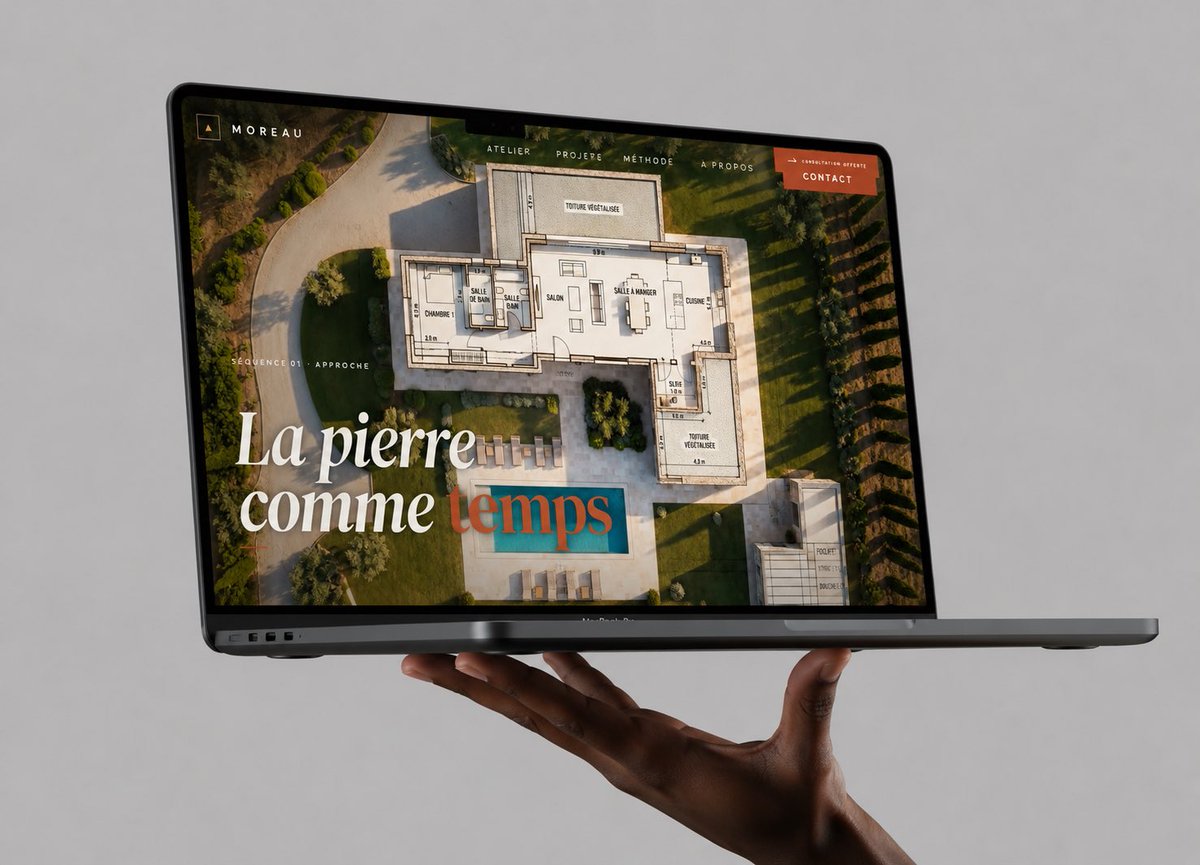
Maket Situs Web Laptop Mengambang
Sebuah mockup MacBook fotorealistik premium yang menampilkan situs web portofolio arsitektur, berguna untuk memamerkan karya desain web dalam unggahan media sosial yang profesional.
Ini adalah contoh kasus GPT Image 2 untuk Produk & Komersial . Gunakan contoh siap salin di bawah ini untuk menghasilkan visual serupa, dan tinjau atribusi Awesome GPT Image 2 Prompts serta hak penggunaan komersial sebelum digunakan kembali.
Butuh seluruh rangkaian prompt? Gunakan Produk & Komersial Untuk contoh terkait lainnya, kunjungi pusat topik, atau buka GPT Image 2 katalog cepat untuk indeks contoh lengkap, struktur yang dapat digunakan kembali, dan atribusi sumber.
Free 1K preview
Generate one preview image instantly, no sign-up required.
1548/4000
Mengingatkan
Prompt siap salin
Create a high-end photorealistic studio mockup of a dark gray MacBook Pro laptop floating horizontally in front of a seamless light gray background, supported from below by one realistic dark-skinned hand with the palm up and fingers gently curled under the laptop. The laptop is open at a shallow angle, viewed from the front-left in three-quarter perspective, with the thin black bezel, webcam notch, ports on the left edge, and slim base visible. On the screen, show a luxury architecture/stonework portfolio website for {argument name="brand name" default="MOREAU"}: a full-bleed aerial photograph of a modern villa garden with a swimming pool, overlaid with a semi-transparent architectural floor plan drawing. Add a minimalist top navigation bar with exactly 5 visible items: “ATELIER”, “PROJERE”, “MÉTHODE”, “À PROPOS”, and an orange button labeled {argument name="button text" default="CONTACT"}. In the upper-left screen corner place a small square monogram icon and the word “MOREAU”. On the left side of the screen add small uppercase text “SÉQUENCE 01 · APPROCHE”. Add a large elegant serif headline in the lower-left reading {argument name="headline text" default="La pierre comme temps"}, with the first words in white and the final word in muted teal/terracotta overlay styling. Use warm golden-hour lighting inside the website image, refined editorial typography, premium agency branding, realistic reflections on the glass screen, subtle shadows beneath the laptop and hand, crisp focus, no watermark, no extra devices, no clutter.Variabel perintah
Placeholder argumen yang dapat diedit ditemukan dalam prompt, beserta nilai defaultnya.
Variabel
brand name
Bawaan
MOREAU
Variabel
button text
Bawaan
CONTACT
Variabel
headline text
Bawaan
La pierre comme temps
Best for
- - Produk & Komersial visual exploration
- - Image generation and reference-image edits
- - Reusable briefs that keep source attribution visible
Change these parts
- - Subject, product, character, or scene
- - Aspect ratio, camera, lighting, and background
- - Brand, text, color, and output constraints
Recommended model and settings
- - Model: gpt-image-2
- - Input mode: Teks ke Gambar
- - Aspect ratio: source
- - Commercial status: review original source
How to use this prompt
- 1. Copy the prompt and preserve its structure for the first test.
- 2. Replace the subject, context, and publishing channel.
- 3. Change one camera, lighting, or style variable per iteration.
- 4. Inspect the output, source, text, and rights before reuse.
Limitations, source, and reuse cautions
- - Generated output is an editable draft, not factual, legal, or rights evidence.
- - Review the linked source, people, brands, logos, text, and third-party media before commercial use.
Diimpor dari Awesome GPT Image 2 Prompts . Atribusi diperlukan. Status penggunaan komersial adalah allowed ; tinjau hak sumber sebelum penggunaan berbayar.
Lebih banyak kasus dalam kategori ini
Diprioritaskan berdasarkan kategori, kompatibilitas mode input, kualitas, dan risiko yang lebih rendah.






Catatan penggunaan kembali dan sumber
Gunakan perintah ini dengan aman setelah melihat pratinjau kasus.
- 1.Salin perintah tersebut atau buka langsung di Dovoo dengan tombol pembuatan.
- 2.Sesuaikan variabel, rasio aspek, dan gambar referensi untuk kebutuhan Anda sendiri.
- 3.Sebelum mempublikasikan atau menggunakan untuk tujuan berbayar, verifikasi hak sumber, persyaratan atribusi, dan risiko merek atau citra.