UI Gameplay Auto-Battler Fantasi
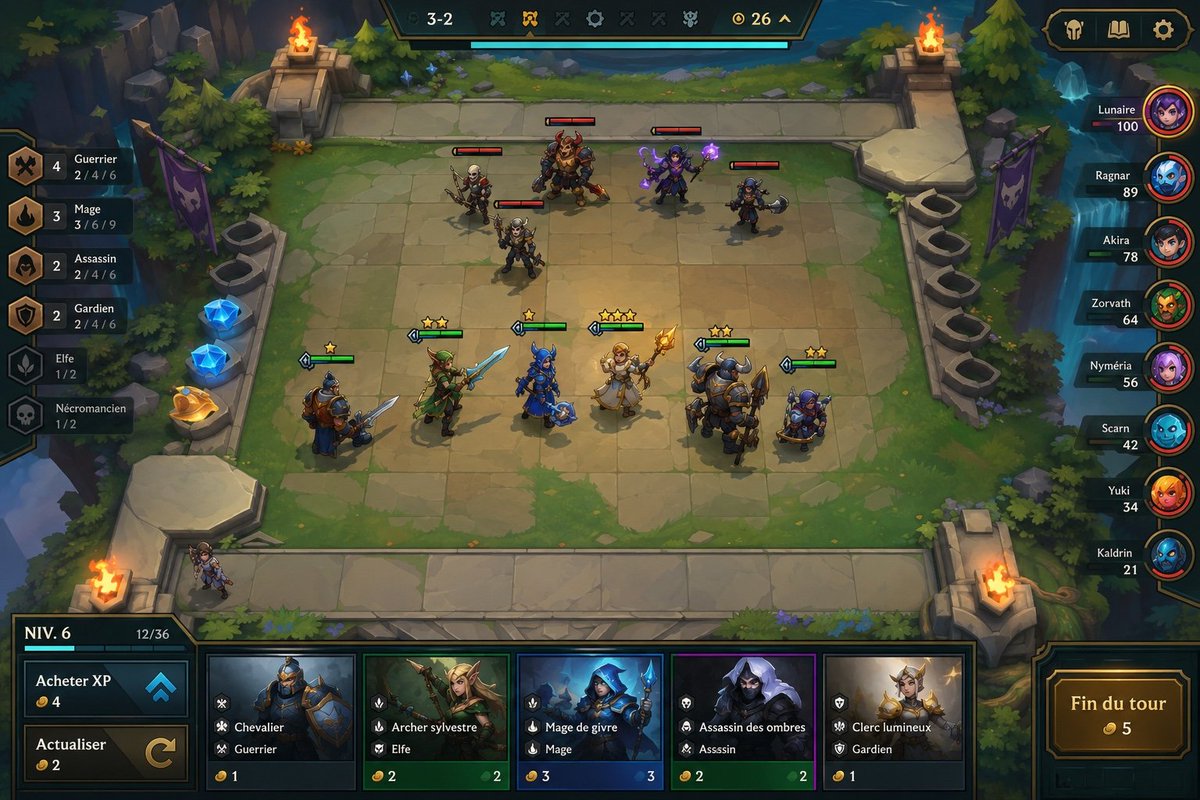
Menghasilkan mockup tangkapan layar auto-battler fantasi isometrik terperinci dengan unit papan, sinergi, kartu toko, papan peringkat, dan label UI Prancis untuk visual prototipe game.
Ini adalah contoh kasus GPT Image 2 untuk Anime & Game . Gunakan contoh siap salin di bawah ini untuk menghasilkan visual serupa, dan tinjau atribusi Awesome GPT Image 2 Prompts serta hak penggunaan komersial sebelum digunakan kembali.
Butuh seluruh rangkaian prompt? Gunakan Anime & Game Untuk contoh terkait lainnya, kunjungi pusat topik, atau buka GPT Image 2 katalog cepat untuk indeks contoh lengkap, struktur yang dapat digunakan kembali, dan atribusi sumber.
Free 1K preview
Generate one preview image instantly, no sign-up required.
3805/4000
Mengingatkan
Prompt siap salin
Goal: Create a polished 2D fantasy auto-battler gameplay mockup for {argument name="game title or mode" default="round 3-2"}, shown from an isometric top-down perspective, with a stone-tile battle arena, UI overlays, characters, shop cards, traits, and player leaderboard.

Canvas: 16:9 widescreen game screenshot, 1152×768 style composition, crisp hand-painted fantasy game art with high readability, saturated colors, soft ambient lighting, and League-of-Legends/TFT-inspired interface design.

Layout: The center is a square stone battlefield grid on a floating forest platform. The arena has worn beige tiles, mossy edges, stairs and stone railings, evergreen trees, cliffs, water at the right edge, purple banners, glowing blue crystals on the left, and four flaming braziers placed near the arena corners. At the top center, place a dark ornate HUD bar showing “3-2”, small trait/item icons, a gold counter “26”, and a long cyan progress bar beneath it. At top right, add three rounded menu buttons with icons: helmet, book, and gear.

Battlefield units: Show exactly 11 visible characters on the board: 5 enemy units on the upper half with red health bars, and 6 allied units on the lower half with green health bars and yellow star ratings. Enemy units: 1 skeleton swordsman, 1 large horned beast warrior with axe, 1 purple mage holding glowing magic, 1 small dark rogue with axe, and 1 armored skeleton fighter. Allied units: 1 blue-and-brown knight with sword and shield, 1 green elf archer/swordsman, 1 blue-armored mage or knight with staff, 1 blonde cleric holding a golden staff, 1 massive horned tank warrior with shield, and 1 small blue gnome engineer/warrior. Add a small bench character standing at the lower-left edge of the board.

Left trait panel: Create a vertical synergy list with exactly 6 rows, each with a bronze/dark icon, class name, current count, and thresholds. The visible French text should be preserved: “Guerrier” with “4” and “2 / 4 / 6”; “Mage” with “3” and “3 / 6 / 9”; “Assassin” with “2” and “2 / 4 / 6”; “Gardien” with “2” and “2 / 4 / 6”; “Elfe” with “1 / 2”; “Nécromancien” with “1 / 2”.

Right leaderboard: Add a vertical player list with exactly 8 players, each in a dark horizontal nameplate with circular avatar on the right and health number. Use these names and values: “Lunaire 100”, “Ragnar 89”, “Akira 78”, “Zorvath 64”, “Nyméria 56”, “Scarn 42”, “Yuki 34”, “Kaldrin 21”. Use varied colorful fantasy portraits: purple mage orb, blue creature, dark red portrait, green orc, pink-haired character, cyan creature, orange-haired character, blue masked character.

Bottom shop and controls: Along the bottom, create a wide shop UI panel. On the left, show a level box reading “NIV. 6” with XP “12/36” and a small cyan progress bar. Under it, exactly 2 control buttons: “Acheter XP” with coin cost “4” and blue double-up arrow icon, and “Actualiser” with coin cost “2” and circular refresh arrow. In the center, show exactly 5 purchasable champion cards with portrait art, class/trait icons, French names and traits, and gold costs: “Chevalier” / “Guerrier” cost 1; “Archer sylvestre” / “Elfe” cost 2; “Mage de givre” / “Mage” cost 3; “Assassin des ombres” / “Assassin” cost 2; “Clerc lumineux” / “Gardien” cost 1. On the bottom right, place a large ornate gold-bordered button labeled “Fin du tour” with coin cost “5”.

Visual style: Painterly fantasy game UI, clean bevels, dark teal and bronze interface frames, readable small text, glowing magic effects, warm firelight, cyan highlights, and compact mobile/PC strategy-game presentation. Keep the mockup as a single in-game screenshot, not a poster or concept sheet. Avoid photorealism, avoid extra panels, avoid watermarks, and do not add more units, shop cards, trait rows, or players than specified.
Variabel perintah
Placeholder argumen yang dapat diedit ditemukan dalam prompt, beserta nilai defaultnya.
Variabel
game title or mode
Bawaan
round 3-2
Best for
- - Anime & Game visual exploration
- - Image generation and reference-image edits
- - Reusable briefs that keep source attribution visible
Change these parts
- - Subject, product, character, or scene
- - Aspect ratio, camera, lighting, and background
- - Brand, text, color, and output constraints
Recommended model and settings
- - Model: gpt-image-2
- - Input mode: Teks ke Gambar
- - Aspect ratio: source
- - Commercial status: review original source
How to use this prompt
- 1. Copy the prompt and preserve its structure for the first test.
- 2. Replace the subject, context, and publishing channel.
- 3. Change one camera, lighting, or style variable per iteration.
- 4. Inspect the output, source, text, and rights before reuse.
Limitations, source, and reuse cautions
- - Generated output is an editable draft, not factual, legal, or rights evidence.
- - Review the linked source, people, brands, logos, text, and third-party media before commercial use.
Diimpor dari Awesome GPT Image 2 Prompts . Atribusi diperlukan. Status penggunaan komersial adalah allowed ; tinjau hak sumber sebelum penggunaan berbayar.
Lebih banyak kasus dalam kategori ini
Diprioritaskan berdasarkan kategori, kompatibilitas mode input, kualitas, dan risiko yang lebih rendah.






Catatan penggunaan kembali dan sumber
Gunakan perintah ini dengan aman setelah melihat pratinjau kasus.
- 1.Salin perintah tersebut atau buka langsung di Dovoo dengan tombol pembuatan.
- 2.Sesuaikan variabel, rasio aspek, dan gambar referensi untuk kebutuhan Anda sendiri.
- 3.Sebelum mempublikasikan atau menggunakan untuk tujuan berbayar, verifikasi hak sumber, persyaratan atribusi, dan risiko merek atau citra.