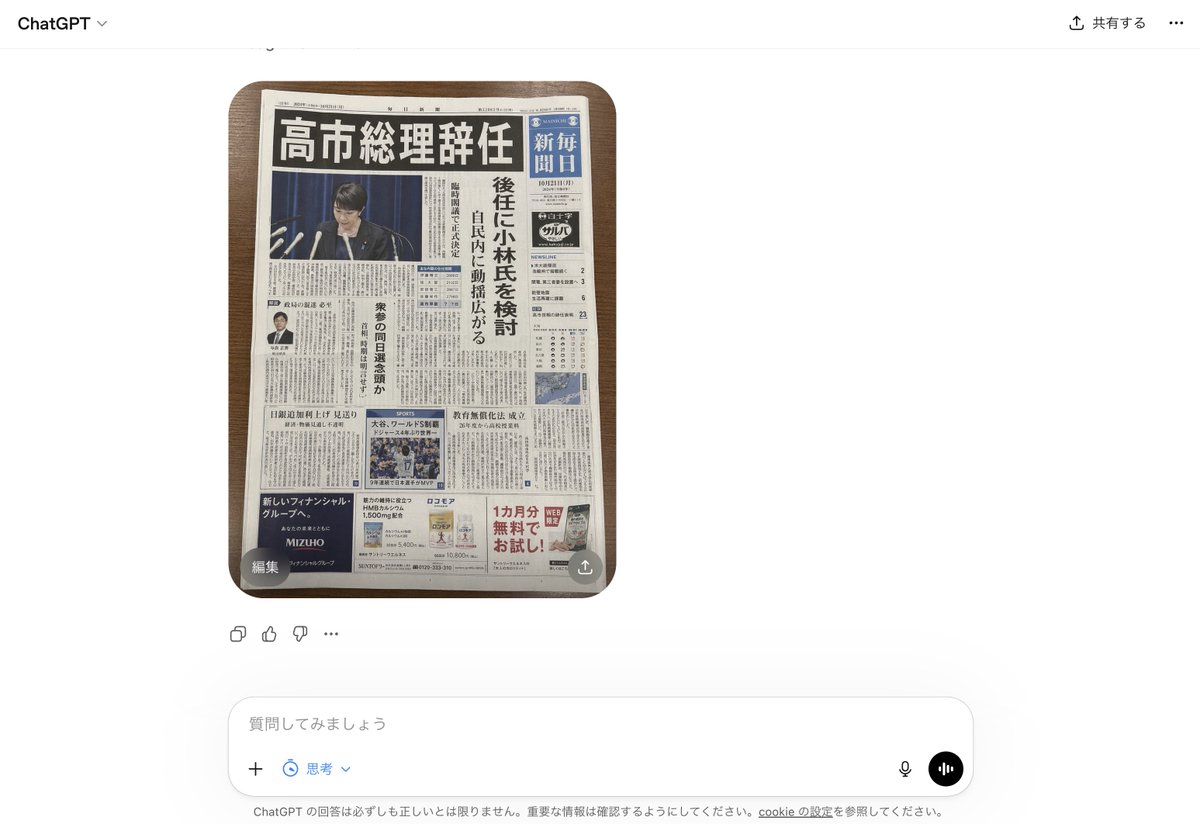
Koran Jepang Palsu di UI ChatGPT
Ini menghasilkan tangkapan layar fotorealistik dari antarmuka ChatGPT yang menampilkan halaman depan surat kabar Jepang yang dibuat-buat namun meyakinkan, berguna untuk maket tentang berita palsu yang dihasilkan oleh AI.
Ini adalah contoh kasus GPT Image 2 untuk Produk & Komersial . Gunakan contoh siap salin di bawah ini untuk menghasilkan visual serupa, dan tinjau atribusi Awesome GPT Image 2 Prompts serta hak penggunaan komersial sebelum digunakan kembali.
Butuh seluruh rangkaian prompt? Gunakan Produk & Komersial Untuk contoh terkait lainnya, kunjungi pusat topik, atau buka GPT Image 2 katalog cepat untuk indeks contoh lengkap, struktur yang dapat digunakan kembali, dan atribusi sumber.
Free 1K preview
Generate one preview image instantly, no sign-up required.
2020/4000
Mengingatkan
Prompt siap salin
A realistic smartphone screenshot of the ChatGPT web interface in Japanese, shown on a clean white background. Centered in the chat is a single generated image: a top-down photo of 1 Japanese newspaper placed neatly on a medium-dark wooden tabletop with rounded table corners visible. The newspaper dominates the image and looks highly believable, like a fake but convincing breaking-news front page. The masthead area is dense and traditional, with a huge bold black Japanese headline across the top reading 「高市総理辞任」. Beneath it is a large main photo of 1 politician at a press conference podium with multiple microphones, Show every face clearly with natural, detailed facial features, in front of a dark blue curtain. Along the right side is 1 vertical blue newspaper nameplate area with white Japanese text resembling a major national daily. A tall vertical subheadline column in Japanese runs beside the main image, suggesting discussion of a successor candidate. The front page includes exactly 4 visible advertisement blocks near the bottom and lower side areas, 1 small portrait photo of a suited man in a left-side article, 1 sports photo block in the lower middle, 1 weather or data box on the right, and many tightly packed columns of Japanese body text throughout. The newspaper should feel authentic, serious, and editorial, with realistic print texture, slight page curl, subtle shadows, and credible Japanese typography. Around the image, include the visible ChatGPT UI chrome: top-left “ChatGPT”, top-right Japanese sharing controls, a small circular overlay button labeled 「編集」 at the lower-left corner of the image, a small share-style overlay icon at the lower-right corner of the image, reaction/action icons beneath the image, and a bottom input bar with Japanese placeholder text 「質問してみましょう」 plus microphone and voice buttons. Overall style: photorealistic screenshot, modern web app interface, fake-news newspaper front page, crisp legible layout, natural lighting, minimal perspective distortion.
Best for
- - Produk & Komersial visual exploration
- - Image generation and reference-image edits
- - Reusable briefs that keep source attribution visible
Change these parts
- - Subject, product, character, or scene
- - Aspect ratio, camera, lighting, and background
- - Brand, text, color, and output constraints
Recommended model and settings
- - Model: gpt-image-2
- - Input mode: Teks ke Gambar
- - Aspect ratio: source
- - Commercial status: review original source
How to use this prompt
- 1. Copy the prompt and preserve its structure for the first test.
- 2. Replace the subject, context, and publishing channel.
- 3. Change one camera, lighting, or style variable per iteration.
- 4. Inspect the output, source, text, and rights before reuse.
Limitations, source, and reuse cautions
- - Generated output is an editable draft, not factual, legal, or rights evidence.
- - Review the linked source, people, brands, logos, text, and third-party media before commercial use.
Diimpor dari Awesome GPT Image 2 Prompts . Atribusi diperlukan. Status penggunaan komersial adalah allowed ; tinjau hak sumber sebelum penggunaan berbayar.
Lebih banyak kasus dalam kategori ini
Diprioritaskan berdasarkan kategori, kompatibilitas mode input, kualitas, dan risiko yang lebih rendah.






Catatan penggunaan kembali dan sumber
Gunakan perintah ini dengan aman setelah melihat pratinjau kasus.
- 1.Salin perintah tersebut atau buka langsung di Dovoo dengan tombol pembuatan.
- 2.Sesuaikan variabel, rasio aspek, dan gambar referensi untuk kebutuhan Anda sendiri.
- 3.Sebelum mempublikasikan atau menggunakan untuk tujuan berbayar, verifikasi hak sumber, persyaratan atribusi, dan risiko merek atau citra.