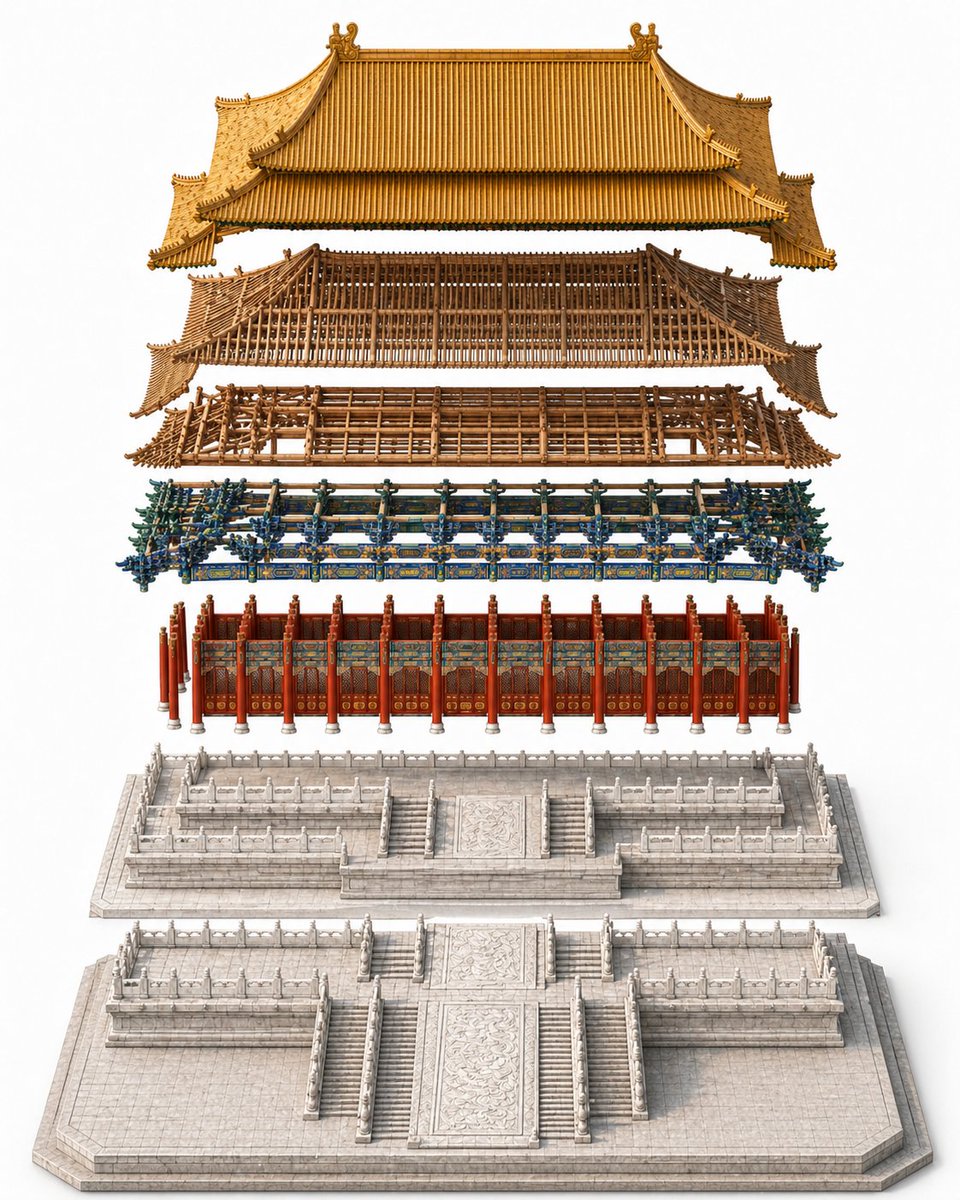
Diagram Aula Istana Kekaisaran yang Terurai
Perintah ini menghasilkan tampilan detail yang bersih dan jelas dari aula istana tradisional Tiongkok untuk visualisasi arsitektur, referensi warisan budaya, atau seni konsep urutan konstruksi.
Ini adalah contoh kasus GPT Image 2 untuk Interior & Arsitektur . Gunakan contoh siap salin di bawah ini untuk menghasilkan visual serupa, dan tinjau atribusi Awesome GPT Image 2 Prompts serta hak penggunaan komersial sebelum digunakan kembali.
Butuh seluruh rangkaian prompt? Gunakan Interior & Arsitektur Untuk contoh terkait lainnya, kunjungi pusat topik, atau buka GPT Image 2 katalog cepat untuk indeks contoh lengkap, struktur yang dapat digunakan kembali, dan atribusi sumber.
Free 1K preview
Generate one preview image instantly, no sign-up required.
1633/4000
Mengingatkan
Prompt siap salin
A highly detailed exploded architectural assembly diagram of {argument name="building name" default="a grand imperial Chinese palace hall"}, shown in a clean studio setting on a pure white background. Use a centered, perfectly symmetrical composition with a slightly elevated isometric front view. The building is vertically separated into 6 clearly distinguishable construction layers, floating one above another with even spacing and precise alignment on the central axis. From bottom to top, show: 1) a large pale stone foundation platform with broad front stairs, carved central ramp, tiled paving, and perimeter edges; 2) a raised white marble terrace layer with multiple staircases, carved balustrades, and layered ceremonial platforms; 3) the main hall facade with a row of red lacquered columns, red doors and wall panels, and richly painted decorative bands; 4) an elaborate blue-green-gold dougong bracket set running across the width of the structure, dense and ornate; 5) a brown wooden roof frame and upper timber skeleton with visible beams, lattice structure, and curved eaves; 6) the finished imperial golden tiled roof floating at the top, with sweeping double-eaved silhouette, ridge ornaments, upturned corners, and finely ribbed tiles. Emphasize realistic materials: pale carved stone, lacquered red wood, painted brackets, raw timber framework, and glazed golden roof tiles. The image should feel like a museum-grade architectural construction explainer or premium reference plate, extremely crisp, elegant, and technical, but without labels, text, people, vehicles, tools, scaffolding, or surrounding buildings.Variabel perintah
Placeholder argumen yang dapat diedit ditemukan dalam prompt, beserta nilai defaultnya.
Variabel
building name
Bawaan
a grand imperial Chinese palace hall
Best for
- - Interior & Arsitektur visual exploration
- - Image generation and reference-image edits
- - Reusable briefs that keep source attribution visible
Change these parts
- - Subject, product, character, or scene
- - Aspect ratio, camera, lighting, and background
- - Brand, text, color, and output constraints
Recommended model and settings
- - Model: gpt-image-2
- - Input mode: Teks ke Gambar
- - Aspect ratio: source
- - Commercial status: review original source
How to use this prompt
- 1. Copy the prompt and preserve its structure for the first test.
- 2. Replace the subject, context, and publishing channel.
- 3. Change one camera, lighting, or style variable per iteration.
- 4. Inspect the output, source, text, and rights before reuse.
Limitations, source, and reuse cautions
- - Generated output is an editable draft, not factual, legal, or rights evidence.
- - Review the linked source, people, brands, logos, text, and third-party media before commercial use.
Diimpor dari Awesome GPT Image 2 Prompts . Atribusi diperlukan. Status penggunaan komersial adalah allowed ; tinjau hak sumber sebelum penggunaan berbayar.
Lebih banyak kasus dalam kategori ini
Diprioritaskan berdasarkan kategori, kompatibilitas mode input, kualitas, dan risiko yang lebih rendah.






Catatan penggunaan kembali dan sumber
Gunakan perintah ini dengan aman setelah melihat pratinjau kasus.
- 1.Salin perintah tersebut atau buka langsung di Dovoo dengan tombol pembuatan.
- 2.Sesuaikan variabel, rasio aspek, dan gambar referensi untuk kebutuhan Anda sendiri.
- 3.Sebelum mempublikasikan atau menggunakan untuk tujuan berbayar, verifikasi hak sumber, persyaratan atribusi, dan risiko merek atau citra.