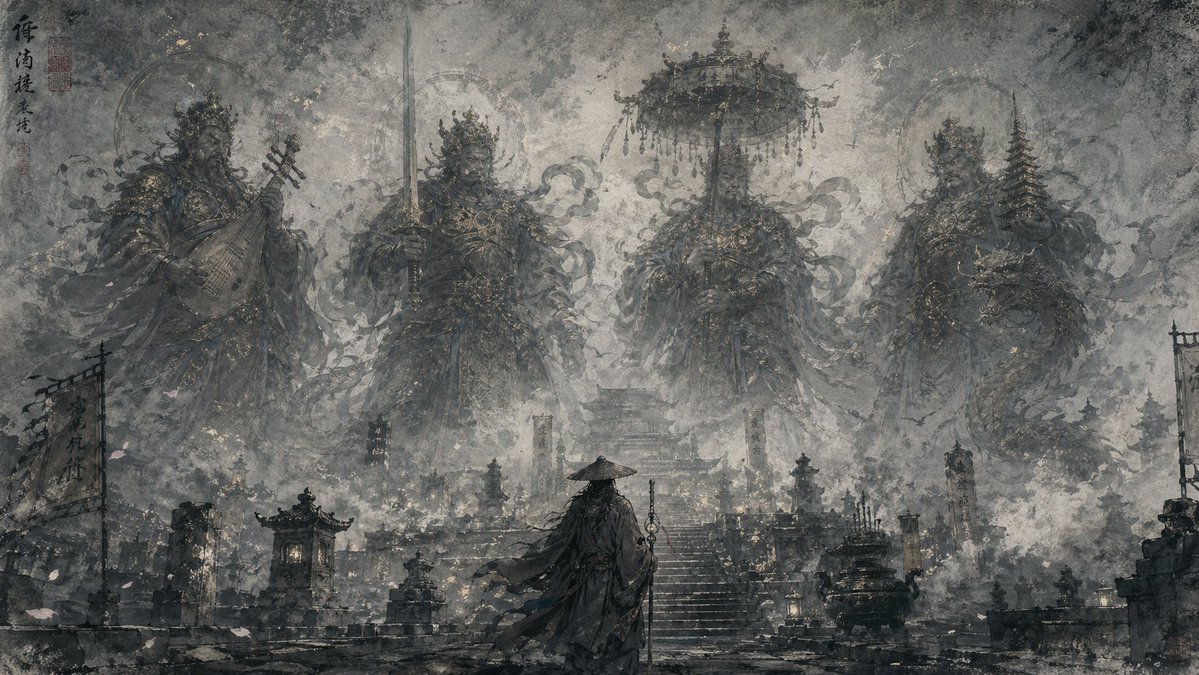
Ilustrasi Fantasi Tinta Timur
Sebuah panduan yang menggugah untuk menghasilkan ilustrasi bergaya tinta Timur yang halus dan misterius, menampilkan siluet transparan, suasana berkabut, dan kesan kedalaman sinematik.
Ini adalah contoh kasus GPT Image 2 untuk Ilustrasi & Seni . Gunakan contoh siap salin di bawah ini untuk menghasilkan visual serupa, dan tinjau atribusi Awesome GPT Image 2 Prompts serta hak penggunaan komersial sebelum digunakan kembali.
Butuh seluruh rangkaian prompt? Gunakan Ilustrasi & Seni Untuk contoh terkait lainnya, kunjungi pusat topik, atau buka GPT Image 2 katalog cepat untuk indeks contoh lengkap, struktur yang dapat digunakan kembali, dan atribusi sumber.
Free 1K preview
Generate one preview image instantly, no sign-up required.
1269/4000
Mengingatkan
Prompt siap salin
Oriental ink fantasy style illustration, black and gray low saturation tones, rice paper texture, old mural texture, ink wash, graininess, overall ethereal, profound, mysterious, and quiet. In the foreground is the back of a {argument name="character identity" default="character"} standing in a {argument name="scene location" default="scene"}; the middle ground has [architectural/prop elements]; a giant {argument name="background subject" default="statue/phantom/historical figure/Buddha/cavalry silhouette"} emerges in the distance. The main subject has a translucent layered silhouette effect, as if condensed from mist, ink, and soft light, with blurred edges naturally merging into the background. Thin mist, water vapor, smoke, birds, petals, and tiny light spots float in the frame, with rich layers and profound space. The overall tone is mainly gray-black and cool blue-gray, with local accents of low-saturation gold and off-white glimmer. The atmosphere is compassionate, fateful, solemn, and poetic, with cinematic depth composition and an Oriental ghost story feel; painterly, ethereal, translucent layered silhouettes, misty atmosphere, subtle gold accents, cinematic depth, high detail, soft diffused light, vertical composition.

Subject: Guanyin 3:4
Variabel perintah
Placeholder argumen yang dapat diedit ditemukan dalam prompt, beserta nilai defaultnya.
Variabel
character identity
Bawaan
character
Variabel
scene location
Bawaan
scene
Variabel
background subject
Bawaan
statue/phantom/historical figure/Buddha/cavalry silhouette
Best for
- - Ilustrasi & Seni visual exploration
- - Image generation and reference-image edits
- - Reusable briefs that keep source attribution visible
Change these parts
- - Subject, product, character, or scene
- - Aspect ratio, camera, lighting, and background
- - Brand, text, color, and output constraints
Recommended model and settings
- - Model: gpt-image-2
- - Input mode: Teks ke Gambar
- - Aspect ratio: source
- - Commercial status: review original source
How to use this prompt
- 1. Copy the prompt and preserve its structure for the first test.
- 2. Replace the subject, context, and publishing channel.
- 3. Change one camera, lighting, or style variable per iteration.
- 4. Inspect the output, source, text, and rights before reuse.
Limitations, source, and reuse cautions
- - Generated output is an editable draft, not factual, legal, or rights evidence.
- - Review the linked source, people, brands, logos, text, and third-party media before commercial use.
Diimpor dari Awesome GPT Image 2 Prompts . Atribusi diperlukan. Status penggunaan komersial adalah allowed ; tinjau hak sumber sebelum penggunaan berbayar.
Lebih banyak kasus dalam kategori ini
Diprioritaskan berdasarkan kategori, kompatibilitas mode input, kualitas, dan risiko yang lebih rendah.

Boisterous Shrimpers Entering Pub
Teks ke Gambar

Hell Hound Character Sheet Infographic
Teks ke Gambar

Tuxedo Cat Photo and Line Art Diptych
Teks ke Gambar

Cute Focus Desk Flat Lay and Kawaii Illustration
Teks ke Gambar

MotoGP POV Cornering Shot
Teks ke Gambar

Luxury Travel Fashion Portrait Prompt
Teks ke Gambar
Catatan penggunaan kembali dan sumber
Gunakan perintah ini dengan aman setelah melihat pratinjau kasus.
- 1.Salin perintah tersebut atau buka langsung di Dovoo dengan tombol pembuatan.
- 2.Sesuaikan variabel, rasio aspek, dan gambar referensi untuk kebutuhan Anda sendiri.
- 3.Sebelum mempublikasikan atau menggunakan untuk tujuan berbayar, verifikasi hak sumber, persyaratan atribusi, dan risiko merek atau citra.