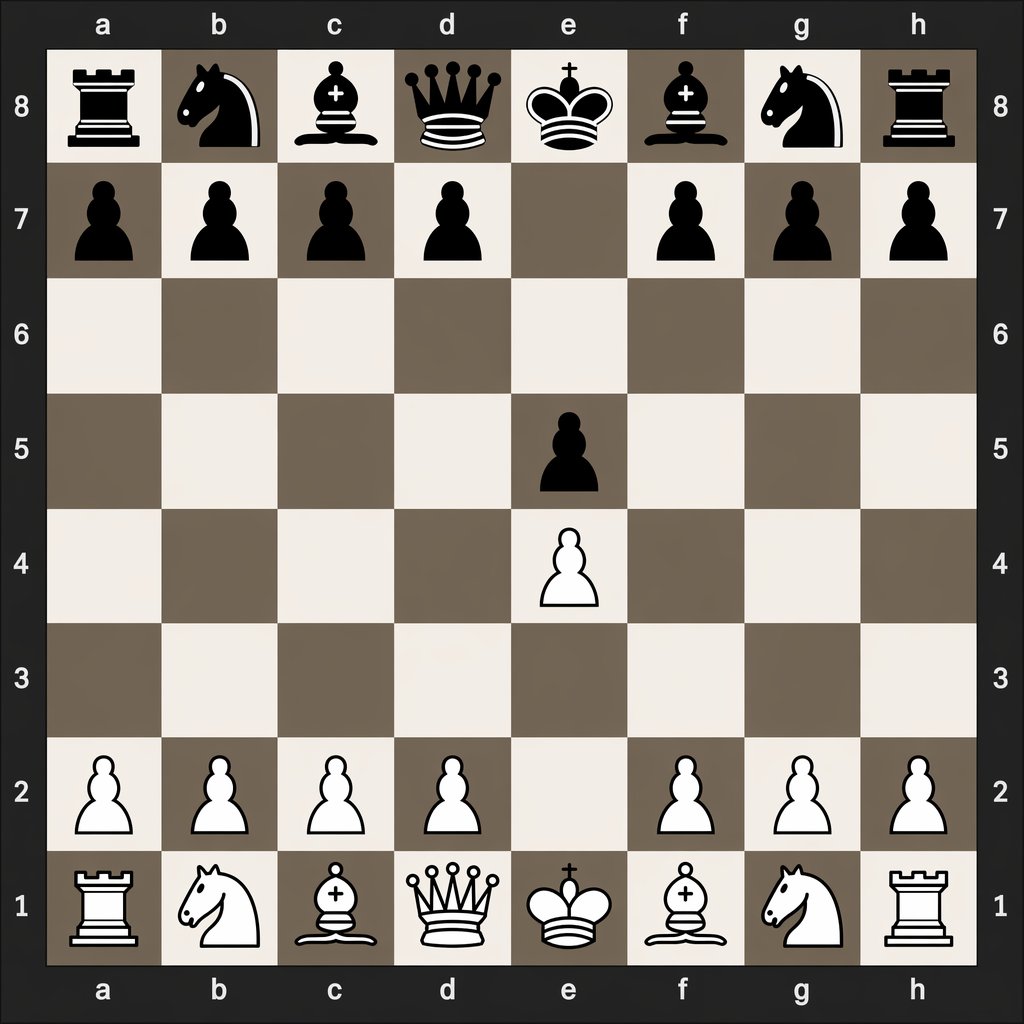
Papan Catur Digital Setelah 1.e4 e5
Perintah ini menghasilkan diagram catur digital yang rapi yang menunjukkan posisi papan yang tepat setelah langkah pembukaan 1.e4 e5, berguna untuk tutorial catur dan perbandingan notasi langkah.
Ini adalah contoh kasus GPT Image 2 untuk Grafis & Poster . Gunakan contoh siap salin di bawah ini untuk menghasilkan visual serupa, dan tinjau atribusi Awesome GPT Image 2 Prompts serta hak penggunaan komersial sebelum digunakan kembali.
Butuh seluruh rangkaian prompt? Gunakan Grafis & Poster Untuk contoh terkait lainnya, kunjungi pusat topik, atau buka GPT Image 2 katalog cepat untuk indeks contoh lengkap, struktur yang dapat digunakan kembali, dan atribusi sumber.
Free 1K preview
Generate one preview image instantly, no sign-up required.
1088/4000
Mengingatkan
Prompt siap salin
A clean, flat digital top-down chessboard centered in the frame, shown as a square 8x8 board with algebraic coordinates visible on all four sides: letters a through h along the top and bottom, and numbers 8 through 1 along the left and right. Use a dark charcoal outer background and border, with alternating light beige and muted taupe-gray squares. Render simple high-contrast 2D chess icons, black pieces at the top and white pieces at the bottom, in a crisp vector-like style with no wood texture, no realistic lighting, and no extra interface elements. Show the exact position after the opening moves 1. e4 e5: black major pieces on a8 rook, b8 knight, c8 bishop, d8 queen, e8 king, f8 bishop, g8 knight, h8 rook; black pawns on a7, b7, c7, d7, f7, g7, h7, and e5; white pawns on a2, b2, c2, d2, f2, g2, h2, and e4; white major pieces on a1 rook, b1 knight, c1 bishop, d1 queen, e1 king, f1 bishop, g1 knight, h1 rook. Leave all other squares empty. Keep the composition perfectly symmetrical, instructional, and legible, like a digital chess diagram illustrating opening move order.
Best for
- - Grafis & Poster visual exploration
- - Image generation and reference-image edits
- - Reusable briefs that keep source attribution visible
Change these parts
- - Subject, product, character, or scene
- - Aspect ratio, camera, lighting, and background
- - Brand, text, color, and output constraints
Recommended model and settings
- - Model: gpt-image-2
- - Input mode: Teks ke Gambar
- - Aspect ratio: source
- - Commercial status: review original source
How to use this prompt
- 1. Copy the prompt and preserve its structure for the first test.
- 2. Replace the subject, context, and publishing channel.
- 3. Change one camera, lighting, or style variable per iteration.
- 4. Inspect the output, source, text, and rights before reuse.
Limitations, source, and reuse cautions
- - Generated output is an editable draft, not factual, legal, or rights evidence.
- - Review the linked source, people, brands, logos, text, and third-party media before commercial use.
Diimpor dari Awesome GPT Image 2 Prompts . Atribusi diperlukan. Status penggunaan komersial adalah allowed ; tinjau hak sumber sebelum penggunaan berbayar.
Lebih banyak kasus dalam kategori ini
Diprioritaskan berdasarkan kategori, kompatibilitas mode input, kualitas, dan risiko yang lebih rendah.






Catatan penggunaan kembali dan sumber
Gunakan perintah ini dengan aman setelah melihat pratinjau kasus.
- 1.Salin perintah tersebut atau buka langsung di Dovoo dengan tombol pembuatan.
- 2.Sesuaikan variabel, rasio aspek, dan gambar referensi untuk kebutuhan Anda sendiri.
- 3.Sebelum mempublikasikan atau menggunakan untuk tujuan berbayar, verifikasi hak sumber, persyaratan atribusi, dan risiko merek atau citra.