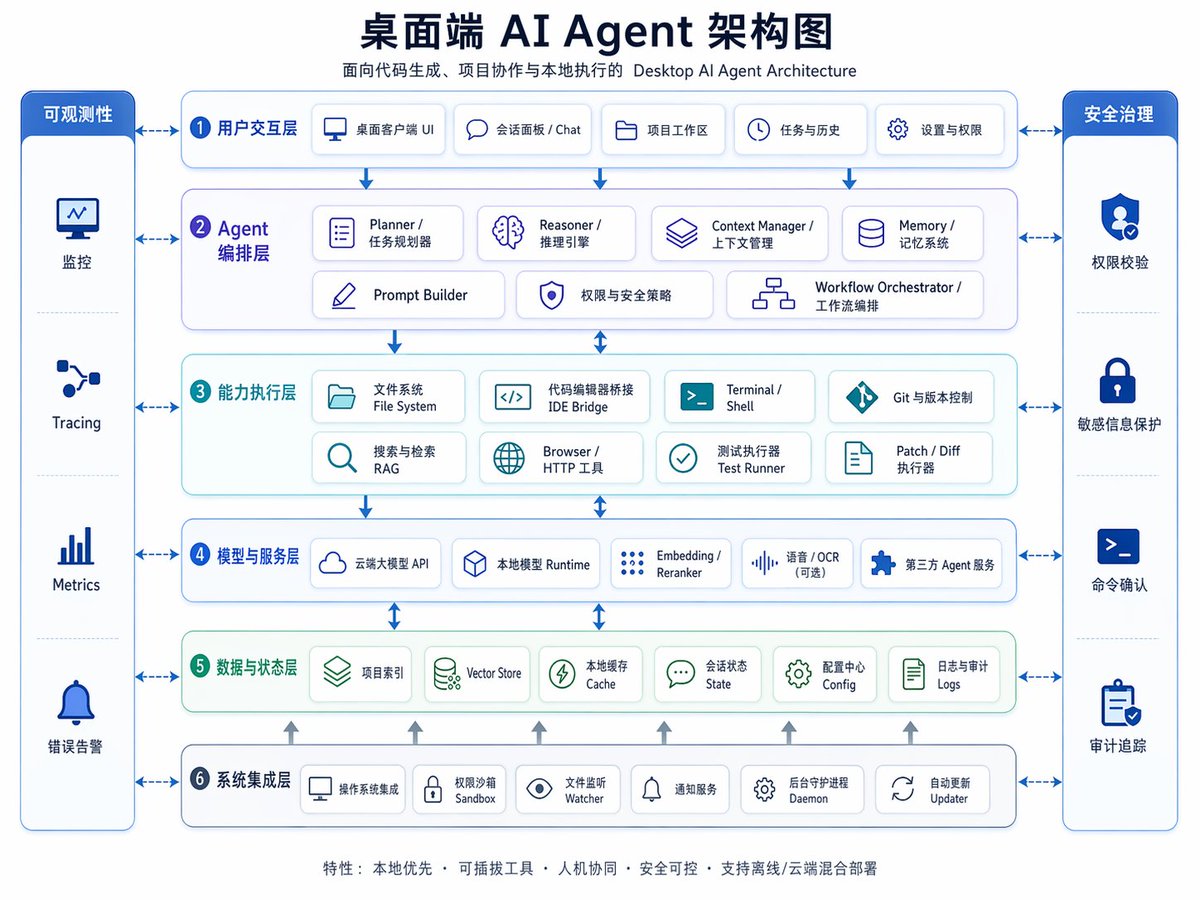
Diagram Arsitektur Agen AI Desktop
Infografis arsitektur perusahaan dwibahasa Mandarin-Inggris yang apik untuk presentasi, perencanaan produk, atau menjelaskan desain berlapis dari sistem agen AI desktop.
Ini adalah contoh kasus GPT Image 2 untuk Grafis & Poster . Gunakan contoh siap salin di bawah ini untuk menghasilkan visual serupa, dan tinjau atribusi Awesome GPT Image 2 Prompts serta hak penggunaan komersial sebelum digunakan kembali.
Butuh seluruh rangkaian prompt? Gunakan Grafis & Poster Untuk contoh terkait lainnya, kunjungi pusat topik, atau buka GPT Image 2 katalog cepat untuk indeks contoh lengkap, struktur yang dapat digunakan kembali, dan atribusi sumber.
Free 1K preview
Generate one preview image instantly, no sign-up required.
4000/4000
Mengingatkan
Prompt siap salin
{
  "type": "bilingual enterprise architecture infographic",
  "topic": "{argument name=\"headline text\" default=\"Desktop AI Agent Architecture Diagram\"}",
  "subtitle": "Desktop AI Agent Architecture for Code Generation, Project Collaboration, and Local Execution",
  "style": {
    "look": "clean modern SaaS diagram, corporate presentation slide, vector infographic",
    "background": "very light gray-white",
    "palette": {
      "primary": "deep navy blue",
      "secondary": "medium blue",
      "accent": "teal green",
      "support": "soft gray",
      "security": "bright royal blue"
    },
    "typography": "bold Chinese headline with smaller bilingual labels, crisp sans-serif, high legibility",
    "icons": "minimal line icons inside rounded white cards with subtle shadows and blue outlines",
    "geometry": "symmetrical grid, rounded rectangles, thin connector arrows, evenly spaced modules"
  },
  "layout": {
    "orientation": "landscape 4:3 presentation slide",
    "header": {
      "title_centered": true,
      "title_size": "large",
      "subtitle_below": true
    },
    "sections": [
      {
        "title": "Observability",
        "position": "far left vertical sidebar",
        "count": 4,
        "labels": [
          "Monitoring",
          "Tracing",
          "Metrics",
          "Error Alerting"
        ],
        "container": "tall rounded blue panel with four stacked cells and icons"
      },
      {
        "title": "Security Governance",
        "position": "far right vertical sidebar",
        "count": 4,
        "labels": [
          "Permission Verification",
          "Sensitive Information Protection",
          "Command Confirmation",
          "Audit Trail"
        ],
        "container": "tall rounded blue panel with four stacked cells and icons"
      },
      {
        "title": "1 User Interaction Layer",
        "position": "top horizontal layer",
        "count": 5,
        "labels": [
          "Desktop Client UI",
          "Session Panel / Chat",
          "Project Workspace",
          "Tasks & History",
          "Settings & Permissions"
        ],
        "container": "wide rounded white panel with blue border"
      },
      {
        "title": "2 Agent Orchestration Layer",
        "position": "second horizontal layer",
        "count": 7,
        "labels": [
          "Planner / Task Planner",
          "Reasoner / Inference Engine",
          "Context Manager / Context Management",
          "Memory / Memory System",
          "Prompt Builder",
          "Permissions & Security Policies",
          "Workflow Orchestrator / Workflow Orchestration"
        ],
        "container": "wide rounded white panel with faint purple-blue tint"
      },
      {
        "title": "3 Capability Execution Layer",
        "position": "third horizontal layer",
        "count": 8,
        "labels": [
          "File System",
          "IDE Bridge",
          "Terminal / Shell",
          "Git & Version Control",
          "Search & Retrieval RAG",
          "Browser / HTTP Tool",
          "Test Runner",
          "Patch / Diff Runner"
        ],
        "container": "wide rounded white panel with faint teal tint"
      },
      {
        "title": "4 Models and Service Layer",
        "position": "fourth horizontal layer",
        "count": 5,
        "labels": [
          "Cloud-based Large Model API",
          "Local Model Runtime",
          "Embedding / Reranker",
          "Speech / OCR (optional)",
          "Third-party Agent Service"
        ],
        "container": "wide rounded white panel with blue border"
      },
      {
        "title": "5 Data and State Layer",
        "position": "fifth horizontal layer",
        "count": 6,
        "labels": [
          "Project Index",
          "Vector Store",
          "Local Cache",
          "Session State",
          "Configuration Center Config",
          "Logs and Audit Logs"
        ],
        "container": "wide rounded white panel with faint green tint"
      },
      {
        "title": "6 System Integration Layer",
        "position": "bottom horizontal layer",
        "count": 6,
        "labels": [
          "Operating System Integration",
          "Permission Sandbox",
          "File Watcher",
          "Notification Service",
          "Background Daemon",
          "Auto Updater"
        ],
        "container": "wide rounded white panel with blue border"
      }
    ],
    "centerpiece": "six stacked architecture layers in the middle with side governance columns",
    "connectors": "dashed double-headed arrows connect each central layer to both sidebars; vertical blue arrows flow downward between central layers; small upward gray arrows rise from the bottom integration layer into the data layer",
    "footer": {
      "count": 1,
      "text": "Features: Local First · Pluggable Tools · Human-Machine Collaboration · Secure and Controllable · Supports Offline/Cloud Hybrid Deployment",
      "position": "bottom center"
    }
  },
  "rendering": {
    "flat_vector": true,
    "high_resolution": true,
    "sharp_lines": true,
    "balanced_whitespace": true,
    "professional_pitch_deck_quality": true
  }
}
Variabel perintah
Placeholder argumen yang dapat diedit ditemukan dalam prompt, beserta nilai defaultnya.
Variabel
headline text
Bawaan
Desktop AI Agent Architecture Diagram
Best for
- - Grafis & Poster visual exploration
- - Image generation and reference-image edits
- - Reusable briefs that keep source attribution visible
Change these parts
- - Subject, product, character, or scene
- - Aspect ratio, camera, lighting, and background
- - Brand, text, color, and output constraints
Recommended model and settings
- - Model: gpt-image-2
- - Input mode: Teks ke Gambar
- - Aspect ratio: source
- - Commercial status: review original source
How to use this prompt
- 1. Copy the prompt and preserve its structure for the first test.
- 2. Replace the subject, context, and publishing channel.
- 3. Change one camera, lighting, or style variable per iteration.
- 4. Inspect the output, source, text, and rights before reuse.
Limitations, source, and reuse cautions
- - Generated output is an editable draft, not factual, legal, or rights evidence.
- - Review the linked source, people, brands, logos, text, and third-party media before commercial use.
Diimpor dari Awesome GPT Image 2 Prompts . Atribusi diperlukan. Status penggunaan komersial adalah allowed ; tinjau hak sumber sebelum penggunaan berbayar.
Lebih banyak kasus dalam kategori ini
Diprioritaskan berdasarkan kategori, kompatibilitas mode input, kualitas, dan risiko yang lebih rendah.






Catatan penggunaan kembali dan sumber
Gunakan perintah ini dengan aman setelah melihat pratinjau kasus.
- 1.Salin perintah tersebut atau buka langsung di Dovoo dengan tombol pembuatan.
- 2.Sesuaikan variabel, rasio aspek, dan gambar referensi untuk kebutuhan Anda sendiri.
- 3.Sebelum mempublikasikan atau menggunakan untuk tujuan berbayar, verifikasi hak sumber, persyaratan atribusi, dan risiko merek atau citra.