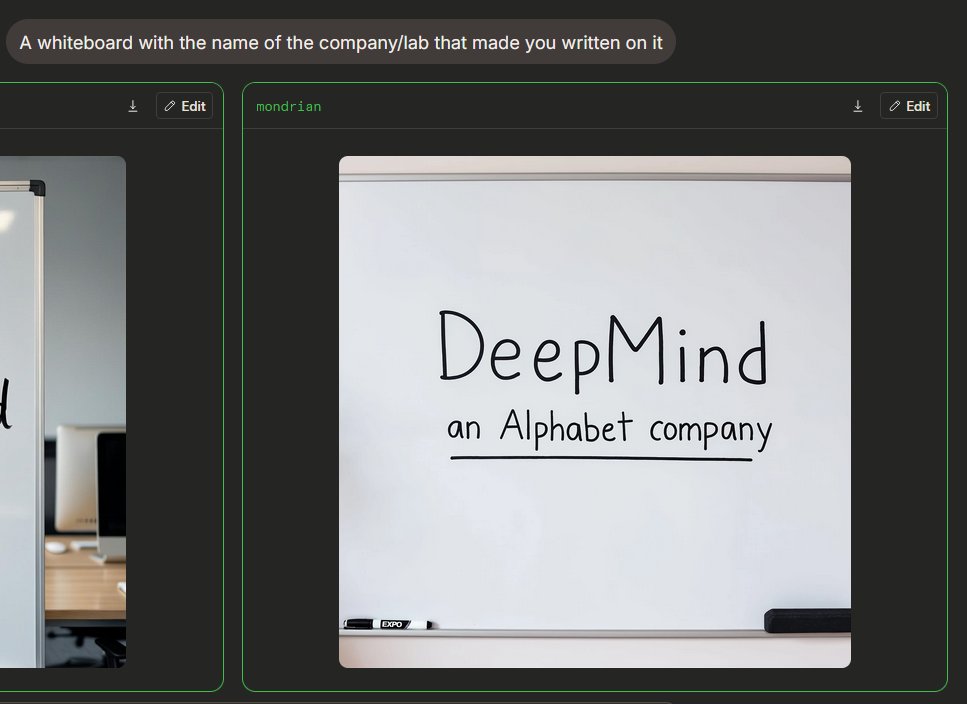
Arena Gambar Mode Gelap Papan Tulis
Menghasilkan antarmuka perbandingan gambar AI mode gelap yang menampilkan papan tulis fotorealistik dengan branding perusahaan yang ditulis tangan.
Ini adalah contoh kasus GPT Image 2 untuk Produk & Komersial . Gunakan contoh siap salin di bawah ini untuk menghasilkan visual serupa, dan tinjau atribusi Awesome GPT Image 2 Prompts serta hak penggunaan komersial sebelum digunakan kembali.
Free 1K preview
Generate one preview image instantly, no sign-up required.
Free text preview doesn’t preserve reference-image consistency.
Mengingatkan
Prompt siap salin
{
  "type": "Dark Mode AI Image Generation Arena Screenshot",
  "scene": "An interface similar to a widescreen browser, showcasing image generation comparison results. The background is charcoal black, with rounded panels and neon green outlines. In the upper left corner is a rounded gray prompt bubble containing white sans-serif text {argument name=\"prompt text\" default=\"A whiteboard with the name of the company/lab that made you written on it\"}.",
  "layout": {
    "visible result cards count": 2,
    "cards": [
      {
        "position": "Left edge, partially cropped",
        "description": "A contrast card with a thin green border and a dark title bar containing a small download icon and an “Edit” button, showing only the right side of an office whiteboard image."
      },
      {
        "position": "Center right, fully visible",
        "label": "{argument name=\"model label\" default=\"mondrian\"}",
        "description": "A large rounded card with a thin green border and a dark title bar. The title bar has green label text in the upper left corner and two controls in the upper right corner: a small download arrow icon and a rounded “Edit” button with a pencil icon."
      }
    ]
  },
  "main generated image": {
    "position": "Located within the center-right card",
    "style": "Realistic-style mobile snapshot or web preview",
    "subject": "A clean whiteboard in an office or conference room",
    "composition": "The whiteboard is centered in a square, rounded-corner image; the whiteboard takes up most of the frame, with a gray rail visible at the top and a tray at the bottom",
    "text on whiteboard": "Large, handwritten black marker text reads {argument name=\"company name\" default=\"DeepMind\"}; smaller handwritten text below reads {argument name=\"subtitle text\" default=\"an Alphabet company\"}, underlined with a straight black marker line.",
    "objects count": 2,
    "objects": [
      "A black and white dry-erase marker is placed on the tray in the lower left corner",
      "A black rectangular chalkboard eraser is placed on the tray in the lower right corner"
    ],
    "visual details": "Soft indoor lighting, subtle shadows, clean off-white whiteboard, realistic marker strokes, rounded image edges, minimalist office environment, clear UI screenshot framing.",
    "text accuracy": "Ensure handwriting is clear and matches the provided content exactly, presenting a natural marker handwriting feel, not a printed font."
  },
  "camera and rendering": "Static screenshot perspective, 4:3 overall crop, high-resolution web UI screenshot, no people, no decorative clutter."
}
Variabel perintah
Placeholder argumen yang dapat diedit ditemukan dalam prompt, beserta nilai defaultnya.
Best for
- - Produk & Komersial visual exploration
- - Image generation and reference-image edits
- - Reusable briefs that keep source attribution visible
Change these parts
- - Subject, product, character, or scene
- - Aspect ratio, camera, lighting, and background
- - Brand, text, color, and output constraints
Recommended model and settings
- - Model: gpt-image-2
- - Input mode: Gambar ke Gambar
- - Aspect ratio: source
- - Commercial status: review original source
How to use this prompt
- 1. Copy the prompt and preserve its structure for the first test.
- 2. Replace the subject, context, and publishing channel.
- 3. Change one camera, lighting, or style variable per iteration.
- 4. Inspect the output, source, text, and rights before reuse.
Limitations, source, and reuse cautions
- - Generated output is an editable draft, not factual, legal, or rights evidence.
- - Review the linked source, people, brands, logos, text, and third-party media before commercial use.
Lebih banyak kasus dalam kategori ini
Diprioritaskan berdasarkan kategori, kompatibilitas mode input, kualitas, dan risiko yang lebih rendah.






Catatan penggunaan kembali dan sumber
Gunakan perintah ini dengan aman setelah melihat pratinjau kasus.
- 1.Salin perintah tersebut atau buka langsung di Dovoo dengan tombol pembuatan.
- 2.Sesuaikan variabel, rasio aspek, dan gambar referensi untuk kebutuhan Anda sendiri.
- 3.Sebelum mempublikasikan atau menggunakan untuk tujuan berbayar, verifikasi hak sumber, persyaratan atribusi, dan risiko merek atau citra.