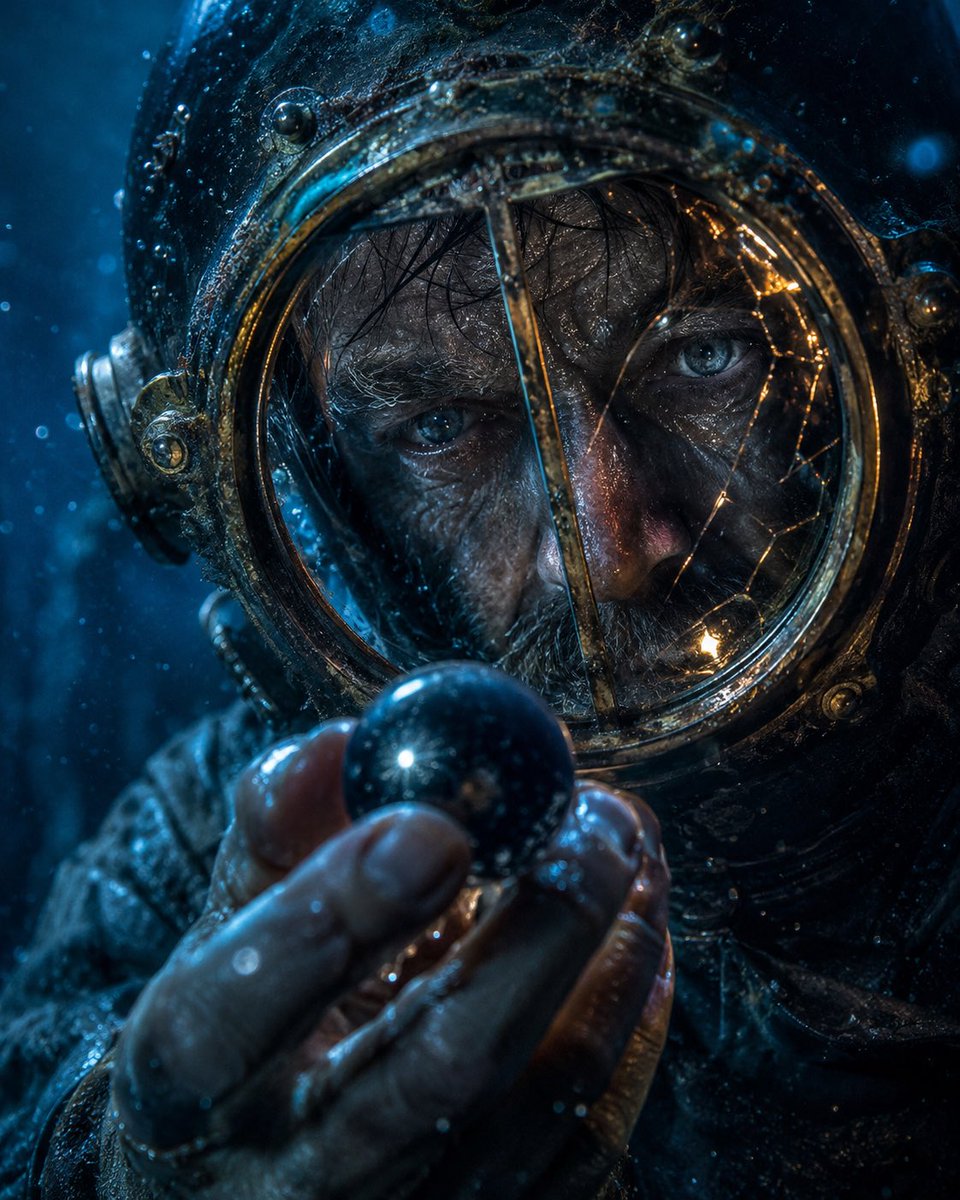
Artefak Penyelam Laut Dalam Tampilan Jarak Dekat
Sebuah petunjuk hiperrealistis sinematik untuk menghasilkan gambar close-up bawah air yang penuh suasana, menampilkan seorang penyelam kuno yang menggenggam artefak persegi gelap yang misterius.
Ini adalah contoh kasus GPT Image 2 untuk Potret & Karakter . Gunakan contoh siap salin di bawah ini untuk menghasilkan visual serupa, dan tinjau atribusi Awesome GPT Image 2 Prompts serta hak penggunaan komersial sebelum digunakan kembali.
Butuh seluruh rangkaian prompt? Gunakan Potret & Karakter Untuk contoh terkait lainnya, kunjungi pusat topik, atau buka GPT Image 2 katalog cepat untuk indeks contoh lengkap, struktur yang dapat digunakan kembali, dan atribusi sumber.
Free 1K preview
Generate one preview image instantly, no sign-up required.
1449/4000
Mengingatkan
Prompt siap salin
Cinematic hyperreal close-up portrait of {argument name="character" default="an antique deep-sea diver in a weathered brass diving helmet"} holding {argument name="object" default="a dark mysterious square artifact"} directly in front of the face with intent. The object is centered and blocks most of the visor, appearing as a flat near-black charcoal square with a subtle vertical gradient, sharp clean edges, and no markings. Show the diver’s wet gloved hands at the bottom foreground, fingers curled around the artifact, with realistic skin/leather texture, droplets, grime, and specular highlights. The helmet fills the frame: aged bronze and blackened metal, round rivets, ornate circular side fittings, corroded seams, scratches, algae-like residue, and a glass porthole rim barely visible around the square. Illuminate the scene with {argument name="lighting" default="cold blue underwater light from the left with warm amber reflections along the brass rim"}. Add {argument name="atmospheric elements" default="suspended bubbles, drifting particles, and murky underwater haze"} throughout the frame. The mood is tense and enigmatic; any visible eyes behind the glass should convey {argument name="emotion" default="focused obsession and dread"}. Use shallow depth of field, macro-level detail, cinematic contrast, teal-blue color grading, glossy wet surfaces, volumetric underwater ambience, no text, no watermark, vertical 4:5 composition.Variabel perintah
Placeholder argumen yang dapat diedit ditemukan dalam prompt, beserta nilai defaultnya.
Variabel
character
Bawaan
an antique deep-sea diver in a weathered brass diving helmet
Variabel
object
Bawaan
a dark mysterious square artifact
Variabel
lighting
Bawaan
cold blue underwater light from the left with warm amber reflections along the brass rim
Variabel
atmospheric elements
Bawaan
suspended bubbles, drifting particles, and murky underwater haze
Variabel
emotion
Bawaan
focused obsession and dread
Best for
- - Potret & Karakter visual exploration
- - Image generation and reference-image edits
- - Reusable briefs that keep source attribution visible
Change these parts
- - Subject, product, character, or scene
- - Aspect ratio, camera, lighting, and background
- - Brand, text, color, and output constraints
Recommended model and settings
- - Model: gpt-image-2
- - Input mode: Teks ke Gambar
- - Aspect ratio: source
- - Commercial status: review original source
How to use this prompt
- 1. Copy the prompt and preserve its structure for the first test.
- 2. Replace the subject, context, and publishing channel.
- 3. Change one camera, lighting, or style variable per iteration.
- 4. Inspect the output, source, text, and rights before reuse.
Limitations, source, and reuse cautions
- - Generated output is an editable draft, not factual, legal, or rights evidence.
- - Review the linked source, people, brands, logos, text, and third-party media before commercial use.
Diimpor dari Awesome GPT Image 2 Prompts . Atribusi diperlukan. Status penggunaan komersial adalah allowed ; tinjau hak sumber sebelum penggunaan berbayar.
Lebih banyak kasus dalam kategori ini
Diprioritaskan berdasarkan kategori, kompatibilitas mode input, kualitas, dan risiko yang lebih rendah.

Cinematic Blue Backlit Portrait
Teks ke Gambar

Hell Hound Character Sheet Infographic
Teks ke Gambar

Studio Portrait of Woman with Sunglasses
Teks ke Gambar

Street Selfie with Cat in Matching Cap
Teks ke Gambar

Cute Speech Bubble Mascot Profile Icon
Teks ke Gambar

Playful Morning Selfie Portrait
Teks ke Gambar
Catatan penggunaan kembali dan sumber
Gunakan perintah ini dengan aman setelah melihat pratinjau kasus.
- 1.Salin perintah tersebut atau buka langsung di Dovoo dengan tombol pembuatan.
- 2.Sesuaikan variabel, rasio aspek, dan gambar referensi untuk kebutuhan Anda sendiri.
- 3.Sebelum mempublikasikan atau menggunakan untuk tujuan berbayar, verifikasi hak sumber, persyaratan atribusi, dan risiko merek atau citra.