Slide Infografis Keahlian AI Gelap
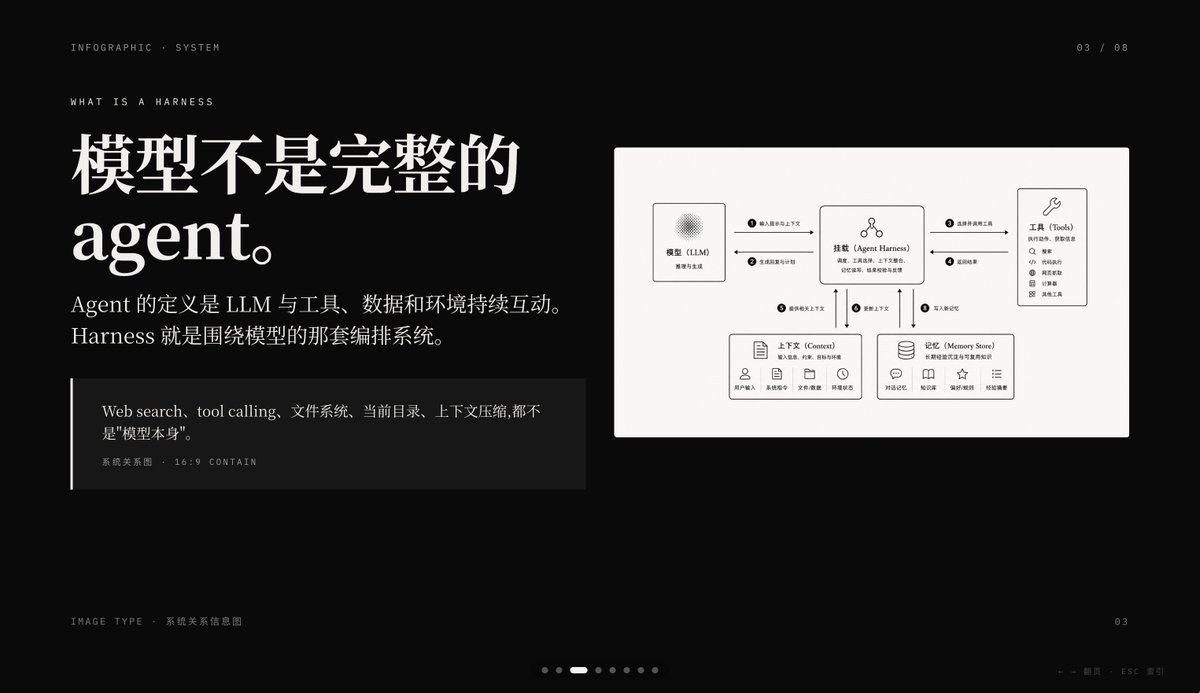
Slide presentasi premium dengan latar belakang hitam yang menjelaskan sistem agen AI dengan tipografi editorial Cina berukuran besar dan diagram hubungan sistem yang rapi, ideal untuk sampul PPT atau halaman penjelasan konsep.
Ini adalah contoh kasus GPT Image 2 untuk Grafis & Poster . Gunakan contoh siap salin di bawah ini untuk menghasilkan visual serupa, dan tinjau atribusi Awesome GPT Image 2 Prompts serta hak penggunaan komersial sebelum digunakan kembali.
Free 1K preview
Generate one preview image instantly, no sign-up required.
Mengingatkan
Prompt siap salin
{
  "type": "dark editorial infographic slide",
  "style": "premium keynote-style presentation page with minimalist Swiss-inspired layout, strong contrast, elegant serif headline paired with small uppercase sans-serif metadata, lots of negative space, cinematic black background, subtle grain, refined white typography, monochrome diagram card",
  "aspect_ratio": "16:9",
  "background": {
    "color": "deep black"
  },
  "layout": {
    "sections": [
      {
        "title": "top metadata",
        "position": "top edge",
        "count": 3,
        "labels": [
          "INFOGRAPHIC · SYSTEM",
          "03 / 08",
          "WHAT IS A HARNESS"
        ]
      },
      {
        "title": "main text block",
        "position": "left side",
        "count": 3,
        "labels": [
          "The model is not a complete Agent.",
          "The definition of an Agent is the continuous interaction of an LLM with tools, data, and the environment. Harness is the orchestration system around the model.",
          "Web search, tool calling, file system, current directory, and context compression are not the \"model itself\"."
        ]
      },
      {
        "title": "diagram card",
        "position": "right side",
        "count": 5,
        "labels": [
          "Model (LLM)",
          "Mount (Agent Harness)",
          "Tools",
          "Context",
          "Memory Store"
        ]
      },
      {
        "title": "footer",
        "position": "bottom edge",
        "count": 4,
        "labels": [
          "Image Type · System Relationship Diagram",
          "03",
          "← → Page   ESC Close",
          "7 pagination dots with the 3rd highlighted"
        ]
      }
    ],
    "centerpiece": "a large off-white rectangular card on the right containing a clean systems diagram"
  },
  "typography": {
    "headline_font": "high-contrast editorial serif, oversized, bold",
    "body_font": "modern serif for Chinese body copy",
    "meta_font": "thin uppercase sans-serif with generous tracking"
  },
  "diagram": {
    "card_color": "warm light gray",
    "border": "none or extremely subtle",
    "line_style": "thin black connector arrows",
    "icon_style": "simple outline icons",
    "nodes": [
      {
        "name": "Model (LLM)",
        "position": "upper left inside card",
        "details": "small box with subtle radial texture behind the heading, subtitle suggests reasoning and generation"
      },
      {
        "name": "Mount (Agent Harness)",
        "position": "upper center inside card",
        "details": "central orchestration box with small person-like icon above title and short descriptive text below"
      },
      {
        "name": "Tools",
        "position": "upper right inside card",
        "details": "tall box with wrench icon and a vertical list of 8 tool items"
      },
      {
        "name": "Context",
        "position": "lower left inside card",
        "details": "wide box with document icon, description line, and 5 small labeled icons along the bottom"
      },
      {
        "name": "Memory Store",
        "position": "lower right inside card",
        "details": "wide box with database icon, description line, and 5 small labeled icons along the bottom"
      }
    ],
    "connections": {
      "count": 8,
      "description": "numbered circular markers on the connector arrows show the orchestration flow between the 5 nodes, including bidirectional links from the central harness to tools, context, and memory, plus one link from the model to the harness"
    }
  },
  "color_palette": {
    "count": 4,
    "colors": [
      "black background",
      "white headline text",
      "soft gray body text",
      "warm light-gray diagram panel"
    ]
  },
  "customization": {
    "headline": "{argument name=\"headline text\" default=\"The model is not a complete Agent.\"}",
    "page_index": "{argument name=\"page number\" default=\"03 / 08\"}",
    "section_kicker": "{argument name=\"section label\" default=\"WHAT IS A HARNESS\"}",
    "diagram_topic": "{argument name=\"diagram topic\" default=\"System Relationship Diagram\"}",
    "quote": "{argument name=\"quote\" default=\"Web search, tool calling, file system, current directory, and context compression are not the "model itself".\"}"
  }
}
Variabel perintah
Placeholder argumen yang dapat diedit ditemukan dalam prompt, beserta nilai defaultnya.
Best for
- - Grafis & Poster visual exploration
- - Image generation and reference-image edits
- - Reusable briefs that keep source attribution visible
Change these parts
- - Subject, product, character, or scene
- - Aspect ratio, camera, lighting, and background
- - Brand, text, color, and output constraints
Recommended model and settings
- - Model: gpt-image-2
- - Input mode: Teks ke Gambar
- - Aspect ratio: source
- - Commercial status: review original source
How to use this prompt
- 1. Copy the prompt and preserve its structure for the first test.
- 2. Replace the subject, context, and publishing channel.
- 3. Change one camera, lighting, or style variable per iteration.
- 4. Inspect the output, source, text, and rights before reuse.
Limitations, source, and reuse cautions
- - Generated output is an editable draft, not factual, legal, or rights evidence.
- - Review the linked source, people, brands, logos, text, and third-party media before commercial use.
Lebih banyak kasus dalam kategori ini
Diprioritaskan berdasarkan kategori, kompatibilitas mode input, kualitas, dan risiko yang lebih rendah.






Catatan penggunaan kembali dan sumber
Gunakan perintah ini dengan aman setelah melihat pratinjau kasus.
- 1.Salin perintah tersebut atau buka langsung di Dovoo dengan tombol pembuatan.
- 2.Sesuaikan variabel, rasio aspek, dan gambar referensi untuk kebutuhan Anda sendiri.
- 3.Sebelum mempublikasikan atau menggunakan untuk tujuan berbayar, verifikasi hak sumber, persyaratan atribusi, dan risiko merek atau citra.