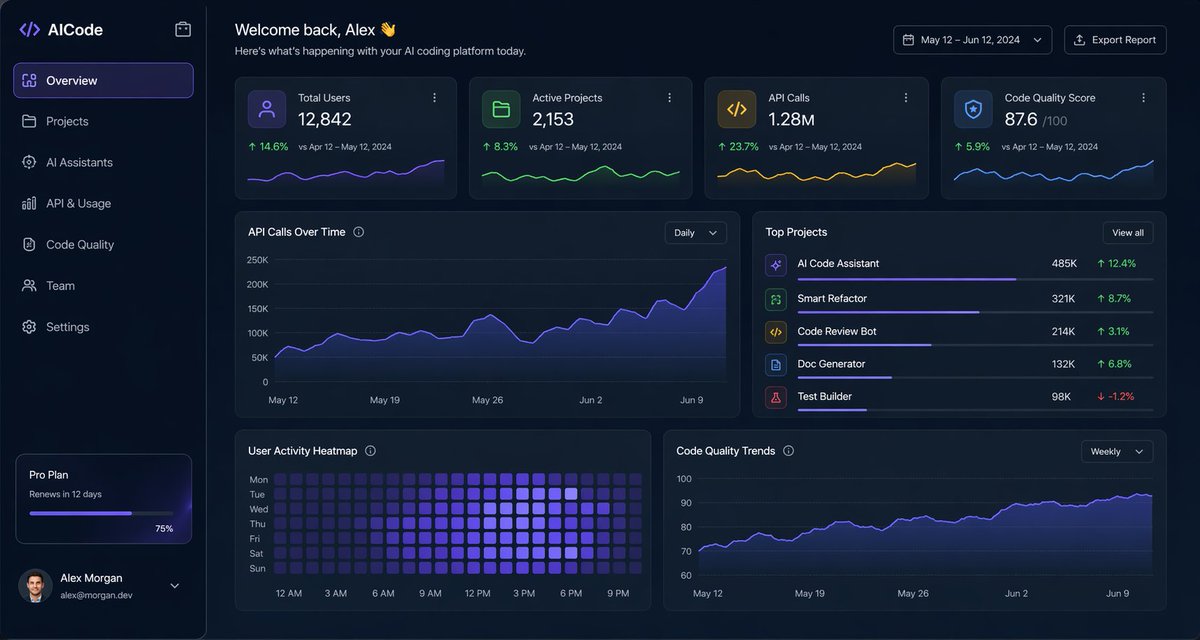
Antarmuka Pengguna Dasbor Pengkodean AI Gelap
Dasbor analitik mode gelap yang elegan untuk platform pengkodean AI, cocok untuk maket desain produk SaaS, panel admin, dan presentasi UI web yang kaya data.
Ini adalah contoh kasus GPT Image 2 untuk Inspirasi Lainnya . Gunakan contoh siap salin di bawah ini untuk menghasilkan visual serupa, dan tinjau atribusi Awesome GPT Image 2 Prompts serta hak penggunaan komersial sebelum digunakan kembali.
Butuh seluruh rangkaian prompt? Gunakan Inspirasi Lainnya Untuk contoh terkait lainnya, kunjungi pusat topik, atau buka GPT Image 2 katalog cepat untuk indeks contoh lengkap, struktur yang dapat digunakan kembali, dan atribusi sumber.
Free 1K preview
Generate one preview image instantly, no sign-up required.
3885/4000
Mengingatkan
Prompt siap salin
{
  "type": "dark SaaS analytics dashboard UI",
  "product": {
    "brand": "{argument name=\"brand name\" default=\"AICode\"}",
    "theme": "dark navy blue glassmorphism interface with subtle gradients, soft glow, rounded cards, thin borders, modern developer-tool aesthetic"
  },
  "canvas": {
    "aspect_ratio": "16:9",
    "background": "deep midnight blue with faint vignette and soft radial lighting"
  },
  "layout": {
    "structure": "left sidebar plus main content area",
    "sections": [
      {
        "title": "Sidebar",
        "position": "left",
        "count": 8,
        "labels": [
          "AICode",
          "Overview",
          "Projects",
          "AI Assistants",
          "API & Usage",
          "Code Quality",
          "Team",
          "Settings"
        ],
        "details": "logo at top, Overview selected with purple highlight, lower subscription card showing Pro Plan, renews in 12 days, horizontal progress bar at 75%, user profile at bottom with avatar, {argument name=\"user name\" default=\"Alex Morgan\"}, and email [email protected]"
      },
      {
        "title": "Header",
        "position": "top main area",
        "count": 4,
        "labels": [
          "Welcome back, Alex 👋",
          "Here's what's happening with your AI coding platform today.",
          "May 12 – Jun 12, 2024",
          "Export Report"
        ],
        "details": "large greeting on left, date range picker and export button on right"
      },
      {
        "title": "Metric cards",
        "position": "top row under header",
        "count": 4,
        "labels": [
          "Total Users",
          "Active Projects",
          "API Calls",
          "Code Quality Score"
        ],
        "values": [
          "12,842",
          "2,153",
          "1.28M",
          "876"
        ],
        "details": "each card has a small colored icon, large main value, comparison text vs Apr 12 – May 12, 2024, positive change percentages 14.6%, 8.3%, 23.7%, 5.9%, and a miniature line chart at the bottom; colors are purple, green, amber, and blue"
      },
      {
        "title": "Main analytics panels",
        "position": "middle and bottom rows",
        "count": 4,
        "labels": [
          "API Calls Over Time",
          "Top Projects",
          "User Activity Heatmap",
          "Code Quality Trends"
        ],
        "details": "API Calls Over Time is a wide area chart with Daily dropdown and rising purple line ending near 250K; Top Projects is a ranked list of 5 items with progress bars and percentage changes; User Activity Heatmap is a 7-row weekly heatmap with hour labels from 12 AM to 9 PM; Code Quality Trends is a line chart with Weekly dropdown and smooth upward purple trend from about 70 to low 90s"
      },
      {
        "title": "Top Projects list",
        "position": "middle right panel",
        "count": 5,
        "labels": [
          "AI Code Assistant",
          "Smart Refactor",
          "Code Review Bot",
          "Doc Generator",
          "Test Builder"
        ],
        "values": [
          "485K",
          "321K",
          "214K",
          "132K",
          "98K"
        ],
        "details": "green positive deltas for first four items 12.4%, 8.7%, 3.1%, 6.8%, and red negative delta -1.2% for Test Builder; each row has a colored square icon and thin horizontal progress bar"
      }
    ]
  },
  "style": {
    "visual_language": "premium fintech and AI product design mockup",
    "rendering": "crisp high-fidelity UI mockup, subtle shadows, neon edge lighting, polished charts, clean sans-serif typography",
    "primary_accent": "{argument name=\"accent color\" default=\"electric purple\"}",
    "secondary_accents": [
      "emerald green",
      "amber yellow",
      "cyan blue"
    ],
    "density": "information-rich but spacious, balanced grid, highly legible"
  }
}
Variabel perintah
Placeholder argumen yang dapat diedit ditemukan dalam prompt, beserta nilai defaultnya.
Variabel
brand name
Bawaan
AICode
Variabel
user name
Bawaan
Alex Morgan
Variabel
accent color
Bawaan
electric purple
Best for
- - Inspirasi Lainnya visual exploration
- - Image generation and reference-image edits
- - Reusable briefs that keep source attribution visible
Change these parts
- - Subject, product, character, or scene
- - Aspect ratio, camera, lighting, and background
- - Brand, text, color, and output constraints
Recommended model and settings
- - Model: gpt-image-2
- - Input mode: Teks ke Gambar
- - Aspect ratio: source
- - Commercial status: review original source
How to use this prompt
- 1. Copy the prompt and preserve its structure for the first test.
- 2. Replace the subject, context, and publishing channel.
- 3. Change one camera, lighting, or style variable per iteration.
- 4. Inspect the output, source, text, and rights before reuse.
Limitations, source, and reuse cautions
- - Generated output is an editable draft, not factual, legal, or rights evidence.
- - Review the linked source, people, brands, logos, text, and third-party media before commercial use.
Diimpor dari Awesome GPT Image 2 Prompts . Atribusi diperlukan. Status penggunaan komersial adalah allowed ; tinjau hak sumber sebelum penggunaan berbayar.
Lebih banyak kasus dalam kategori ini
Diprioritaskan berdasarkan kategori, kompatibilitas mode input, kualitas, dan risiko yang lebih rendah.






Catatan penggunaan kembali dan sumber
Gunakan perintah ini dengan aman setelah melihat pratinjau kasus.
- 1.Salin perintah tersebut atau buka langsung di Dovoo dengan tombol pembuatan.
- 2.Sesuaikan variabel, rasio aspek, dan gambar referensi untuk kebutuhan Anda sendiri.
- 3.Sebelum mempublikasikan atau menggunakan untuk tujuan berbayar, verifikasi hak sumber, persyaratan atribusi, dan risiko merek atau citra.