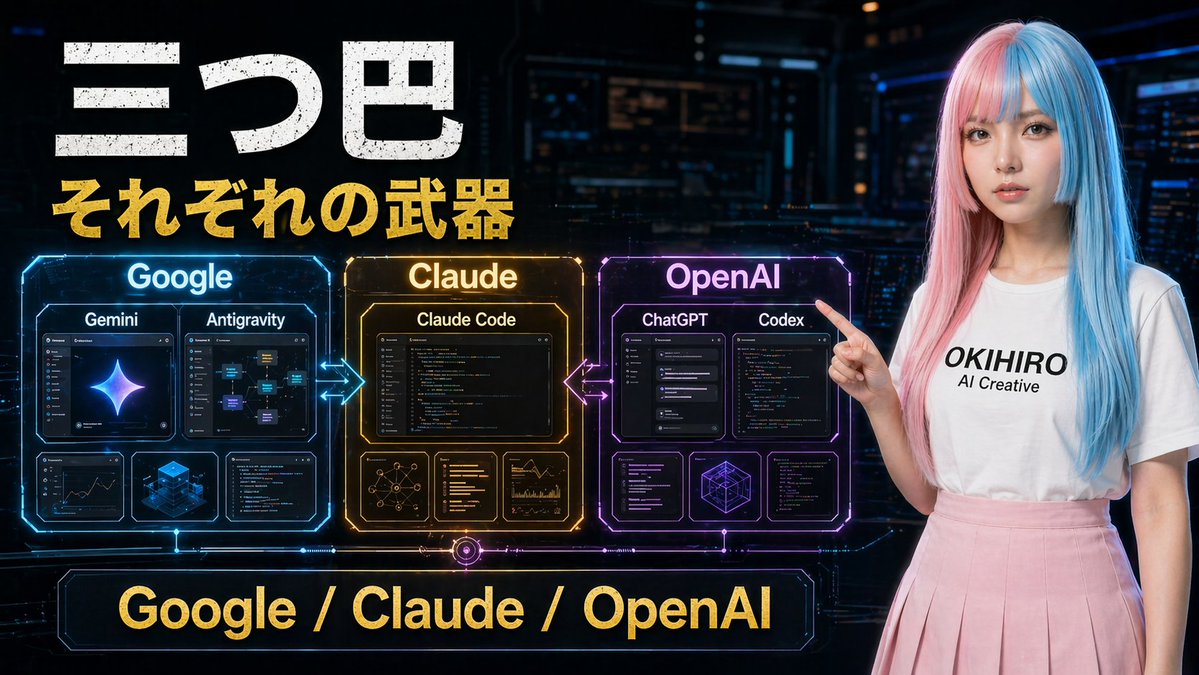
Poster Perbandingan Alat AI Cyberpunk
Grafik mini bergaya fiksi ilmiah yang dramatis membandingkan alat-alat Google, Claude, dan OpenAI, ideal untuk video teknologi, unggahan media sosial, atau gambar sampul presentasi.
Ini adalah contoh kasus GPT Image 2 untuk Grafis & Poster . Gunakan contoh siap salin di bawah ini untuk menghasilkan visual serupa, dan tinjau atribusi Awesome GPT Image 2 Prompts serta hak penggunaan komersial sebelum digunakan kembali.
Butuh seluruh rangkaian prompt? Gunakan Grafis & Poster Untuk contoh terkait lainnya, kunjungi pusat topik, atau buka GPT Image 2 katalog cepat untuk indeks contoh lengkap, struktur yang dapat digunakan kembali, dan atribusi sumber.
Free 1K preview
Generate one preview image instantly, no sign-up required.
1738/4000
Mengingatkan
Prompt siap salin
A futuristic Japanese tech comparison poster in a dark cyberpunk control-room setting, wide 16:9 composition. Large distressed white Japanese headline text at the upper left reading "三つ巴", with a bold gold subtitle directly below reading "それぞれの武器". Across the center-left are 3 glowing holographic comparison panels arranged horizontally and connected by neon arrows: a blue panel labeled "Google", an amber-gold panel labeled "Claude", and a purple-magenta panel labeled "OpenAI". The Google panel contains 4 inner cards: 2 larger top cards labeled "Gemini" and "Antigravity", plus 2 smaller bottom cards showing analytics/dashboard-like visuals and a blue isometric cube graphic. The Claude panel contains 4 inner cards: 1 large top card labeled "Claude Code", plus 3 smaller bottom cards showing a network diagram, text/code list, and chart analytics. The OpenAI panel contains 5 inner cards: 2 larger top cards labeled "ChatGPT" and "Codex", plus 3 smaller bottom cards showing interface/code windows and a geometric wireframe cube. Add glowing bidirectional arrows between Google and Claude, and between Claude and OpenAI. At the bottom center, place a large neon-framed banner with gold text reading "Google / Claude / OpenAI". On the right side, include a young woman standing and pointing left toward the panels, with long straight split-dyed hair in pastel pink and cyan blue, a plain white t-shirt with black text reading "{argument name="shirt text" default="OKIHIRO AI Creative"}", and a soft pink pleated skirt. Show every face clearly with natural, detailed facial features. Use cinematic sci-fi lighting, glossy hologram UI details, high contrast, vivid blue-gold-purple accents, and a polished YouTube thumbnail aesthetic.Variabel perintah
Placeholder argumen yang dapat diedit ditemukan dalam prompt, beserta nilai defaultnya.
Variabel
shirt text
Bawaan
OKIHIRO AI Creative
Best for
- - Grafis & Poster visual exploration
- - Image generation and reference-image edits
- - Reusable briefs that keep source attribution visible
Change these parts
- - Subject, product, character, or scene
- - Aspect ratio, camera, lighting, and background
- - Brand, text, color, and output constraints
Recommended model and settings
- - Model: gpt-image-2
- - Input mode: Teks ke Gambar
- - Aspect ratio: source
- - Commercial status: review original source
How to use this prompt
- 1. Copy the prompt and preserve its structure for the first test.
- 2. Replace the subject, context, and publishing channel.
- 3. Change one camera, lighting, or style variable per iteration.
- 4. Inspect the output, source, text, and rights before reuse.
Limitations, source, and reuse cautions
- - Generated output is an editable draft, not factual, legal, or rights evidence.
- - Review the linked source, people, brands, logos, text, and third-party media before commercial use.
Diimpor dari Awesome GPT Image 2 Prompts . Atribusi diperlukan. Status penggunaan komersial adalah allowed ; tinjau hak sumber sebelum penggunaan berbayar.
Lebih banyak kasus dalam kategori ini
Diprioritaskan berdasarkan kategori, kompatibilitas mode input, kualitas, dan risiko yang lebih rendah.

Android Quantum Lab Workstation
Teks ke Gambar

Manga Desert Radio Telescope Road Trip
Teks ke Gambar

Female Clown Cyborg Portrait
Teks ke Gambar

Imperial Research Bunker on Volcanic Planet
Teks ke Gambar

Grumpy Rhino Storybook Illustration
Teks ke Gambar

Martial Arts Legend Character Bible Sheet
Teks ke Gambar
Catatan penggunaan kembali dan sumber
Gunakan perintah ini dengan aman setelah melihat pratinjau kasus.
- 1.Salin perintah tersebut atau buka langsung di Dovoo dengan tombol pembuatan.
- 2.Sesuaikan variabel, rasio aspek, dan gambar referensi untuk kebutuhan Anda sendiri.
- 3.Sebelum mempublikasikan atau menggunakan untuk tujuan berbayar, verifikasi hak sumber, persyaratan atribusi, dan risiko merek atau citra.