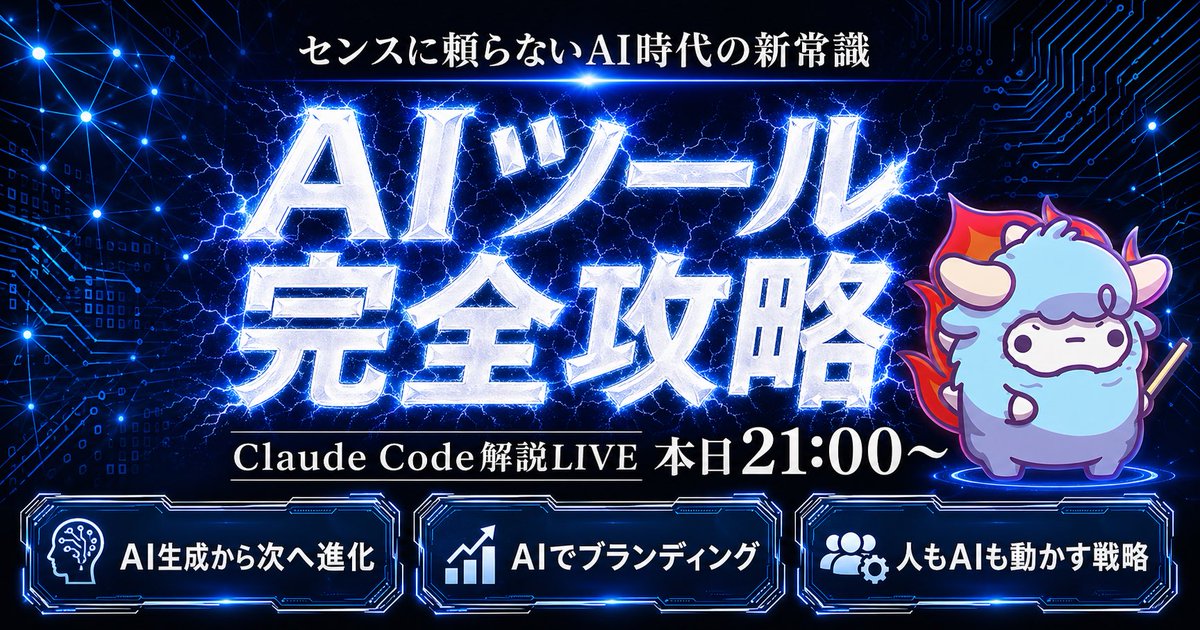
Gambar Miniatur Webinar AI Siber
Prompt ini menghasilkan thumbnail siaran langsung bergaya siber Jepang yang berani dengan tipografi elektrik, karakter maskot, dan tiga panel fitur untuk diskusi teknologi, webinar AI, atau siaran promosi.
Ini adalah contoh kasus GPT Image 2 untuk Grafis & Poster . Gunakan contoh siap salin di bawah ini untuk menghasilkan visual serupa, dan tinjau atribusi Awesome GPT Image 2 Prompts serta hak penggunaan komersial sebelum digunakan kembali.
Butuh seluruh rangkaian prompt? Gunakan Grafis & Poster Untuk contoh terkait lainnya, kunjungi pusat topik, atau buka GPT Image 2 katalog cepat untuk indeks contoh lengkap, struktur yang dapat digunakan kembali, dan atribusi sumber.
Free 1K preview
Generate one preview image instantly, no sign-up required.
1782/4000
Mengingatkan
Prompt siap salin
Create a flashy Japanese YouTube thumbnail in a dark futuristic cyber-tech style, 16:9 landscape composition, with a deep navy-to-black background filled with glowing blue circuit-board patterns, connected network nodes, tiny digital squares, and electric energy lines. At the top center, place a small white Japanese headline reading {argument name="headline text" default="センスに頼らないAI時代の新常識"}. In the center, add a massive 2-line Japanese title in metallic silver-white beveled lettering with intense neon-blue outer glow, electric lightning cracking behind and through the letters, reading {argument name="main title" default="AIツール 完全攻略"}. Beneath the main title, place one black horizontal banner with thin gold trim and white serif Japanese text reading {argument name="subheadline text" default="Claude Code Explanation LIVE Today from 9:00 PM"}. On the right side, include 1 cute chibi sheep mascot standing on a glowing blue circular platform, with fluffy light blue and lavender fur, small horns, simple dot eyes, a neutral expression, outlined in purple-blue light, holding a short stick, and surrounded by a red-orange flame aura behind its body. Along the bottom, place 3 glowing futuristic rounded rectangular panels with blue neon borders and dark interiors, evenly spaced left to right. The left panel contains 1 white head-with-circuit icon and the Japanese text {argument name="bottom left label" default="AI生成から次へ進化"}. The center panel contains 1 white upward-trend chart icon and the text "AIでブランディング". The right panel contains 1 white group-and-gear icon and the text "人もAIも動かす戦略". Use extremely high contrast, glossy metallic text effects, layered blue rim lighting, energetic lightning, subtle lens glows, and a premium high-impact webinar thumbnail aesthetic.Variabel perintah
Placeholder argumen yang dapat diedit ditemukan dalam prompt, beserta nilai defaultnya.
Variabel
headline text
Bawaan
センスに頼らないAI時代の新常識
Variabel
main title
Bawaan
AIツール 完全攻略
Variabel
subheadline text
Bawaan
Claude Code Explanation LIVE Today from 9:00 PM
Variabel
bottom left label
Bawaan
AI生成から次へ進化
Best for
- - Grafis & Poster visual exploration
- - Image generation and reference-image edits
- - Reusable briefs that keep source attribution visible
Change these parts
- - Subject, product, character, or scene
- - Aspect ratio, camera, lighting, and background
- - Brand, text, color, and output constraints
Recommended model and settings
- - Model: gpt-image-2
- - Input mode: Teks ke Gambar
- - Aspect ratio: source
- - Commercial status: review original source
How to use this prompt
- 1. Copy the prompt and preserve its structure for the first test.
- 2. Replace the subject, context, and publishing channel.
- 3. Change one camera, lighting, or style variable per iteration.
- 4. Inspect the output, source, text, and rights before reuse.
Limitations, source, and reuse cautions
- - Generated output is an editable draft, not factual, legal, or rights evidence.
- - Review the linked source, people, brands, logos, text, and third-party media before commercial use.
Diimpor dari Awesome GPT Image 2 Prompts . Atribusi diperlukan. Status penggunaan komersial adalah allowed ; tinjau hak sumber sebelum penggunaan berbayar.
Lebih banyak kasus dalam kategori ini
Diprioritaskan berdasarkan kategori, kompatibilitas mode input, kualitas, dan risiko yang lebih rendah.






Catatan penggunaan kembali dan sumber
Gunakan perintah ini dengan aman setelah melihat pratinjau kasus.
- 1.Salin perintah tersebut atau buka langsung di Dovoo dengan tombol pembuatan.
- 2.Sesuaikan variabel, rasio aspek, dan gambar referensi untuk kebutuhan Anda sendiri.
- 3.Sebelum mempublikasikan atau menggunakan untuk tujuan berbayar, verifikasi hak sumber, persyaratan atribusi, dan risiko merek atau citra.