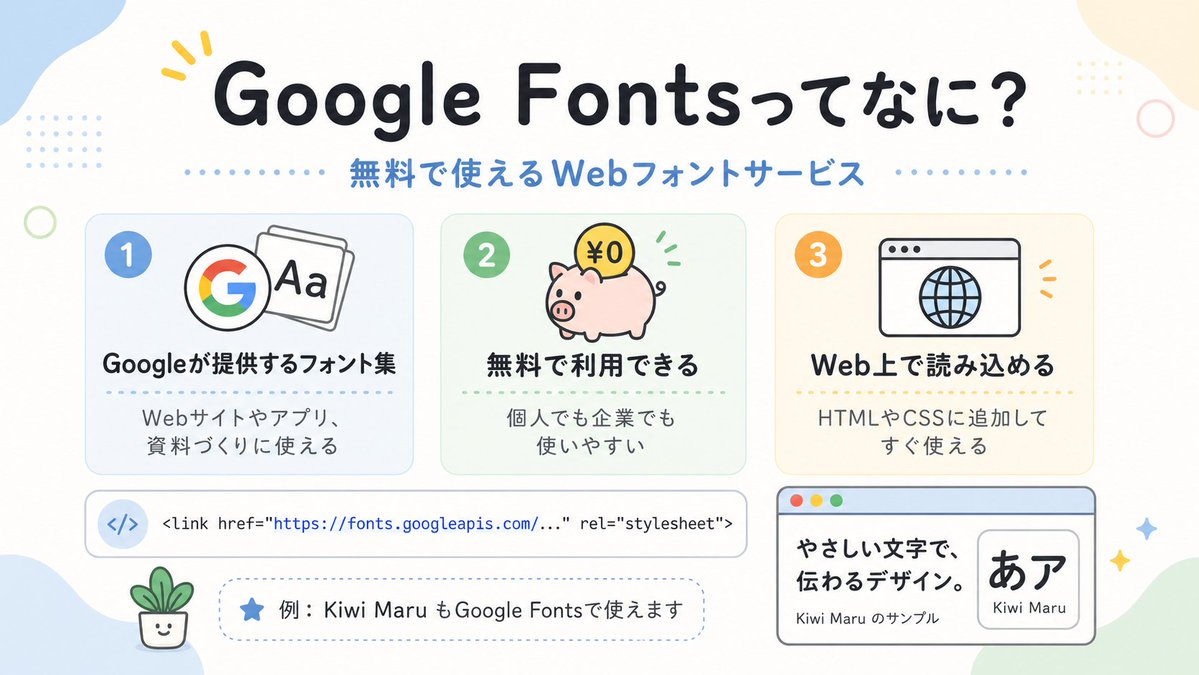
Infografis Jepang dengan Font Google yang Lucu
Infografis penjelasan bergaya Jepang pastel yang memperkenalkan Google Fonts, ideal untuk unggahan media sosial, slide presentasi, atau visual edukasi desain web yang ramah bagi pemula.
Ini adalah contoh kasus GPT Image 2 untuk Grafis & Poster . Gunakan contoh siap salin di bawah ini untuk menghasilkan visual serupa, dan tinjau atribusi Awesome GPT Image 2 Prompts serta hak penggunaan komersial sebelum digunakan kembali.
Butuh seluruh rangkaian prompt? Gunakan Grafis & Poster Untuk contoh terkait lainnya, kunjungi pusat topik, atau buka GPT Image 2 katalog cepat untuk indeks contoh lengkap, struktur yang dapat digunakan kembali, dan atribusi sumber.
Free 1K preview
Generate one preview image instantly, no sign-up required.
2567/4000
Mengingatkan
Prompt siap salin
A clean, cute Japanese infographic on a soft off-white background with rounded pastel abstract corner blobs and tiny decorative dots and rings, designed like a friendly web-design explainer poster. At the top center, place a large bold rounded headline in Japanese reading {argument name="headline text" default="Google Fontsってなに?"}, in very dark navy, with a small yellow accent mark near the first word. Directly below it, add a medium-size blue subheading reading {argument name="subheadline text" default="無料で使えるWebフォントサービス"}, with dotted divider lines extending left and right. In the middle, arrange exactly 3 rounded rectangular feature cards in a horizontal row, evenly spaced. Card 1 is pale blue with a blue number badge "1" in the upper left, an icon showing the multicolor Google G beside overlapping font sheets with "Aa", a bold Japanese title "Googleが提供するフォント集", and smaller text below "Webサイトやアプリ、資料づくりに使える". Card 2 is pale mint green with a green number badge "2", an icon of a pink piggy bank with a gold coin labeled "¥0" and small green motion marks, a bold title "無料で利用できる", and smaller text "個人でも企業でも使いやすい". Card 3 is pale warm cream with an orange number badge "3", an icon of a simple browser window with a globe, a bold title "Web上で読み込める", and smaller text "HTMLやCSSに追加してすぐ使える". Below the three cards, place a wide horizontal white code bar with rounded corners and a subtle outline; on the left include a pale blue circular icon containing </>, and to the right show a single line of code in a monospaced style: "<link href=\"https://fonts.googleapis.com/...\" rel=\"stylesheet\">" with the URL in blue. Under that, add a dashed rounded pill-shaped note box containing a blue star icon and Japanese text {argument name="example text" default="例:Kiwi Maru もGoogle Fontsで使えます"}. At the bottom left, place a tiny smiling potted plant illustration. At the bottom right, add a larger browser-style sample panel with a light blue title bar and three small traffic-light circles in the top left; inside, on the left, show bold Japanese sample copy "やさしい文字で、伝わるデザイン。" and smaller text "Kiwi Maru のサンプル", and on the right a rounded white inset card displaying large black Japanese characters "あア" with the font name {argument name="font sample name" default="Kiwi Maru"} beneath. Scatter 4 small sparkle/star accents around the lower right area. Use a flat vector illustration style, crisp outlines, soft pastel palette, centered composition, generous spacing, rounded sans-serif typography, and a cheerful beginner-friendly tech education aesthetic.Variabel perintah
Placeholder argumen yang dapat diedit ditemukan dalam prompt, beserta nilai defaultnya.
Variabel
headline text
Bawaan
Google Fontsってなに?
Variabel
subheadline text
Bawaan
無料で使えるWebフォントサービス
Variabel
example text
Bawaan
例:Kiwi Maru もGoogle Fontsで使えます
Variabel
font sample name
Bawaan
Kiwi Maru
Best for
- - Grafis & Poster visual exploration
- - Image generation and reference-image edits
- - Reusable briefs that keep source attribution visible
Change these parts
- - Subject, product, character, or scene
- - Aspect ratio, camera, lighting, and background
- - Brand, text, color, and output constraints
Recommended model and settings
- - Model: gpt-image-2
- - Input mode: Teks ke Gambar
- - Aspect ratio: source
- - Commercial status: review original source
How to use this prompt
- 1. Copy the prompt and preserve its structure for the first test.
- 2. Replace the subject, context, and publishing channel.
- 3. Change one camera, lighting, or style variable per iteration.
- 4. Inspect the output, source, text, and rights before reuse.
Limitations, source, and reuse cautions
- - Generated output is an editable draft, not factual, legal, or rights evidence.
- - Review the linked source, people, brands, logos, text, and third-party media before commercial use.
Diimpor dari Awesome GPT Image 2 Prompts . Atribusi diperlukan. Status penggunaan komersial adalah allowed ; tinjau hak sumber sebelum penggunaan berbayar.
Lebih banyak kasus dalam kategori ini
Diprioritaskan berdasarkan kategori, kompatibilitas mode input, kualitas, dan risiko yang lebih rendah.






Catatan penggunaan kembali dan sumber
Gunakan perintah ini dengan aman setelah melihat pratinjau kasus.
- 1.Salin perintah tersebut atau buka langsung di Dovoo dengan tombol pembuatan.
- 2.Sesuaikan variabel, rasio aspek, dan gambar referensi untuk kebutuhan Anda sendiri.
- 3.Sebelum mempublikasikan atau menggunakan untuk tujuan berbayar, verifikasi hak sumber, persyaratan atribusi, dan risiko merek atau citra.