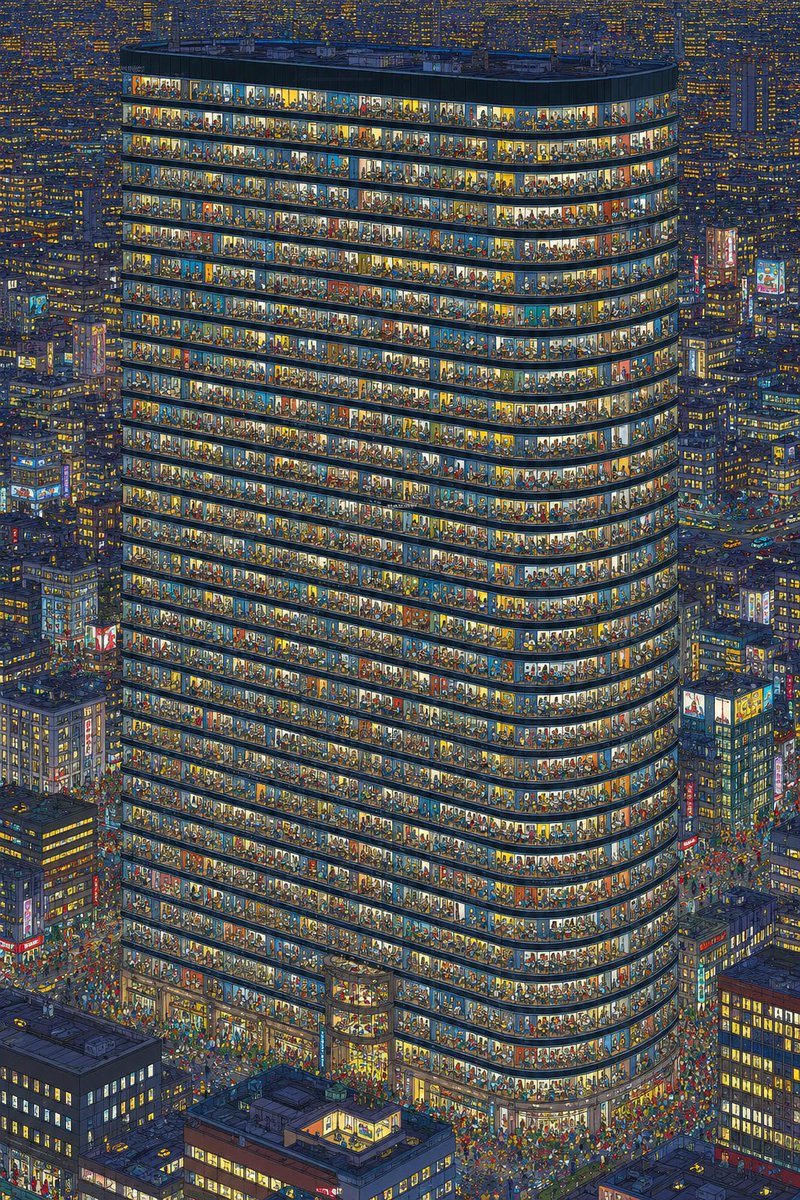
Gedung Perkantoran Malam yang Ramai
Menghasilkan ilustrasi kota malam hari yang sangat detail, menampilkan menara perkantoran kaca yang dipenuhi oleh banyak orang yang terlihat, untuk tantangan penghitungan atau pengamatan visual.
Ini adalah contoh kasus GPT Image 2 untuk Ilustrasi & Seni . Gunakan contoh siap salin di bawah ini untuk menghasilkan visual serupa, dan tinjau atribusi Awesome GPT Image 2 Prompts serta hak penggunaan komersial sebelum digunakan kembali.
Butuh seluruh rangkaian prompt? Gunakan Ilustrasi & Seni Untuk contoh terkait lainnya, kunjungi pusat topik, atau buka GPT Image 2 katalog cepat untuk indeks contoh lengkap, struktur yang dapat digunakan kembali, dan atribusi sumber.
Free 1K preview
Generate one preview image instantly, no sign-up required.
1631/4000
Mengingatkan
Prompt siap salin
Create an ultra-detailed nighttime isometric city illustration centered on one enormous rounded-corner office tower, viewed from a high aerial angle, with the facade cut open through continuous glass windows so every floor is visible. The tower should have exactly 34 visible occupied horizontal office floors, each floor packed with tiny individual people, desks, chairs, lamps, partitions, plants, shelves, meeting rooms, and colorful interior details; make the crowd density extreme, like a visual counting challenge, with hundreds or thousands of miniature figures visible through the windows. Use {argument name="building shape" default="a tall rounded rectangular glass office tower with curved corners"} as the main subject. Surround it with a dense cyberpunk-like metropolis of shorter high-rise buildings, glowing windows, neon signs, street traffic, and crowds at street level. Lighting is nighttime blue with warm yellow, orange, and white office lights, creating a strong contrast between the dark city and the brightly illuminated tower interiors. The style should be intricate hand-drawn architectural illustration with crisp linework, dense micro-detail, slightly painterly colors, and no empty areas. The image should be vertical, poster-like, packed edge to edge with buildings and tiny people. Add a busy entrance plaza and streets around the base filled with many tiny pedestrians and vehicles, but keep the main tower dominant and centered. Do not include readable text, logos, watermarks, or UI elements. Emphasize that every window bay contains distinct tiny scenes and visible human silhouettes for counting.Variabel perintah
Placeholder argumen yang dapat diedit ditemukan dalam prompt, beserta nilai defaultnya.
Variabel
building shape
Bawaan
a tall rounded rectangular glass office tower with curved corners
Best for
- - Workplace-density and urban-office editorial concepts
- - Image generation and reference-image edits
- - Reusable briefs that keep source attribution visible
Change these parts
- - Define floor plan, occupancy, circulation, window rhythm, viewpoint, and time of day
- - Aspect ratio, camera, lighting, and background
- - Brand, text, color, and output constraints
Recommended model and settings
- - Model: gpt-image-2
- - Input mode: Teks ke Gambar
- - Aspect ratio: source
- - Commercial status: review original source
How to use this prompt
- 1. Copy the prompt and preserve its structure for the first test.
- 2. Replace the subject, context, and publishing channel.
- 3. Change one camera, lighting, or style variable per iteration.
- 4. Inspect the output, source, text, and rights before reuse.
Limitations, source, and reuse cautions
- - Do not present the image as an actual building, safety study, or measured design
- - Review the linked source, people, brands, logos, text, and third-party media before commercial use.
Diimpor dari Awesome GPT Image 2 Prompts . Atribusi diperlukan. Status penggunaan komersial adalah allowed ; tinjau hak sumber sebelum penggunaan berbayar.
Lebih banyak kasus dalam kategori ini
Diprioritaskan berdasarkan kategori, kompatibilitas mode input, kualitas, dan risiko yang lebih rendah.

Boisterous Shrimpers Entering Pub
Teks ke Gambar

Tuxedo Cat Photo and Line Art Diptych
Teks ke Gambar

Cute Focus Desk Flat Lay and Kawaii Illustration
Teks ke Gambar

Anime Girl Heterochromia Portrait
Teks ke Gambar

Street Selfie with Cat in Matching Cap
Teks ke Gambar

Hell Hound Character Sheet Infographic
Teks ke Gambar
Catatan penggunaan kembali dan sumber
Gunakan perintah ini dengan aman setelah melihat pratinjau kasus.
- 1.Salin perintah tersebut atau buka langsung di Dovoo dengan tombol pembuatan.
- 2.Sesuaikan variabel, rasio aspek, dan gambar referensi untuk kebutuhan Anda sendiri.
- 3.Sebelum mempublikasikan atau menggunakan untuk tujuan berbayar, verifikasi hak sumber, persyaratan atribusi, dan risiko merek atau citra.