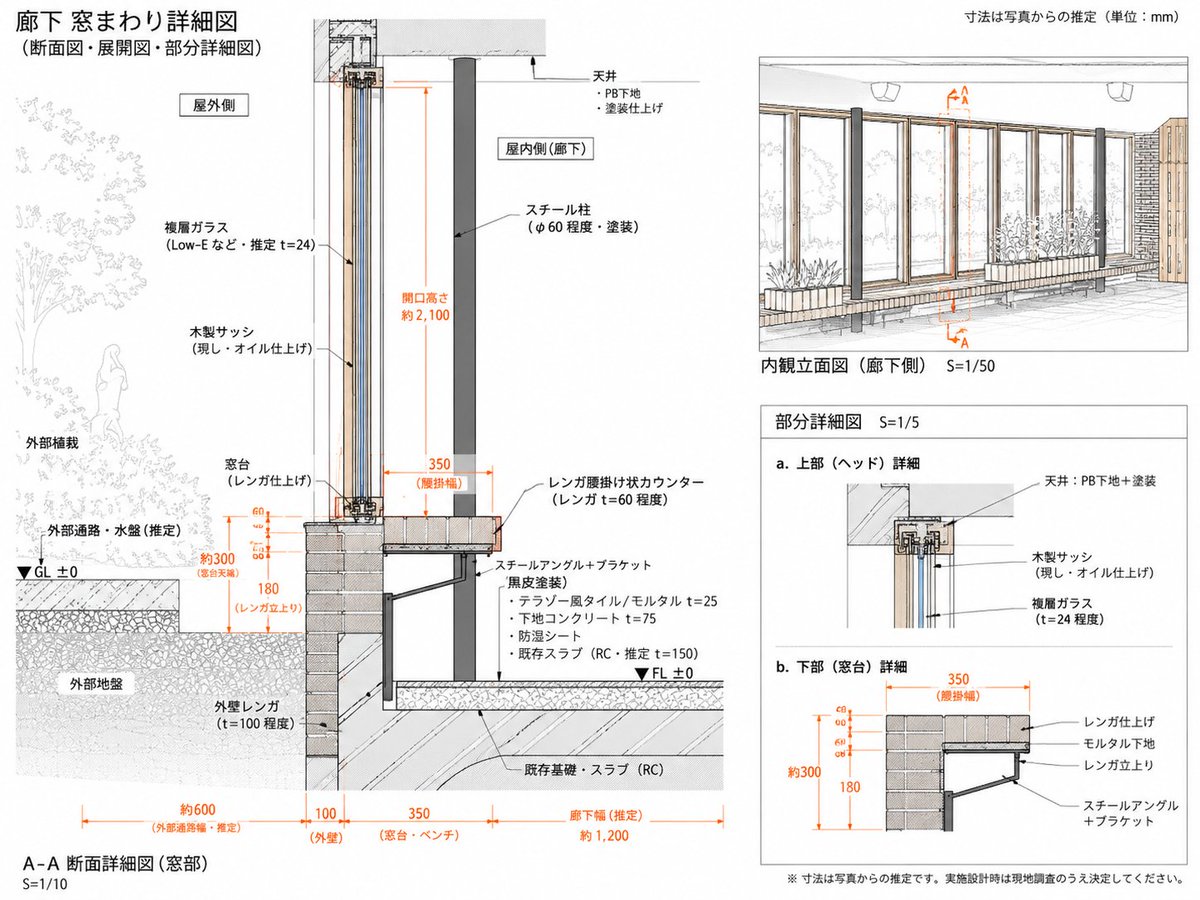
Japanese Corridor Window Detail Sheet
Generates a clean Japanese architectural detail sheet from a reference, focusing on inferred corridor window section, elevation, and partial construction details.
Ini adalah contoh kasus GPT Image 2 untuk Interior & Arsitektur . Gunakan contoh siap salin di bawah ini untuk menghasilkan visual serupa, dan tinjau atribusi Awesome GPT Image 2 Prompts serta hak penggunaan komersial sebelum digunakan kembali.
Free 1K preview
Generate one preview image instantly, no sign-up required.
Free text preview doesn’t preserve reference-image consistency.
Mengingatkan
Prompt siap salin
Using REFERENCE_0 as the architectural source, reorganize it into a cleaner, more focused Japanese technical drawing sheet for the corridor window assembly. Keep the same subject and hand-drafted architectural illustration style, but simplify the page and redraw the construction details as an inferred measured detail rather than a broad explanatory board.

Goal: Create a detailed drawing titled {argument name="main title" default="廊下 窓まわり詳細図"} with subtitle {argument name="subtitle" default="(断面図・展開図・部分詳細図)"}. Treat all dimensions as estimates from the reference/photo and note that the unit is {argument name="unit note" default="mm"}.

Layout: Use exactly 4 drawing areas: 1 large A-A section detail on the left, 1 interior elevation view at the upper right, and 2 small partial detail diagrams at the lower right. Make the left section the dominant focus and include a small key plan/section marker at the top of it.

Left main section: Redraw the corridor window section at S=1/10 with clearer construction layers and orange dimension lines. Show exterior planting and exterior ground on the left, the tall wood sash/glass opening in the center, and the interior corridor side on the right. Include labels for exterior side, interior side, ceiling, steel column, wood sash, double glass, brick sill/window base, brick exterior wall, steel angle/bracket, floor build-up, existing RC slab/foundation, GL ±0 and FL ±0. Emphasize estimated dimensions including opening height about 2100, window base about 300, brick rise 180, brick ledge width 350, exterior passage about 600, wall 100, sill/bench 350, and corridor width about 1200.

Upper-right drawing: Create an interior elevation view labeled {argument name="elevation label" default="Interior elevation (corridor side) S=1/50"}. Show the corridor-side window wall with repeated vertical wooden frames, glass panes, brick/bench base, steel columns, exterior planting visible through the glass, and orange A-A section markers.

Lower-right details: Add exactly 2 partial detail diagrams labeled a and b: a. upper/head detail showing ceiling, PB substrate/paint finish, wood sash, and double glass; b. lower/sill detail showing brick finish, mortar substrate, brick support, and steel angle plus bracket, with orange dimensions 350, about 300, and 180.

Style and constraints: Maintain the reference’s clean Japanese architectural presentation: thin black linework, light gray hatching, muted wood and brick tones, orange dimensions, white background, precise leader lines, and a professional measured-drawing look. Use Japanese technical labels where shown, but avoid overcrowding. Add a bottom caution note {argument name="caution note" default="※寸法は写真からの推定です。実施設計時は現地調査のうえ決定してください。"}. Do not add unrelated photos, people in the interior, decorative icons, or extra drawing panels.
Variabel perintah
Placeholder argumen yang dapat diedit ditemukan dalam prompt, beserta nilai defaultnya.
Best for
- - Interior & Arsitektur visual exploration
- - Image generation and reference-image edits
- - Reusable briefs that keep source attribution visible
Change these parts
- - Subject, product, character, or scene
- - Aspect ratio, camera, lighting, and background
- - Brand, text, color, and output constraints
Recommended model and settings
- - Model: gpt-image-2
- - Input mode: Gambar ke Gambar
- - Aspect ratio: source
- - Commercial status: review original source
How to use this prompt
- 1. Copy the prompt and preserve its structure for the first test.
- 2. Replace the subject, context, and publishing channel.
- 3. Change one camera, lighting, or style variable per iteration.
- 4. Inspect the output, source, text, and rights before reuse.
Limitations, source, and reuse cautions
- - Generated output is an editable draft, not factual, legal, or rights evidence.
- - Review the linked source, people, brands, logos, text, and third-party media before commercial use.
Lebih banyak kasus dalam kategori ini
Diprioritaskan berdasarkan kategori, kompatibilitas mode input, kualitas, dan risiko yang lebih rendah.






Catatan penggunaan kembali dan sumber
Gunakan perintah ini dengan aman setelah melihat pratinjau kasus.
- 1.Salin perintah tersebut atau buka langsung di Dovoo dengan tombol pembuatan.
- 2.Sesuaikan variabel, rasio aspek, dan gambar referensi untuk kebutuhan Anda sendiri.
- 3.Sebelum mempublikasikan atau menggunakan untuk tujuan berbayar, verifikasi hak sumber, persyaratan atribusi, dan risiko merek atau citra.